All shelves / Mods / Usage
usage-pane
By T-AI-Labs
usage-pane is a Claude Code usage mod by T-AI-Labs.
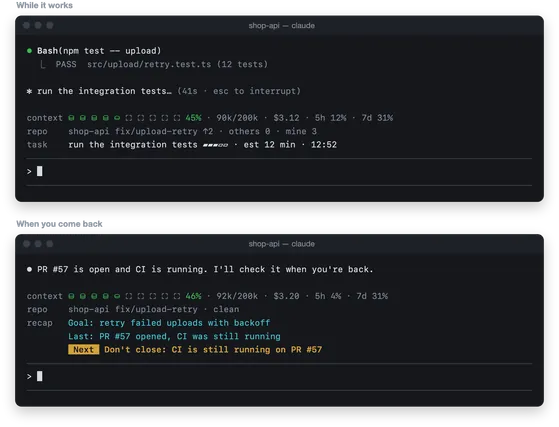
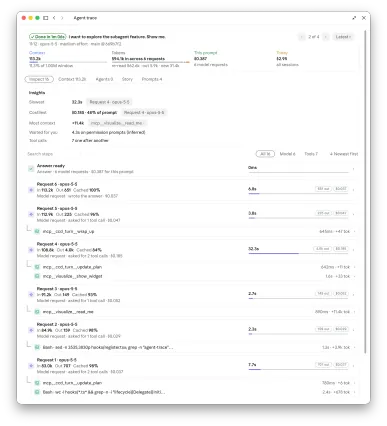
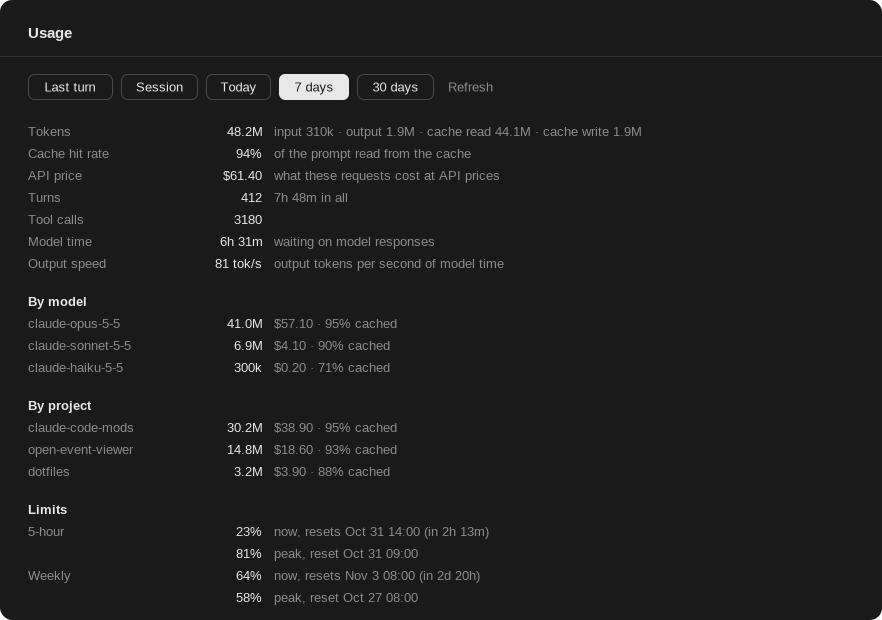
Opens a /tokens pane that adds up tokens, cache hit rate, and API price by day, model, and project, and lists each session's prompts by cost and why.
Draws
Install
The marketplace name is T-AI-Labs.
claude plugin marketplace add T-AI-Labs/claude-code-mods
claude plugin install usage-pane@T-AI-Labs
It runs inside the Claude Code process. The side panel is only what the author's README names. Read the repo before you install, or run claude plugin validate on the plugin folder.
- Version
- 0.3.0
- License
- MIT
- Repo stars
- 5
- Last change
- 2026-11-02
What it can reach
- Draws in the session
- Reads usage or context figures
- Sees tool calls
The commands also work inside Claude Code with /plugin in place of claude plugin, and new sessions load the changes. /tokens opens the pane in the desktop app and in the terminal; /tokens today, /tokens month, or /tokens prompts opens that tab. Usage is counted from the install of the mod on, in every session that runs it, and kept for 31 days; the details of each prompt are kept for 7 days. Model time and output speed are counted from version 0.3.0 on. The limits fill in once Claude Code reports them, on a subscription plan with each response.
The marketplace name is T-AI-Labs. The marketplace also lists context-usage, cache-meter, context-meter, usage-limits, and catalog-pane, each installed on its own. Adding up where the tokens went is why this page files it under usage. usage-stats, by omeerdvrn, opens a pane of this machine's Claude Code tokens over 7 days, 30 days, or all time, by day, project, and model. session-receipt, by VedantAndhale, opens a pane of every turn's tokens, with the five that spent the most. This one has a tab for Last turn, Session, Today, 7 days, and 30 days, each with tokens split into uncached input, output, cache reads and cache writes, cache hit rate, API price as /cost totals it, turns, tool calls, model time, and output speed, by model and by project, and the current 5-hour and weekly windows with the peak each earlier window reached in the last 8 days. Sessions lists the last 30 days by price, and Prompts lists a session's prompts, most expensive first, with where the cost went and up to three hints for next time. On a subscription, the API price is what the same usage would cost on the API.
Demo
What it hooks into
session.startWhen a session startscommand.runWhen you run its slash commandturn.startWhen Claude starts a turnturn.stepAt each step of a turnturn.completeWhen a turn endstool.callAround a tool call, where it can hold onesession.measureWhen usage is measuredui.renderDraws into the sessionPane
Read from the on() calls in its hook modules. Open its source under Files to check what each one does.
Files
The author's source, 3 files. They load when you open them.
Facts
- Author
- T-AI-Labs
- Category
- Usage
- Marketplace
- T-AI-Labs
- Folder
- usage-pane
- Version
- 0.3.0
- License
- MIT
- Repo stars
- 5
- Last change
- 2026-11-02
- Language
- TypeScript
- Files
- 6