ClaudeCodeMod

All shelves / Mods / Workflow

uploads

By buildinternet

uploads is a Claude Code workflow mod by buildinternet.

Draws the files staged on uploads.sh, a public file host, above the prompt and attaches them when a pull request opens, sending the branch and repository there.

Draws

Install

The marketplace name is uploads.

In Claude Code
/plugin marketplace add buildinternet/uploads
/plugin install uploads@uploads
Open the repo

It runs inside the Claude Code process. The side panel is only what the author's README names. Read the repo before you install, or run claude plugin validate on the plugin folder.

Version
0.4.4
License
Apache-2.0
Repo stars
19
Last change
2026-10-18

What it can reach

  • Draws in the session
  • Reaches the network or an outside service
  • Sees tool calls
  • Runs a command when you press

Needs Claude Code 2.1.287 or later. It draws in the terminal and the Desktop app's Code tab. Elsewhere it still attaches files and tells Claude, but shows nothing. It needs the uploads CLI, signed in, and does nothing without it. Uploaded files are served from a public URL on uploads.sh, so anyone with the link can view them. After a pull request opens, the mod can send the pull request number, the repository, and the branch to uploads.sh, which posts the comment. Turn off Attach staged files on gh pr create in /plugin to have it only report what is waiting. On the Desktop app, Remove sends the file's key and Copy link sends the repository and pull request number, and thumbnails come from storage.uploads.sh. The pre-PR reminder is a nudge, not a hold.

The install name is uploads. This page adds the author's name. The marketplace name is uploads. uploads.sh hosts screenshots, GIFs, and recordings at a public URL so a coding agent can show them in a pull request. The staged band is why this page files it under workflow. image-peek draws thumbnails of images you paste, above the prompt while you write, and larger pictures under the message once it is sent. This one draws files already staged on uploads.sh for the branch. The plugin also brings uploads.sh's hosted MCP server and three skills that capture, annotate, and upload.

Demo

Two paragraphs of the plugin README: where the staged media mod draws, then the band of staged thumbnails on the Desktop app and the pane to view, copy, or remove each one.
Screenshot of the author's GitHub page.

What it hooks into

  • session.startWhen a session starts
  • command.runWhen you run its slash command/uploads-staged
  • turn.completeWhen a turn ends
  • tool.callAround a tool call, where it can hold oneBash
  • ui.renderDraws into the sessionAbovePromptPane

Read from the on() calls in its hook modules. Open its source under Files to check what each one does.

Slash commands 1

  • /uploads-stagedShow the attachments staged on uploads.sh for this branch

Hooks 1

  • PreToolUse · Bash"${CLAUDE_PLUGIN_ROOT}"/hooks/pre-pr-screenshot.sh

Files

The author's README and source, 4 files. They load when you open them.

Facts

Author
buildinternet
Category
Workflow
Marketplace
uploads
Repo
buildinternet/uploads
Folder
plugins/claude/uploads
Version
0.4.4
License
Apache-2.0
Repo stars
19
Last change
2026-10-18
Language
TypeScript
Files
12

Same repo on other shelves

MCP servers

  1. 4689uploads.shsh.uploads/mcpHost files from coding agents; stage on a branch and attach to GitHub PRs.19

Other mods in Workflow

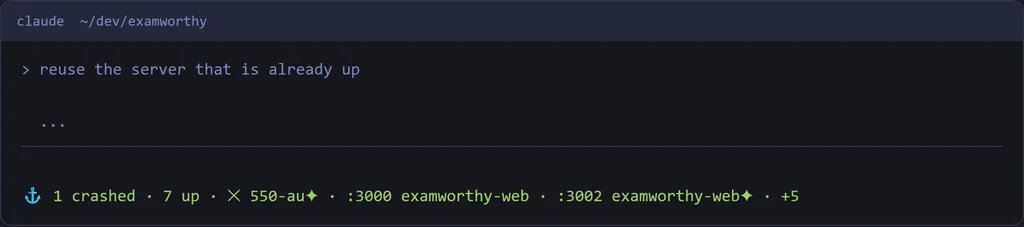
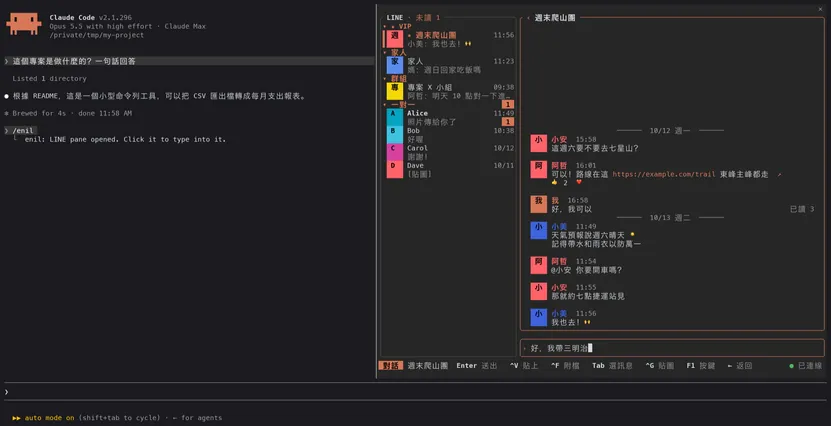
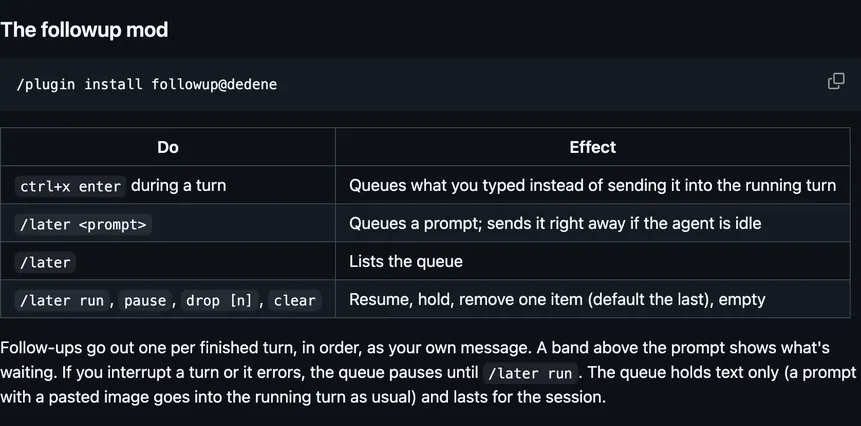
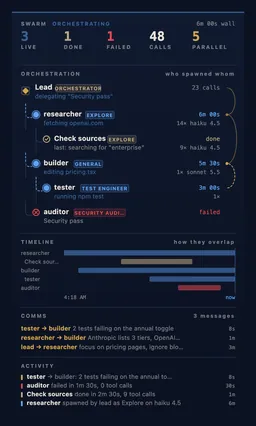
portpilotm4cd4r4Holds a commandFor PortPilot, a Windows and Linux app that runs your dev servers, draws their state and a crash band, and turns away a second start of a running server.enilUnayungOpens a LINE chat pane from enil, a terminal LINE client, to read and answer chats. A message you send goes to LINE through your enil daemon.followupdedeneQueues a prompt while Claude works, draws the queue above the prompt, and sends each one as your message once the turn and its background agents finish.swarmOneWave-AIDraws a live pane of your subagents: who spawned whom, how they overlap, and the messages between them.dispatch-boardHangghostDraws a board of the mission files you write, showing which session is done, running, or waiting on you.handoff-runnerHangghostLets a background session hand you a finished worktree branch, and fast-forwards it when you press the pane's run button.qa-guideaieo-productWhen Claude asks a question, opens a pane that explains why, what each option does, and which option it would pick.workflow-watchalonbaronFollows the session's newest Workflow run and draws each stage live in a pane, a band above the prompt, and the status line.aicqashfulcraDraws AICQ, Fulcra's agent-to-agent work: your agents, friends' agents, and the collaborations under way, and answers new messages in the mode you set.gh-accountVedantAndhaleRuns each git or gh step as the logged-in GitHub account that owns that repository or is in its organization, and counts them on the status line.lightningLightning-AIDraws a live progress bar above the prompt for each Lightning AI job, with skills for that cloud platform's GPU studios, batch jobs, and deployments.ccfnaniilujaKeeps planning in plan mode, checks work against the project spec, runs slices in parallel, and can draw the task, the board, and the waves.
All 396 in Workflow