All shelves / Mods / Review
screen-guard
By danyuchn
screen-guard is a Claude Code review mod by danyuchn.
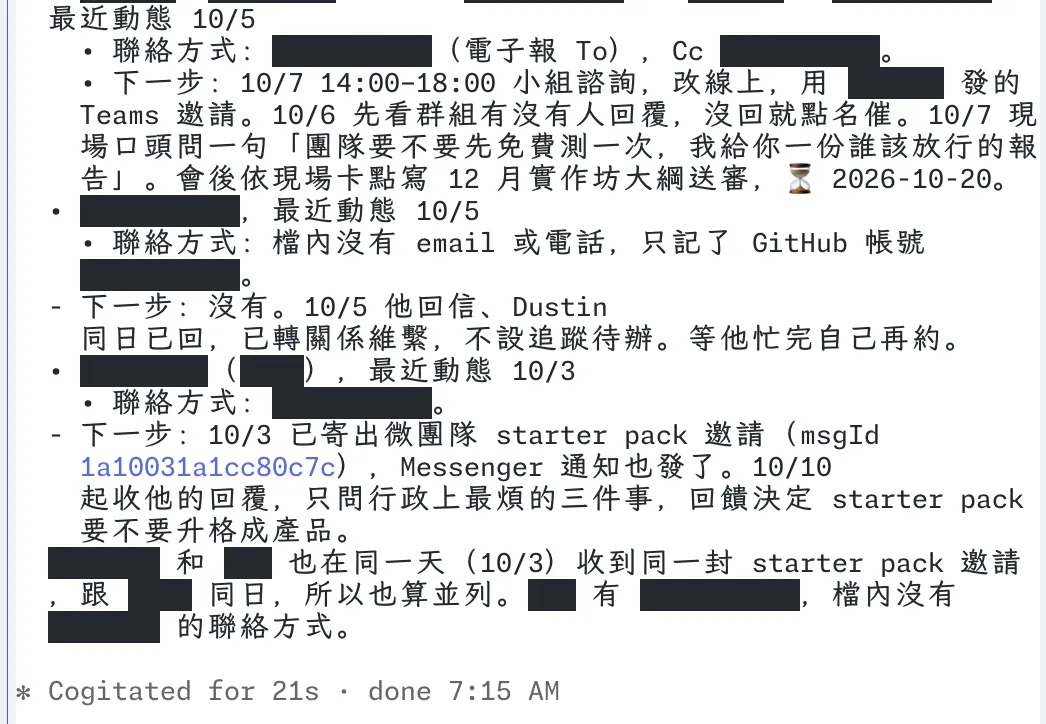
Draws black bars over names, organisations, secrets, and contact details in the transcript while you share your screen.
Draws
Install
The marketplace name is dustin-mods.
claude plugin marketplace add danyuchn/claude-mods
claude plugin install screen-guard@dustin-mods
It runs inside the Claude Code process. The side panel is only what the author's README names. Read the repo before you install, or run claude plugin validate on the plugin folder.
- Version
- 0.1.0
- License
- MIT
- Repo stars
- 6
- Last change
- 2026-10-06
What it can reach
- Draws in the session
- Reaches the network or an outside service
- Sees tool calls
- Calls another program on this machine
The mod's own messages are in Traditional Chinese. The repository README requires Claude Code 2.1.287 or newer. The author says detection is tuned for Traditional Chinese (Taiwan) mixed with English, and that Chinese names are found by surname and title rules, so a rare surname can be missed. The README says to put important names in the word list. Type /mask on to start. The switch is kept for the next session. /mask toggles, /mask off stops, /mask reset covers words you had revealed, and /mask reload rereads the lists. It only changes what is drawn. The model still reads the original text, and the stored transcript stays the original. While masking is on, solid bars cover names, organisations, secrets, and contact details in Claude's replies, your prompts, tool-call arguments and results, and collapsed tool groups. Local rules mask keys, email, phone numbers, identity numbers, addresses, and words on your list at once. A possible name is masked first and judged in the background. A failure or a timeout stays masked. Click a bar to reveal that word. The README says the click works only in the fullscreen layout. Otherwise the bars are drawn and do not open. Bars on a tool-call row and on your own prompt do not open, because Claude Code draws those. Your input box, a permission dialog, and other apps are not masked. A table or a code block that contains a bar is drawn as raw lines, without the table frame. A reply can miss the mask for a moment as streaming finishes. The next redraw applies it. While masking is on, the mod adds a paragraph to the system prompt asking Claude to mark private names and organisations in the reply. Those marks are drawn as bars, and they are stripped before a file is written or a command is run, so they are not written into a file. Tool output the model does not write still depends on the detector. TypeSafe's Jev, an outside model, is the default judge when TYPESAFE_API_KEY is set: candidate words, and 60 characters on each side, go to TypeSafe. The author measured about half a second for 40 candidates. With no key, every judgment stays on this machine. /mask local uses only the local model, and the text does not leave the machine. /mask cloud goes back to Jev and falls back to the local model if JEV fails. The local judge is Ollama, a program that runs a model on this machine. The model defaults to qwen3.6:35b-a3b unless SCREEN_GUARD_OLLAMA_MODEL names another. The author measured about 7.8 seconds for 40 candidates on an M4 Pro. The lists live in your home directory, not in the repo. ~/.config/screen-guard/terms.txt is one word a line, always masked, and a line that starts with ! is never masked. local-only.txt is one folder path a line. A session opened in one of those folders uses only the local model. The word list itself always runs on this machine.
The install name is screen-guard. This page adds the author's name. The marketplace name is dustin-mods. The marketplace also holds cache-panel. This one installs on its own. The bars on the drawn transcript are why this page files it under review. It guards names, organisations, secrets, and contact details while you share your screen, and it does not hold a command. display-redaction masks email addresses and secret-shaped text in what Claude Code draws, and leaves the transcript, the model's context, and the files unchanged. This one also masks names and organisations, asks Claude to mark them, and opens a bar on a click. On the Jev path the candidate words and the characters beside them go to TypeSafe. On the Ollama path they stay on this machine. The word lists are read from your home directory.
Demo
What it hooks into
session.startWhen a session startsprompt.composeWhile you write a prompttool.callAround a tool call, where it can hold onecommand.runWhen you run its slash command/maskui.renderDraws into the sessionAssistantMessageUserMessageToolUseToolResultToolGroup
Read from the on() calls in its hook modules. Open its source under Files to check what each one does.
Slash commands 1
/maskScreen-share guard: toggle masking (/mask on|off|local|cloud|reset|reload)
Files
The author's README and source, 4 files. They load when you open them.
Facts
- Author
- danyuchn
- Category
- Review
- Marketplace
- dustin-mods
- Folder
- screen-guard
- Version
- 0.1.0
- License
- MIT
- Repo stars
- 6
- Last change
- 2026-10-06
- Language
- TypeScript
- Files
- 10