All shelves / Mods / Workflow
workspace
By pinkpixel-dev
workspace is a Claude Code workflow mod by pinkpixel-dev.
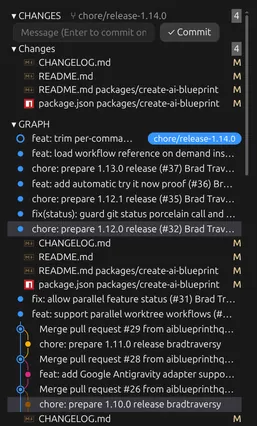
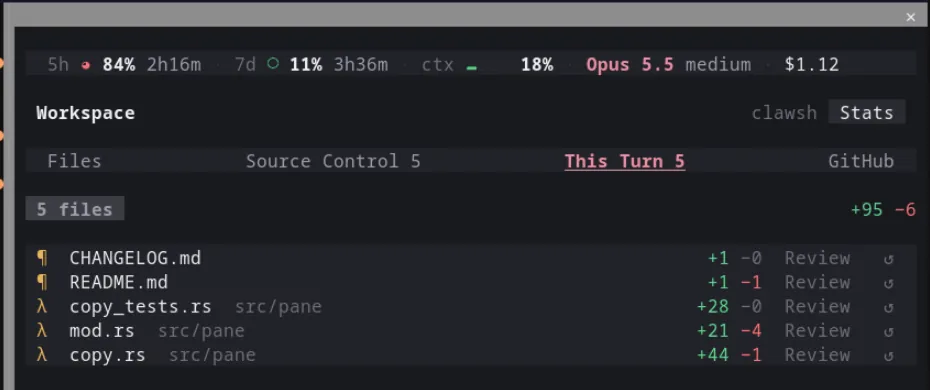
Opens a Workspace pane: files marked as Claude reads and edits them, this turn's edits with diffs and revert, VS Code style git, GitHub, and your limits.
Draws
Install
The marketplace name is claude-workspace.
/plugin install workspace --marketplace pinkpixel-dev/claude-workspaceIt runs inside the Claude Code process. The side panel is only what the author's README names. Read the repo before you install, or run claude plugin validate on the plugin folder.
- Version
- 0.10.0
- License
- Apache-2.0
- Repo stars
- 3
- Last change
- 2026-10-19
What it can reach
- Draws in the session
- Reads usage or context figures
- Reads this turn's file edits
- Sees tool calls
- Runs a command when you press
- Calls another program on this machine
- Reaches the network or an outside service
Answer y to add the github:pinkpixel-dev/claude-workspace marketplace, then pick a scope; the mod is active right away. From a shell it is claude plugin install workspace --marketplace pinkpixel-dev/claude-workspace, or add the marketplace first and install workspace@claude-workspace; in the desktop app you add the marketplace under Plugins. The author built it on Claude Code 2.1.303, and the mod API is still early access. The GitHub tab needs the GitHub CLI installed and logged in. Git hooks don't run for commits made from the pane, and push and pull need an SSH key or a credential helper already set up. Reverting a file Claude created only works inside a git repository. Mobile isn't supported, and the picture graph needs kitty-style image support.
The marketplace, claude-workspace, holds only workspace. Following the project while Claude works is why this page files it under workflow. source-control, by manuel-will, draws the branch and changed files above the chat, with a /git panel to commit, stage, and see the history graph. file-tree, by ha-ptt0601, draws a file tree that lights up what Claude reads, edits, and commits. This one puts files and git in one pane, with ◆ on a file Claude reads and ✎ on one it edits, and a This Turn tab of every file Claude edited since your last prompt, Bash changes included, each with a diff against the copy before Claude's first edit and ↺ to put it back. Source Control stages single hunks and handles merges, rebases, and conflicts, and ✦ Message has Haiku write a commit message from the staged diff, which costs a little of your usage. The GitHub tab lists open pull requests and issues with CI and review status, read-only. @ drops a path into the prompt box, and Review and Explain only fill it.
Demo
What it hooks into
session.startWhen a session startscommand.runWhen you run its slash command/workspacetool.callAround a tool call, where it can hold oneprompt.submitWhen you send a promptsession.measureWhen usage is measuredturn.stepAt each step of a turnturn.completeWhen a turn endsui.renderDraws into the sessionPane
Read from the on() calls in its hook modules. Open its source under Files to check what each one does.
Slash commands 1
/workspaceOpen the file browser and source control pane
Files
The author's README and source, 4 files. They load when you open them.
Facts
- Author
- pinkpixel-dev
- Category
- Workflow
- Marketplace
- claude-workspace
- Version
- 0.10.0
- License
- Apache-2.0
- Repo stars
- 3
- Last change
- 2026-10-19
- Language
- TypeScript
- Files
- 71