All shelves / Mods / Workflow
source-control
By bradtraversy
source-control is a Claude Code workflow mod by bradtraversy.
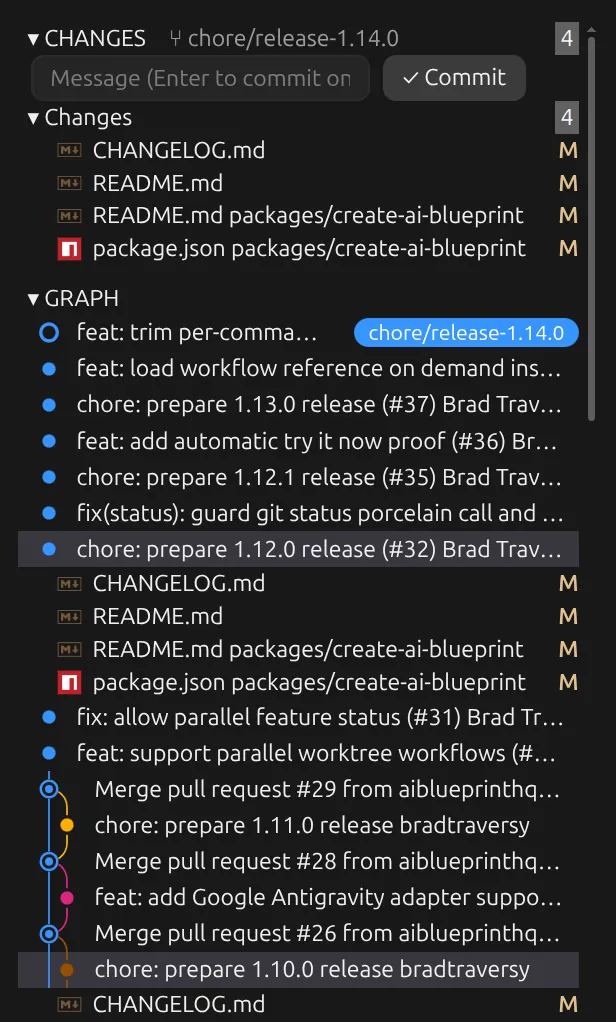
Draws a VS Code style Source Control pane beside the chat: changes by group, stage, discard, and commit, a diff for each file, and the commit graph.
Draws
Install
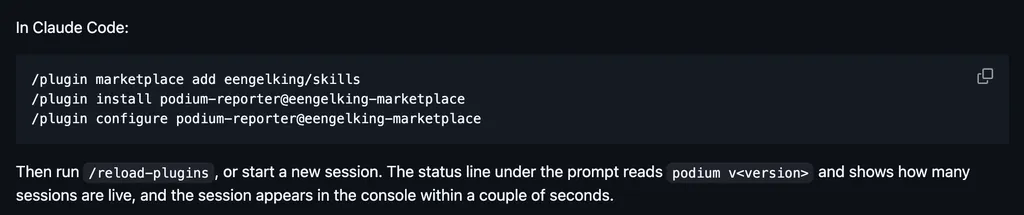
The marketplace name is traversy-mods.
claude plugin marketplace add bradtraversy/traversy-claude-mods
claude plugin install source-control@traversy-mods
It runs inside the Claude Code process. The side panel is only what the author's README names. Read the repo before you install, or run claude plugin validate on the plugin folder.
- Version
- 0.2.0
- License
- MIT
- Repo stars
- 8
- Last change
- 2026-10-30
What it can reach
- Draws in the session
- Sees tool calls
- Runs a command when you press
- Calls another program on this machine
Restart the session or enter /reload-plugins after installing. The pane opens by itself when a session starts inside a Git repository, and /scm opens it again. It follows the session's working directory, so start the session inside the repository you want to see. It never pushes, pulls, or fetches. Commits made from the pane run without your repository's Git hooks. Opening files and diffs in VS Code works on Linux, through systemd-run; on other systems it shows a message that VS Code could not be opened. A diff over 100,000 characters is too large to draw and offers Open in VS Code. The Show diffs in setting (diff_view) is pane by default, or vscode. File icons come from the vscode-icons theme on the desktop, and the terminal uses letter codes. Very long change lists show their first 300 files per group.
The install name is source-control, which source-control already has (by manuel-will), so this page adds the author's name. The marketplace name is traversy-mods. The marketplace also holds session-hud, tool-cards, and next-steps. Working with a repository's changes without leaving the session is why this page files it under workflow. source-control, by manuel-will, draws the branch, commits to pull and push, and changed files above the chat with a Sync button and a /git panel. git-pulse, by Singh-AP, draws the branch, ahead and behind, and dirty files on the status line. This one is modeled on VS Code's Source Control view: a pane with Merge Changes, Staged Changes, and Changes groups with counts and status letters, a commit message box that commits on Enter, a diff for each file in a pane of its own or in VS Code, and a commit graph with the current branch and its upstream labeled, 50 commits at first and Load More for 50 more. Clicking a commit lists its files, and clicking one shows what the commit changed in it. The README says the pane asks inline before a discard, says when the discard deletes an untracked file, and never pushes, pulls, or fetches.
Demo
What it hooks into
session.startWhen a session startscommand.runWhen you run its slash command/scmtool.callAround a tool call, where it can hold oneturn.completeWhen a turn endsui.closeWhen its pane closesui.renderDraws into the sessionPane
Read from the on() calls in its hook modules. Open its source under Files to check what each one does.
Slash commands 1
/scmOpen the Source Control pane
Files
The author's README and source, 4 files. They load when you open them.
Facts
- Author
- bradtraversy
- Category
- Workflow
- Marketplace
- traversy-mods
- Folder
- source-control
- Version
- 0.2.0
- License
- MIT
- Repo stars
- 8
- Last change
- 2026-10-30
- Language
- TypeScript
- Files
- 14