bilingual-view is a Claude Code review mod by againest1.
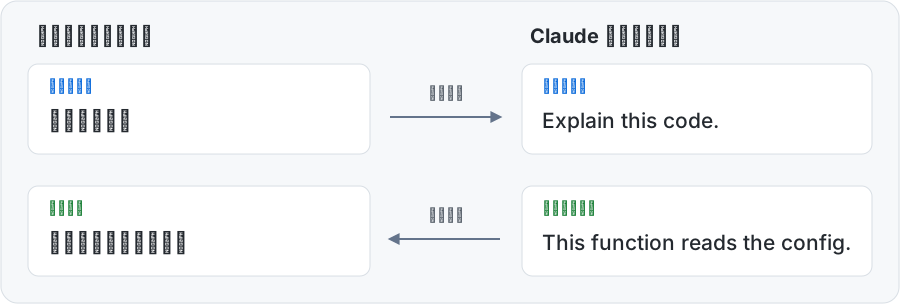
Translates a Chinese prompt into English before it is sent, and draws Claude's English reply in Chinese, with buttons to see the sent text or the original.
It runs inside the Claude Code process. The side panel is only what the author's README names. Read the repo before you install, or run claude plugin validate on the plugin folder.
License
MIT
Repo stars
5
Last change
2026-10-28
What it can reach
Draws in the session
Reaches the network or an outside service
Needs a Claude Code terminal or desktop session that supports mods, and a translation service compatible with the OpenAI Chat Completions API, with its model and an API key if it asks for one. Start a new session, or run /reload-plugins in an open terminal session; the Bilingual View bar appears above the prompt, and Settings takes the Provider URL, the API key, and the Model ID. The translation model's effort is low by default. One translation request times out after 30 seconds. Chinese originals and translations are kept in ~/.claude/bilingual-view/cache/, up to 4 MiB a session. Slash commands, shell commands, code, thinking, and ordinary tool output are not translated. The README is in Chinese.
The marketplace, bilingual-view, holds only this plugin, from plugins/bilingual-view. This one installs on its own. Reading replies in another language is why this page files it under review. translate-view translates each prompt before sending it, and draws the reply's translation in a side pane. parrot-translate rewrites each prompt into English before sending it, and draws the reply's translation under the English text. This one works between Chinese and English only, keeps a prompt from being sent when no service is set, the translation fails, or Chinese that should have been translated is left in it, and also translates the Chinese answers you type into Claude's questions. In the source, your messages, Claude's replies, the questions, and the bar above the prompt are drawn with ui.render.
Demo
From the author's repo.
What it hooks into
session.startWhen a session starts
session.endWhen a session ends
classic.SessionStartA Claude Code event
prompt.submitWhen you send a prompt
turn.startWhen Claude starts a turn
turn.stepAt each step of a turn
session.appendWhen an entry is written to the transcript
turn.completeWhen a turn ends
ui.renderDraws into the sessionUserMessageAssistantMessageAbovePromptPaneAskUserQuestionToolUseToolResult
tool.callAround a tool call, where it can hold oneAskUserQuestion
command.runWhen you run its slash command/bilingual-view
Read from the on() calls in its hook modules. Open its source under Files to check what each one does.
Slash commands 1
/bilingual-viewTranslation settings, connection and speed tests, and diagnostic snapshot
Files
The author's source, 15 files. They load when you open them.