All shelves / Mods / Usage
statuspane
By xuanji86
statuspane is a Claude Code usage mod by xuanji86.
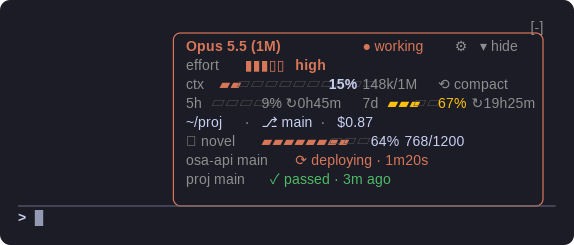
Draws a card above the prompt: model, context gauge, 5-hour and 7-day limits, directory, branch, and session cost. Press the gauge and confirm to run /compact.
Draws
Install
The marketplace name is claude-statuspane.
claude plugin marketplace add xuanji86/claude-statuspane
claude plugin install statuspane@claude-statuspane
It runs inside the Claude Code process. The side panel is only what the author's README names. Read the repo before you install, or run claude plugin validate on the plugin folder.
- Version
- 1.3.4
- License
- MIT
- Repo stars
- 15
- Last change
- 2026-10-15
What it can reach
- Draws in the session
- Reads usage or context figures
- Reaches the network or an outside service
- Sees tool calls
- Runs a command when you press
- Calls another program on this machine
Claude Code 2.1.287 or later; the author tested 2.1.300 and says the mod API can change between releases. The card appears in terminals at least 70 columns wide; the desktop app shows none, since it has its own. It shows the model and its effort on a gauge, the context in tokens against the window, the 5-hour and 7-day use with reset countdowns, the directory and git branch, and the session's cost so far, in Claude Code's own theme colors. Press compact on the context gauge, then confirm, to run /compact, after the turn if Claude is working. Hide, show, and settings are buttons: pick the lines you want and the bar width, one set for every session. It adds to a configured statusLine and replaces nothing. It runs git branch --show-current in the session's folder. Two GitHub CI switches, off until you turn them on, need gh signed in: one shows the branch's latest Actions run, and one shows the runs that a git push or gh pr merge by Claude sets off, deploys included. Any script can feed up to five progress rows by writing a JSON file to ~/.claude/statuspane/progress/, and another mod through $.statuspane.
The marketplace, claude-statuspane, holds only this plugin, from the repo root. This one installs on its own. Watching the context and the plan limits is why this page files it under usage. session-meter, by arasovic, draws a pane of context by category, the 5-hour and 7-day windows and their pace, and the last 30 tool calls and model requests. better-statusline, by Autumn1337, draws the context, cache, and plan limits as dot-matrix rings above the prompt, with the music you are playing. This one is a small card above the prompt that you can click, with CI rows and a progress API. The author says everything stays on your machine unless a CI switch is on; then it reads the origin remote and runs gh run list and gh run view for that repository, through gh and your own sign-in. From the progress folder it reads only JSON files of at most 64 KB, strips control characters from their text, and never runs anything they contain. Its plugin.json names Anji Xu as its author.
Demo
What it hooks into
engine.createWhen Claude Code startssession.startWhen a session startscommand.runWhen you run its slash command/statuspaneturn.completeWhen a turn endstool.callAround a tool call, where it can hold oneBashturn.stepAt each step of a turnsession.measureWhen usage is measuredsession.compactWhen the context is compactedui.renderDraws into the sessionAbovePrompt
Read from the on() calls in its hook modules. Open its source under Files to check what each one does.
Slash commands 1
/statuspaneHide or show the status card
Files
The author's README and source, 4 files. They load when you open them.
Facts
- Author
- xuanji86
- Category
- Usage
- Marketplace
- claude-statuspane
- Version
- 1.3.4
- License
- MIT
- Repo stars
- 15
- Last change
- 2026-10-15
- Language
- TypeScript
- Files
- 18