It runs inside the Claude Code process. The side panel is only what the author's README names. Read the repo before you install, or run claude plugin validate on the plugin folder.
Version
0.1.1
License
Apache-2.0
Repo stars
1089
Last change
2026-10-23
What it can reach
Draws in the session
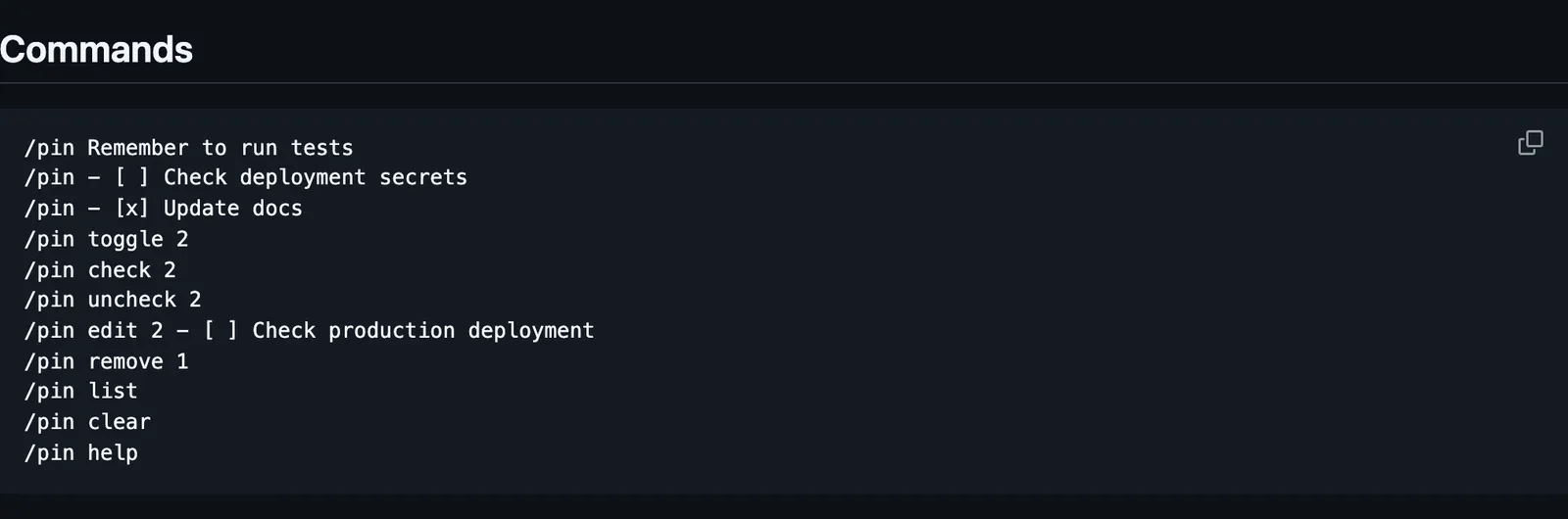
Verified with Claude Code 2.1.292 in the engine's tests; the author says real terminal and desktop pixels have not been checked. The band is for the terminal and the desktop app; VS Code chat and headless sessions can use the commands and the saved notes. /pin <memo> adds a note, and /pin - [ ] <memo> adds a todo. /pin toggle, check, uncheck, edit, and remove take the note's number, /pin list shows every note in full, and /pin clear empties the list. Click a checkbox, or focus the band with ctrl+x tab and use Tab and Enter; no digit shortcuts get in the way of typing. Completed todos stay visible, dimmed and struck through. Notes do not enter the model's context on their own. The engine's plugin store keeps them for the same session in the same folder: a new session or /clear starts a separate list, and resuming the old one brings its notes back. Up to 100 notes of at most 2,000 Unicode code points each, with no automatic expiry. The author says it runs no tools or programs and contacts no network host. A checkout can also load with claude --plugin-dir ./pin-memo.
The marketplace, my-claude-code-mods, holds seventeen mods by YeonwooSung, model-effort-band, token-run, and time-machine among them. This one installs on its own. Keeping notes in view while you work is why this page files it under workflow. pin-board, by arasovic, draws standing notes in one row above the prompt, adds one with /pin too, and gives them to Claude again after /compact and /clear. pinboard-sirkitree draws open decisions, the session's todos, and links Claude creates in a side pane. This one keeps notes and checkable todos for you, out of the model's context.
Demo
Screenshot of the author's GitHub page.
What it hooks into
session.startWhen a session starts
session.endWhen a session ends
turn.startWhen Claude starts a turn
command.runWhen you run its slash command/pin
ui.renderDraws into the sessionAbovePrompt
Read from the on() calls in its hook modules. Open its source under Files to check what each one does.
Slash commands 1
/pinPin a memo or todo: <memo> | - [ ] <todo> | list | toggle <id> | help
Files
The author's README and source, 4 files. They load when you open them.