flow-plan is a Claude Code review mod by madmat01.
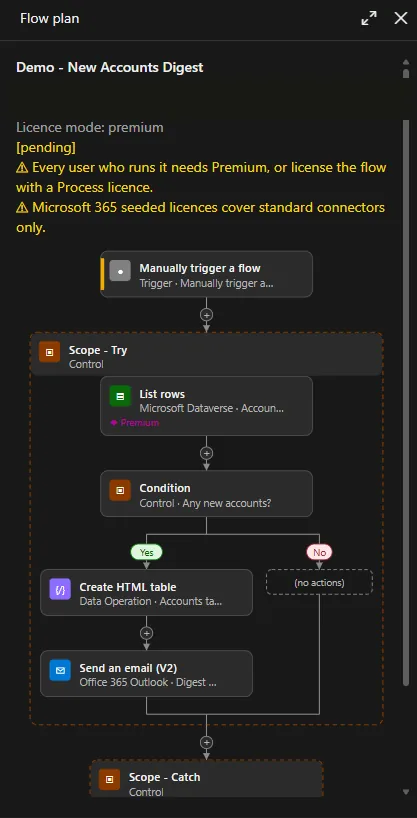
Draws Claude's Power Automate flow plan in a pane with licence badges and design checks, and blocks the build tools until you approve that flow's plan.
It runs inside the Claude Code process. The side panel is only what the author's README names. Read the repo before you install, or run claude plugin validate on the plugin folder.
Version
0.8.0
License
MIT
Repo stars
5
Last change
2026-11-05
What it can reach
Draws in the session
Holds a command
Sees tool calls
Claude Code 2.1.308 or later, with mods support; earlier versions cannot tell the mod that its connector lookup is read-only, so in auto mode the badges show a question mark. Microsoft's power-automate plugin must be installed and set up first: /plugin marketplace add microsoft/power-platform-skills, then /plugin install power-automate@power-platform-skills, then /power-automate:setup. It also needs the Azure CLI, signed in with az login, and access to a Power Automate environment where you can create flows; the README suggests a dev environment. Approval lasts for the session, and the licence mode resets to premium in each new session. /flow-plan opens the pane, /flow-plan-style switches between designer and cards, and /flow-plan-licence sets premium or standard.
The marketplace, flow-plan, holds only this plugin, which gates Microsoft's power-automate plugin. Reviewing a flow's design before anything is built is why this page files it under review. plannotator opens Claude's plan in a review UI where you mark it up, sends your annotations back, and shows what changed when the plan comes back. merge-gate holds gh pr merge until CI is green and a Codex review has run once, and draws that pull request's status above the prompt. This one is for Power Automate cloud flows: Claude proposes each flow through a propose_flow_plan tool, and the pane draws it like the Power Automate designer, with a text version in the terminal, plus premium and custom connector badges and eight design checks. create_flow, update_flow, edit_flow, and copy_flow stay blocked until you approve that flow's plan, and a create approval is used up once the flow exists. Approve and Reject send your word back to Claude, and Reject takes a reason. The README says the gate covers only the power-automate plugin's build tools: PAC CLI, a direct Flow API call, or a Dataverse write could still create a flow.
Demo
From the author's repo.
What it hooks into
session.startWhen a session starts
prompt.composeWhile you write a prompt
prompt.submitWhen you send a prompt
tool.checkA Claude Code event
command.runWhen you run its slash command/flow-plan/flow-plan-style/flow-plan-licence
tool.callAround a tool call, where it can hold one
ui.renderDraws into the sessionPane
Read from the on() calls in its hook modules. Open its source under Files to check what each one does.
Slash commands 3
/flow-planDraft a visual plan of a Power Automate flow before building it
/flow-plan-styleSwitch the flow plan pane style: designer or cards
/flow-plan-licenceSet the flow plan licence mode: premium or standard
Files
The author's README and source, 4 files. They load when you open them.