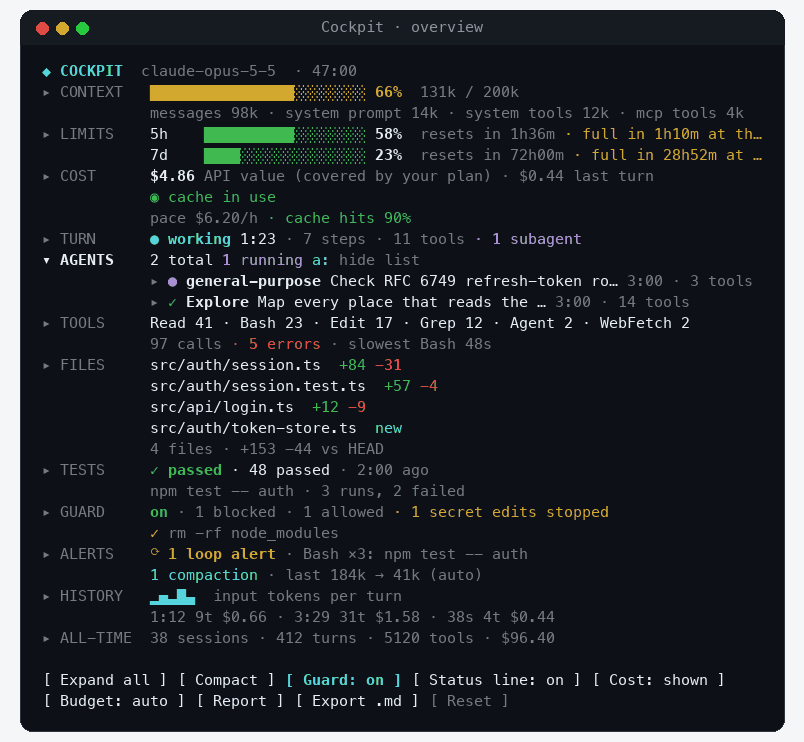
Opens a panel beside the transcript with context, rate limits, cost, subagents, tool calls, changed files, and tests, and asks before rm -rf or a force push.
It runs inside the Claude Code process. The side panel is only what the author's README names. Read the repo before you install, or run claude plugin validate on the plugin folder.
Version
1.0.2
License
MIT
Repo stars
10
Last change
2026-10-09
What it can reach
Draws in the session
Reads usage or context figures
Holds a command
Sees tool calls
Runs a command when you press
Calls another program on this machine
Claude Code v2.1.287 or later. Works in the Claude Code terminal and the desktop app's Code tab; tested on macOS. The panel opens on its own in a wide terminal, docking from 110 columns in fullscreen; anywhere else, type /cockpit. Where the app shows no side panel, a two-line band above the prompt carries the same numbers. In the VS Code chat panel, claude -p, and cloud sessions, the guard and alerts still run and nothing is drawn. Rate-limit windows appear on a Pro or Max subscription. From a shell: claude plugin marketplace add drkokorev/cockpit-for-claude, then claude plugin install cockpit@cockpit-for-claude. /cockpit-demo fills every section with sample data.
The marketplace, cockpit-for-claude, holds only this mod. The context, limits, and cost at the top of the panel are why this page files it under usage. cockpit-tsergeytovarov, another mod named cockpit, draws context weather and the plan limits above the prompt and can stop a dangerous command. token-optimizer draws session quality, context fill, a cache countdown, and the plan limits above the prompt in the desktop app. This one puts twelve sections in one panel, each opening to its details: the biggest tool outputs, a subagent's timeline, a changed file's diff, and the last test runs. Toasts come at 80% and 95% context, near a rate limit, and on a likely loop. The guard stops commands such as rm -rf, git push --force, and terraform destroy with Run it or Block it, and asks Allow or Block it before an edit to a secrets file such as .env. The same author's context-diet is also on the shelf.
Demo
From the author's repo.
What it hooks into
session.startWhen a session starts
session.measureWhen usage is measured
turn.startWhen Claude starts a turn
turn.stepAt each step of a turn
tool.callAround a tool call, where it can hold one
turn.completeWhen a turn ends
session.compactWhen the context is compacted
command.runWhen you run its slash command/cockpit-budget/cockpit-demo/cockpit-cache/cockpit-export/cockpit/cockpit-report/cockpit-guard
ui.closeWhen its pane closes
ui.renderDraws into the sessionAbovePromptPane
Read from the on() calls in its hook modules. Open its source under Files to check what each one does.
Slash commands 7
/cockpitOpen the agent cockpit panel
/cockpit-reportPrint a cockpit summary of this session
/cockpit-guardTurn the risky-command guard on or off
/cockpit-budgetSet a spend budget for this session, in USD
/cockpit-exportSave a Markdown report of this session to .cockpit/
/cockpit-demoFill the cockpit with sample data to see every section (off restores yours)
/cockpit-cacheSet the prompt-cache lifetime the countdown assumes
Files
The author's README and source, 4 files. They load when you open them.