All shelves / Mods / Workflow
altimate-code
By AltimateAI
altimate-code is a Claude Code workflow mod by AltimateAI.
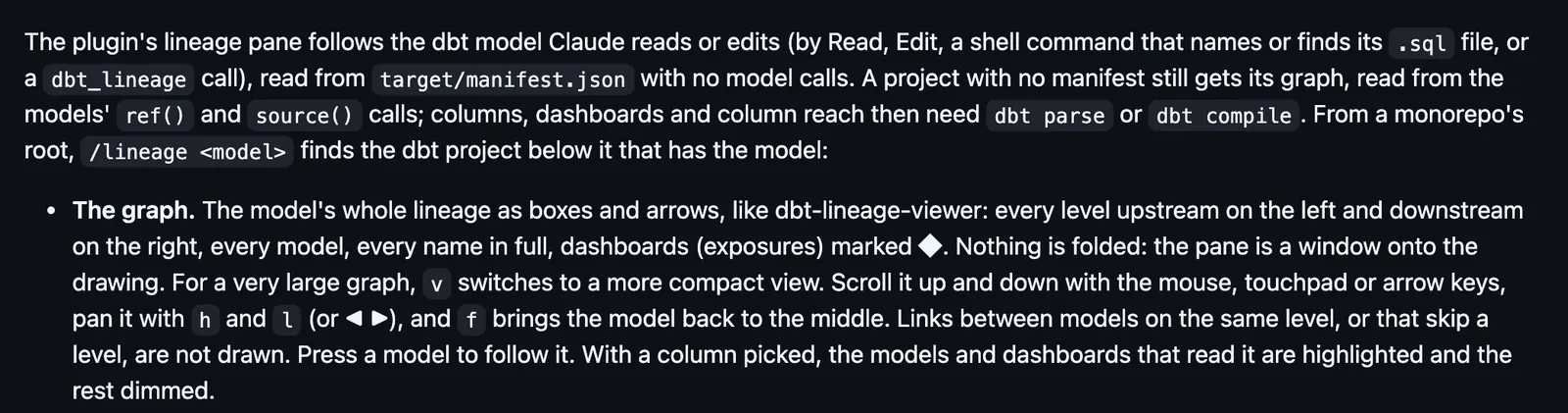
Draws a band for GitHub, Jira and Linear credentials it finds, an /integrations pane, and a /lineage pane of the dbt model Claude reads or edits.
Draws
Install
The marketplace name is altimate-claude-plugin.
claude plugin install altimate-code --marketplace AltimateAI/altimate-claude-pluginIt runs inside the Claude Code process. The side panel is only what the author's README names. Read the repo before you install, or run claude plugin validate on the plugin folder.
- Version
- 1.4.1
- License
- MIT
- Repo stars
- 4
- Last change
- 2026-11-07
What it can reach
- Draws in the session
- Reaches the network or an outside service
- Sees tool calls
- Reads this turn's file edits
- Calls another program on this machine
The altimate-code CLI must be installed and configured on your PATH: npm install -g altimate-code needs Node 20 or newer, and a curl install also works. The side pane and the band need a Claude Code build with hooks modules and altimate integrations from altimate-code. To update, run claude plugin marketplace update altimate-claude-plugin and claude plugin update altimate-code@altimate-claude-plugin, then restart Claude Code. Run dbt parse or dbt compile first, since column lineage and reach need compiled SQL. /integrations opens the pane and /lineage <model> opens the lineage pane. A band offers Connect, Keep local, Review or Later; Keep local keeps a credential in your OS keychain and never sends it to Altimate. When you are not signed in to Altimate, everything works locally. The plugin also ships an MCP server, a skill, an analyst agent and a /altimate-code:altimate command, and an opt-in PreToolUse guard that stays off until you set ALTIMATE_ROUTE_GUARD=1.
The marketplace, altimate-claude-plugin, holds only altimate-code. The plugin's MCP tools, skill, agent and command are not what this page covers; it covers the band and the panes the hooks module draws. Connecting the credentials you already have and seeing a dbt model's lineage beside the chat is why this page files it under workflow. databricks-cli-data-goblin draws a Databricks workspace beside the session, and asks Databricks for catalogs, compute, jobs, and pipelines. gh-status-oborchers draws the branch's pull request, issues, and Actions above the prompt, and a confirmed press sends a merge or a review to GitHub. This one finds GitHub, Jira and Linear credentials already on your machine and shows a band above the prompt, an /integrations pane, and a count of connected integrations on the status line. A /lineage pane draws the dbt model Claude reads or edits as boxes and arrows, read from target/manifest.json with no model calls, and before an edit to a model's SQL lands it toasts what reads the model and leaves a band with the severity. The README describes an opt-in guard, off by default, that denies direct warehouse client commands. It is a command hook outside the hooks module, so this page lists no hold. Delegating a long dbt job with altimate run sends your prompt to the CLI's LLM provider, the Altimate LLM Gateway by default.
Demo
What it hooks into
session.startWhen a session startscommand.runWhen you run its slash commandui.renderDraws into the sessionAbovePromptPane
Read from the on() calls in its hook modules. Open its source under Files to check what each one does.
Hooks 3
SessionStartbash "${CLAUDE_PLUGIN_ROOT}/hooks-handlers/session-start.sh"PreToolUse · Bashbash "${CLAUDE_PLUGIN_ROOT}/hooks-handlers/warehouse-guard.sh"Stopbash "${CLAUDE_PLUGIN_ROOT}/hooks-handlers/refresh-skills.sh" --if-stale
Files
The author's README and source, 4 files. They load when you open them.
Facts
- Author
- AltimateAI
- Category
- Workflow
- Marketplace
- altimate-claude-plugin
- Folder
- plugins/altimate-code
- Version
- 1.4.1
- License
- MIT
- Repo stars
- 4
- Last change
- 2026-11-07
- Language
- TypeScript
- Files
- 27