topic-guard is a Claude Code workflow mod by dougcunha.
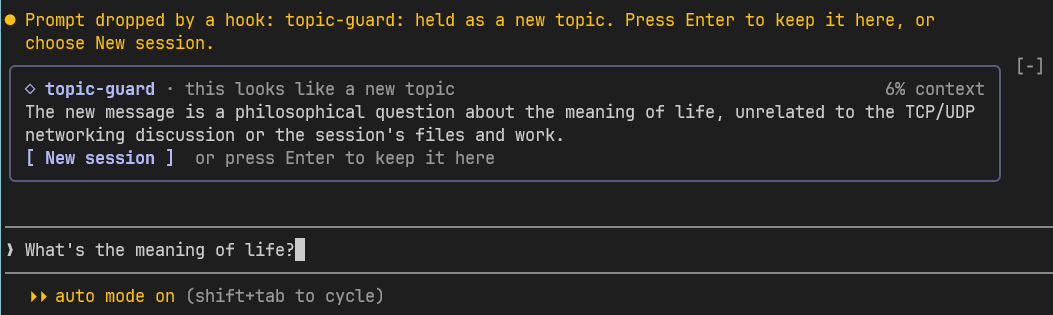
Before a prompt you type enters the session, has Haiku judge whether it starts a new topic, and holds it with a New session button that clears the chat for it.
It runs inside the Claude Code process. The side panel is only what the author's README names. Read the repo before you install, or run claude plugin validate on the plugin folder.
Version
0.5.0
License
MIT
Repo stars
4
Last change
2026-10-21
What it can reach
Draws in the session
Reads usage or context figures
Runs a command when you press
Reaches the network or an outside service
Answer y to add the marketplace and choose a scope; with it added, /plugin install topic-guard@claude-mods. It judges only a prompt typed at an idle session, once the context is at least 20% full. Each judged prompt is one call to the judging model, Haiku by default, through the session's own client, and waits 1 to 3 seconds, at most 8. Settings are in /config. The Jev judge needs a connected MCP server with a jev_classify tool, such as @jkudish/jev-mcp, and a key such as TYPESAFE_API_KEY.
The marketplace, claude-mods, holds dougcunha's four mods: session-info, topic-guard, feature-progress, and visual-review. Keeping one topic per session is why this page files it under workflow. prompt-bouncer sends a vague prompt back before Claude sees it. turn-budget stops a turn that passes a limit and writes a handoff for a new session. This one judges whether your new message needs anything from this conversation, and when it doesn't, puts it back in the prompt box with the model's reason; New session runs /clear and leaves the message for you to send. It never sends or moves a message without your press. In the source, the check is a prompt.submit hook and the band an AbovePrompt render; it has no tool.call hook.
Demo
From the author's repo.
What it hooks into
session.startWhen a session starts
prompt.submitWhen you send a prompt
ui.renderDraws into the sessionAbovePrompt
Read from the on() calls in its hook modules. Open its source under Files to check what each one does.
Files
The author's README and source, 4 files. They load when you open them.