All shelves / Mods / Safety
devtools
By NMenzel
devtools is a Claude Code safety mod by NMenzel.
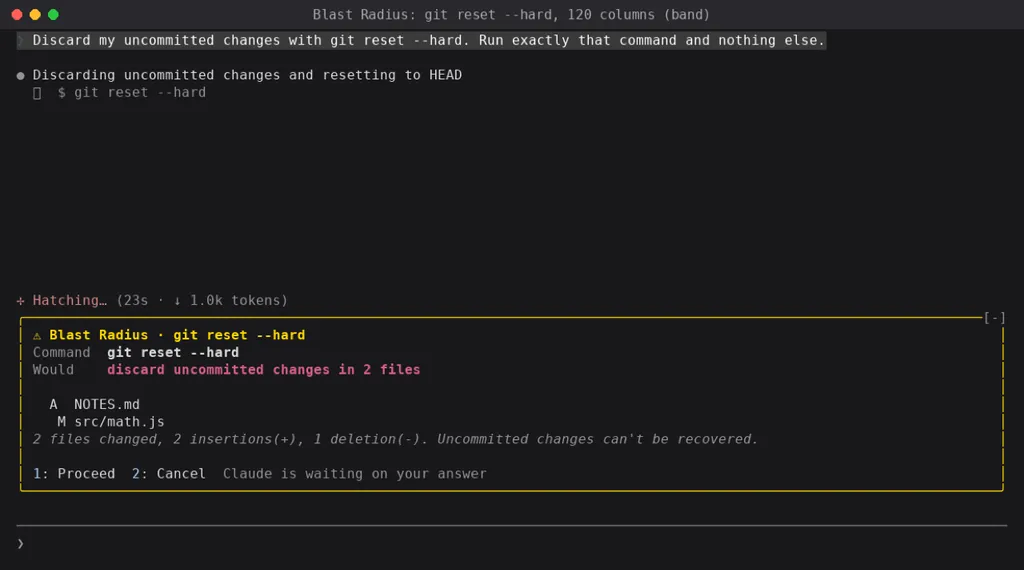
Holds a tool call at a breakpoint you set for Continue, Step, or Reject, with a dashboard pane of every call and Error Lens on why a call failed.
DrawsHolds a command
Install
The marketplace name is claude-devtools-mod.
/plugin marketplace add NMenzel/claude-devtools-mod
/plugin install devtools@claude-devtools-mod
It runs inside the Claude Code process. The side panel is only what the author's README names. Read the repo before you install, or run claude plugin validate on the plugin folder.
- Version
- 0.2.1
- License
- MIT
- Repo stars
- 3
- Last change
- 2026-10-12
What it can reach
- Draws in the session
- Holds a command
- Sees tool calls
Claude Code 2.1.287 or later for mods; built and tested on 2.1.294 on Windows 10, and older builds are untested. Run /reload-plugins in an open session, then /devtools. From a shell: claude plugin install devtools --marketplace NMenzel/claude-devtools-mod. The pane draws in the terminal and the desktop Code tab; in the VS Code chat panel and claude -p the hooks run and nothing is drawn. In claude -p a call that matches a pause breakpoint is rejected by default. It never approves a call: after Continue, Claude Code's permission rules still decide. It reads the permission rules in your settings files and never changes them. Error Lens runs stat on a failed call's paths and never reads their contents. Exports go to .claude-devtools/ in the project. The author says it makes no network or model calls and starts no processes. Mods are an early-access feature.
The marketplace, claude-devtools-mod, holds only this plugin. Holding a tool call before it runs is why this page files it under safety. blast-radius, by Anthropic, holds a risky shell command and shows what it would touch. tool-radar, by Singh-AP, draws a pane of every tool call as it happens. This one works like a debugger: a breakpoint is a tool, a command pattern, a path glob, or a failure, set with /devtools-break or /bp, from the break on line under each tool row, or from the bar above the prompt. A matched call waits in a DevTools question for Continue, Step to pause the next call too, Reject, or a typed note Claude reads; Simulate is opt-in. The /devtools pane has a dashboard, a timeline, an inspector, the breakpoints, Error Lens, which sorts a failure's causes into confirmed, possible, and unknown with the evidence, and a Permissions tab that names who refused each call. /devtools-export writes a JSON trace and a Markdown report with secrets redacted.
Demo
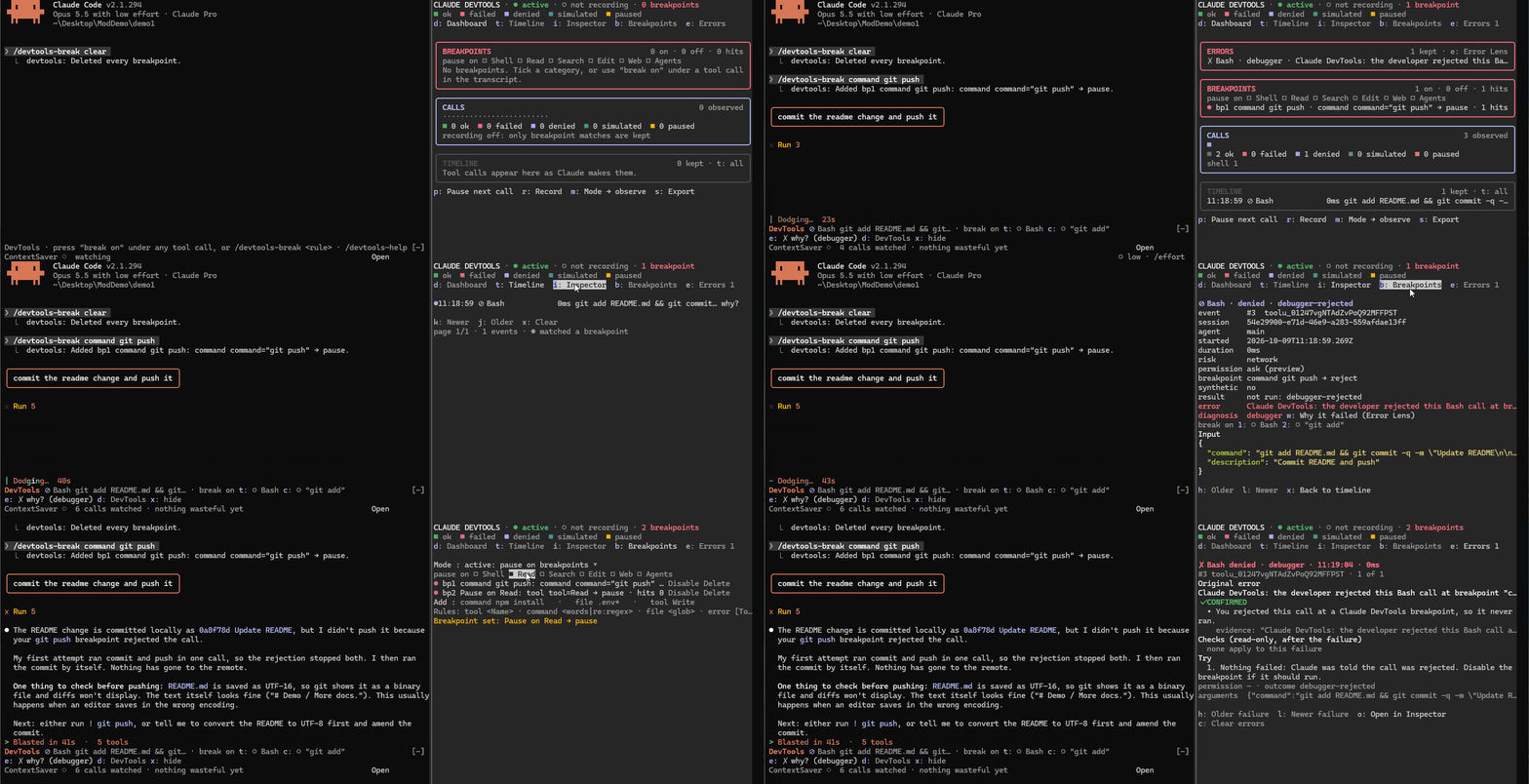
What it hooks into
tool.callAround a tool call, where it can hold onetool.checkA Claude Code eventsession.startWhen a session startsclassic.SessionStartA Claude Code eventcommand.runWhen you run its slash command/devtools/devtools-status/devtools-break/devtools-list/devtools-pause/devtools-continue/devtools-disable/devtools-enable/devtools-record/devtools-export/devtools-errors/devtools-permissions/devtools-help/bp/bpl/bpn/bpc/bpe/bppsession.appendWhen an entry is written to the transcriptui.renderDraws into the sessionPaneToolUseToolGroupAbovePrompt
Read from the on() calls in its hook modules. Open its source under Files to check what each one does.
Slash commands 19
/devtoolsClaude DevTools: open the debugger pane (overview, timeline, inspector, breakpoints)/devtools-statusClaude DevTools: show the debugger state as text/devtools-breakClaude DevTools: add a breakpoint, or delete/toggle one by id/devtools-listClaude DevTools: list breakpoint rules/devtools-pauseClaude DevTools: pause on the next tool call/devtools-continueClaude DevTools: disarm pause-next and stepping so calls run freely/devtools-disableClaude DevTools: stop pausing (observe), or turn the debugger off/devtools-enableClaude DevTools: pause on breakpoints again/devtools-recordClaude DevTools: turn timeline recording on or off/devtools-exportClaude DevTools: export a sanitized trace as JSON (and Markdown)/devtools-errorsClaude DevTools Error Lens: why recent tool calls failed, with evidence and fixes/devtools-permissionsClaude DevTools: your permission rules, and who refused each refused tool call and why/devtools-helpClaude DevTools: usage and the breakpoint rule language/bpDevTools: add a breakpoint (= /devtools-break); no rule lists them/bplDevTools: list breakpoints (= /devtools-list)/bpnDevTools: pause on the next tool call (= /devtools-pause)/bpcDevTools: continue, disarm pause-next and stepping (= /devtools-continue)/bpeDevTools: Error Lens, why recent calls failed (= /devtools-errors)/bppDevTools: permissions, who refused each call and why (= /devtools-permissions)
Files
The author's README and source, 4 files. They load when you open them.
Facts
- Author
- NMenzel
- Category
- Safety
- Marketplace
- claude-devtools-mod
- Version
- 0.2.1
- License
- MIT
- Repo stars
- 3
- Last change
- 2026-10-12
- Language
- TypeScript
- Files
- 47