All shelves / Mods / Safety
command-explainer
By Singh-AP
command-explainer is a Claude Code safety mod by Singh-AP.
Draws a plain-English line and a risk level on the permission prompt, so you can see what the command does before you approve it.
Draws
Install
The marketplace name is awesome-claude-mods.
/plugin marketplace add Singh-AP/awesome-claude-mods
/plugin install command-explainer@awesome-claude-mods
It runs inside the Claude Code process. The side panel is only what the author's README names. Read the repo before you install, or run claude plugin validate on the plugin folder.
- Version
- 1.0.0
- License
- MIT
- Repo stars
- 3
- Last change
- 2026-10-04
What it can reach
- Draws in the session
- Sees tool calls
Claude Code 2.1.287 or later. The mod is live once you run /reload-plugins or start a new session. When a shell command is about to open a permission prompt, it asks a small, fast model, haiku by default, for one sentence on the command's concrete effect and a risk level, Safe, Caution, or Danger, and draws it on the call's row just above the dialog. It runs Claude Code's own permission check first, so commands your rules or mode already allow cost nothing, and plain read-only commands such as ls, cat, git status, and git log are never sent. The call goes ahead at once, and the line appears when the model answers. The last 200 explanations are cached by exact command. /explain explains any command on demand, in claude -p too. Set model and minLength in /config; if your organization blocks the model, the session's own model is used.
The marketplace, Singh-AP's awesome-claude-mods, holds the 21 mods built there, bash-guard, file-guard, slopsquat-guard among them, and 26 community and Anthropic mods pinned to a commit. This one installs on its own. Knowing what you approve is why this page files it under safety. blast-radius, by Anthropic, holds a shell command such as rm -rf, a force push, a hard reset, or a migration, shows what it would touch, then asks you to proceed or cancel. apexyard-explainer-me2resh, in an ApexYard ops fork, draws a pane that explains each tool call in one plain sentence. This one holds nothing: it adds one line above the dialog you already get. Each new command at a permission prompt costs one small model call, of 80 tokens at most. The README says the explanation is a second pair of eyes, not a guarantee, and that in this Claude Code release the notice line does not draw under the terminal's Bash permission dialog. Its plugin.json names awesome-claude-mods as its author, and Singh-AP owns the marketplace.
Demo
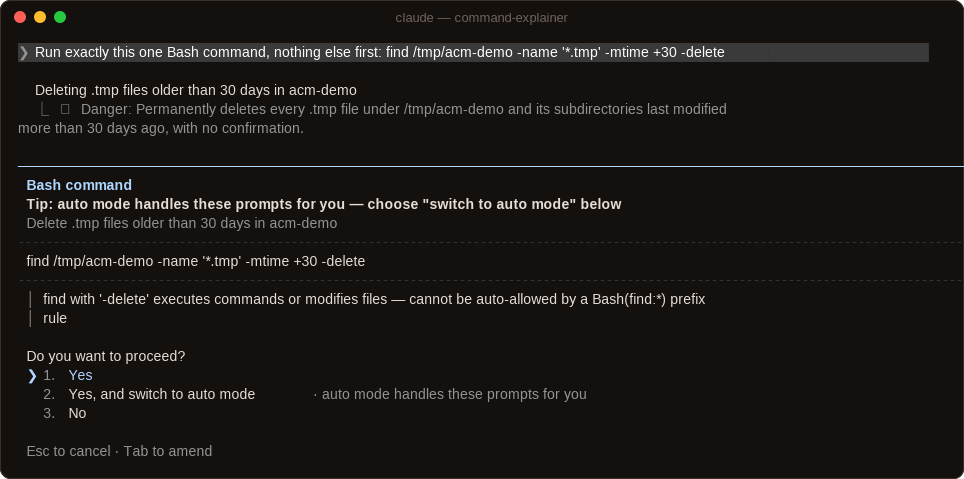
What it hooks into
session.startWhen a session startstool.callAround a tool call, where it can hold oneBashui.renderDraws into the sessionToolGroupcommand.runWhen you run its slash command/explain
Read from the on() calls in its hook modules. Open its source under Files to check what each one does.
Slash commands 1
/explainExplain a shell command in one plain sentence, with its risk
Files
The author's README and source, 4 files. They load when you open them.
Facts
- Author
- Singh-AP
- Category
- Safety
- Marketplace
- awesome-claude-mods
- Folder
- mods/safety/command-explainer
- Version
- 1.0.0
- License
- MIT
- Repo stars
- 3
- Last change
- 2026-10-04
- Language
- TypeScript
- Files
- 7