Install
The repo has no one-line install. Follow its README.
Files
symbolica-mcp
A scientific computing Model Context Protocol (MCP) server allows AI, such as Claude, to perform symbolic computing, conduct calculations, analyze data, and generate visualizations. This is particularly useful for scientific and engineering applications, including quantum computing, all within a containerized environment.
Features
- Run scientific computing operations with NumPy, SciPy, SymPy, Pandas
- Perform symbolic mathematics and solve differential equations
- Support for linear algebra operations and matrix manipulations
- Quantum computing analysis
- Create data visualizations with Matplotlib and Seaborn
- Perform machine learning operations with scikit-learn
- Execute tensor operations and complex matrix calculations
- Analyze data sets with statistical tools
- Cross-platform support (automatically detects Windows, macOS, and Linux), especially for users with Mac M series chips
- Works on both Intel/AMD (x86_64) and ARM processors
Quick Start
Using the Docker image
# Pull the image from Docker Hub
docker pull ychen94/computing-mcp:latest

# Run the container (automatically detects host OS)
docker run -i --rm -v /tmp:/app/shared ychen94/computing-mcp:latest
For Windows users:
docker run -i --rm -v $env:TEMP:/app/shared ychen94/computing-mcp:latest
Integrating with Claude for Desktop
- Open Claude for Desktop
- Open Settings ➝ Developer ➝ Edit Config
- Add the following configuration:
For MacOS/Linux:
{
  "mcpServers": {
    "computing-mcp": {
      "command": "docker",
      "args": [
        "run",
        "-i",
        "--rm",
        "-v",
        "/tmp:/app/shared",
        "ychen94/computing-mcp:latest"
      ]
    }
  }
}
For Windows:
{
  "mcpServers": {
    "computing-mcp": {
      "command": "docker",
      "args": [
        "run",
        "-i",
        "--rm",
        "-v",
        "%TEMP%:/app/shared",
        "ychen94/computing-mcp:latest"
      ]
    }
  }
}
Examples
Tensor Products
Can you calculate and visualize the tensor product of two matrices? Please run:

import numpy as np
import matplotlib.pyplot as plt

# Define two matrices
A = np.array([[1, 2],
              [3, 4]])
B = np.array([[5, 6],
              [7, 8]])

# Calculate tensor product using np.kron (Kronecker product)
tensor_product = np.kron(A, B)

# Display the result
print("Matrix A:")
print(A)
print("\nMatrix B:")
print(B)
print("\nTensor Product A ⊗ B:")
print(tensor_product)

# Create a visualization of the tensor product
plt.figure(figsize=(8, 6))
plt.imshow(tensor_product, cmap='viridis')
plt.colorbar(label='Value')
plt.title('Visualization of Tensor Product A ⊗ B')
Symbolic Mathematics
Can you solve this differential equation? Please run:
import sympy as sp
import matplotlib.pyplot as plt
import numpy as np

# Define symbolic variable
x = sp.Symbol('x')
y = sp.Function('y')(x)

# Define the differential equation: y''(x) + 2*y'(x) + y(x) = 0
diff_eq = sp.Eq(sp.diff(y, x, 2) + 2*sp.diff(y, x) + y, 0)

# Solve the equation
solution = sp.dsolve(diff_eq)
print("Solution:")
print(solution)

# Plot a particular solution (C1=1, C2=0)
solution_func = solution.rhs.subs({sp.symbols('C1'): 1, sp.symbols('C2'): 0})
print("Particular solution:")
print(solution_func)

# Create a numerical function we can evaluate
solution_lambda = sp.lambdify(x, solution_func)

# Plot the solution
x_vals = np.linspace(0, 5, 100)
y_vals = [float(solution_lambda(x_val)) for x_val in x_vals]

plt.figure(figsize=(10, 6))
plt.plot(x_vals, y_vals)
plt.grid(True)
plt.title("Solution to y''(x) + 2*y'(x) + y(x) = 0")
plt.xlabel('x')
plt.ylabel('y(x)')
plt.show()
Data Analysis
Can you perform a clustering analysis on this dataset? Please run:

import numpy as np
import pandas as pd
import matplotlib.pyplot as plt
from sklearn.cluster import KMeans
from sklearn.preprocessing import StandardScaler

# Create a sample dataset
np.random.seed(42)
n_samples = 300

# Create three clusters
cluster1 = np.random.normal(loc=[2, 2], scale=0.5, size=(n_samples//3, 2))
cluster2 = np.random.normal(loc=[7, 7], scale=0.5, size=(n_samples//3, 2))
cluster3 = np.random.normal(loc=[2, 7], scale=0.5, size=(n_samples//3, 2))

# Combine clusters
X = np.vstack([cluster1, cluster2, cluster3])

# Create DataFrame
df = pd.DataFrame(X, columns=['Feature1', 'Feature2'])
print(df.head())

# Standardize data
scaler = StandardScaler()
X_scaled = scaler.fit_transform(X)

# Apply KMeans clustering
kmeans = KMeans(n_clusters=3, random_state=42)
df['Cluster'] = kmeans.fit_predict(X_scaled)

# Plot the clusters
plt.figure(figsize=(10, 6))
for cluster_id in range(3):
    cluster_data = df[df['Cluster'] == cluster_id]
    plt.scatter(cluster_data['Feature1'], cluster_data['Feature2'],
                label=f'Cluster {cluster_id}', alpha=0.7)

# Plot cluster centers
centers = scaler.inverse_transform(kmeans.cluster_centers_)
plt.scatter(centers[:, 0], centers[:, 1], s=200, c='red', marker='X', label='Centers')

plt.title('K-Means Clustering Results')
plt.xlabel('Feature 1')
plt.ylabel('Feature 2')
plt.legend()
plt.grid(True)
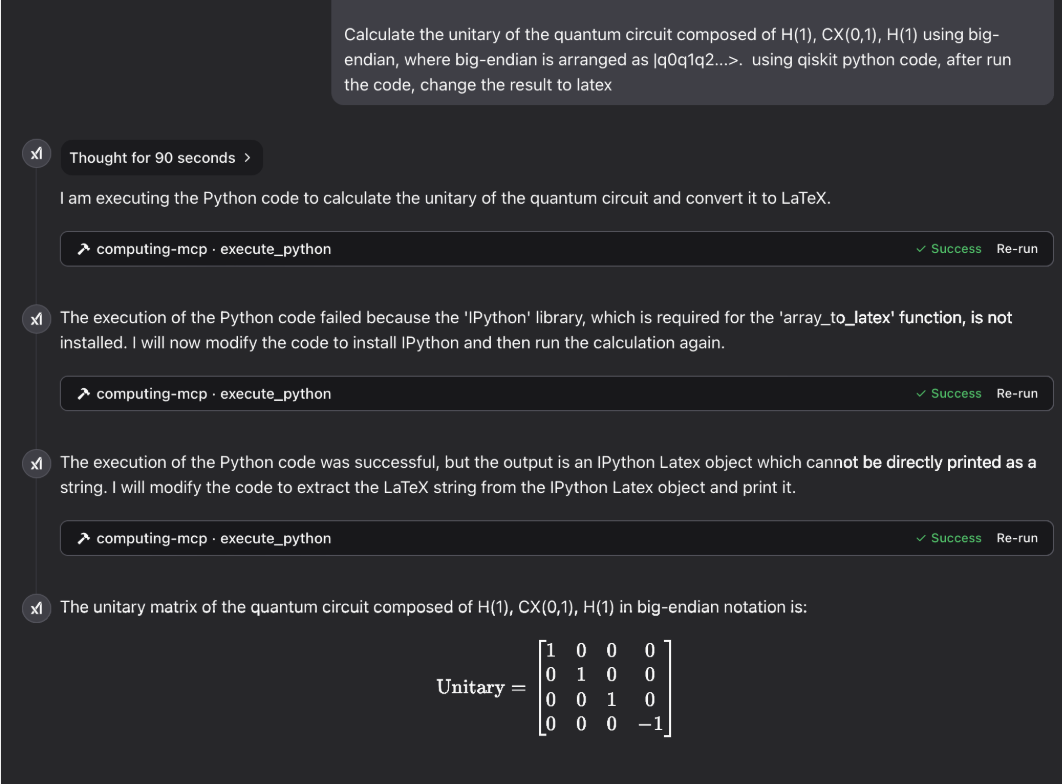
Quantum Computing
Gallery
laser physics:

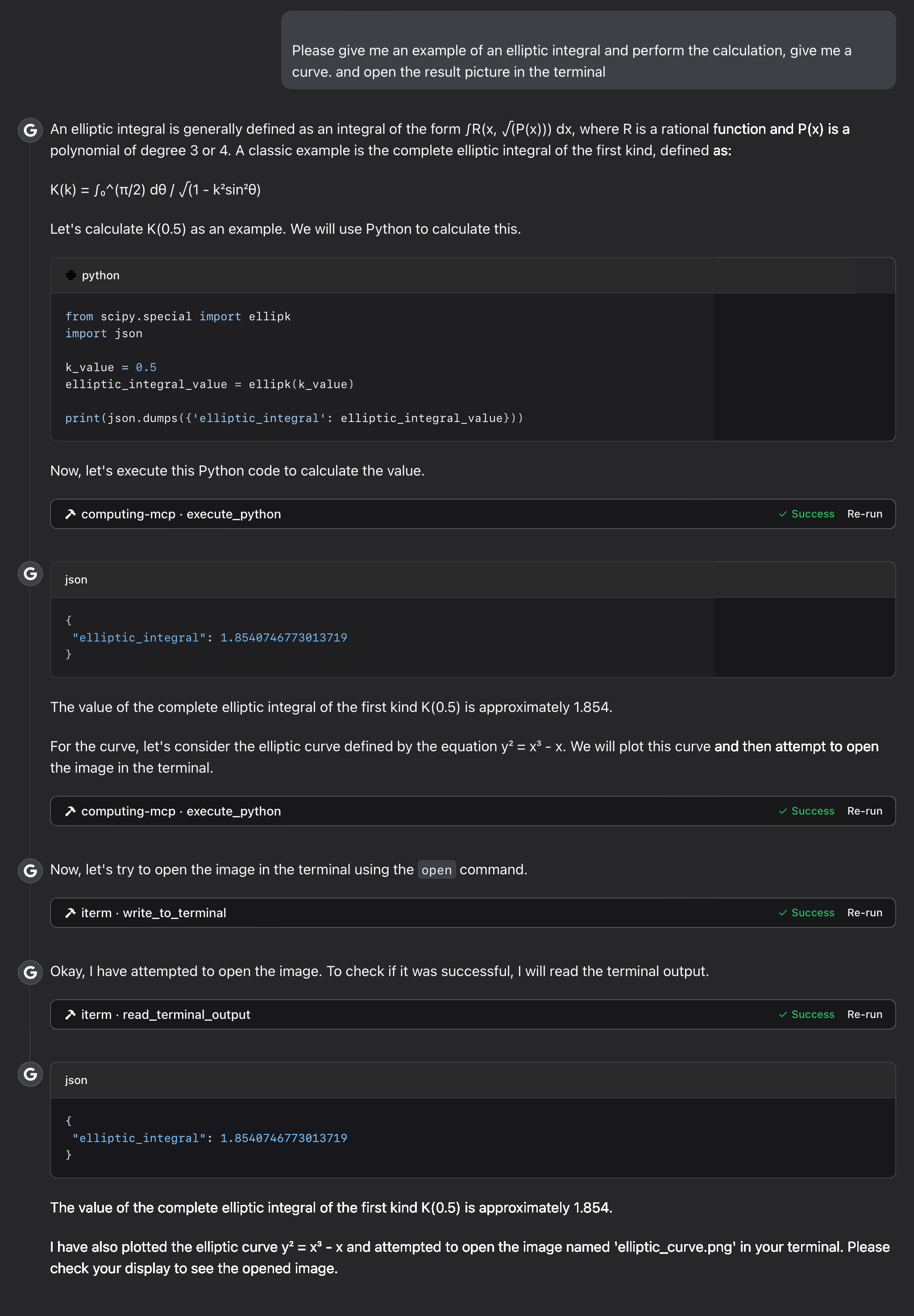
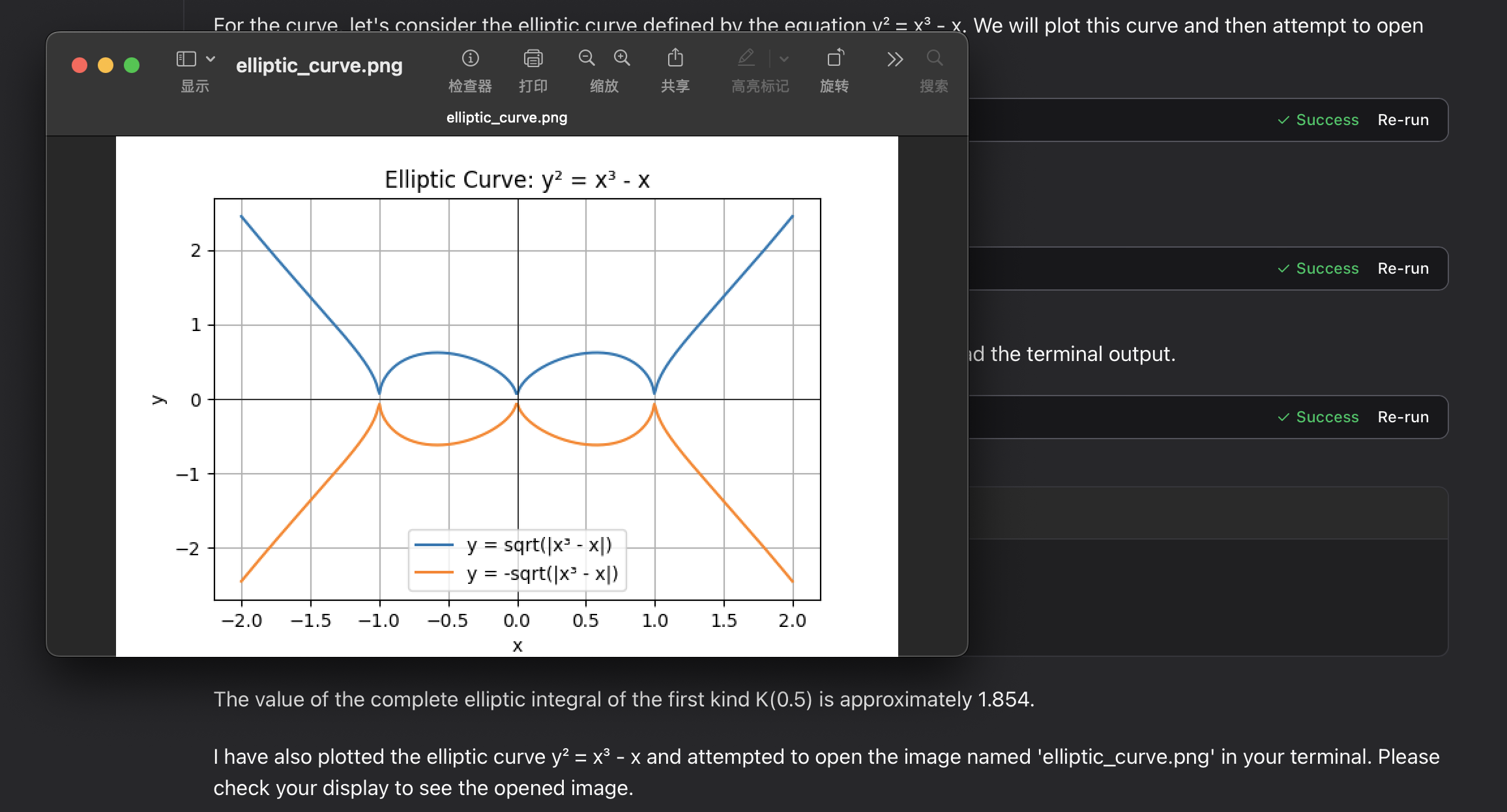
elliptic integral:
Troubleshooting
Common Issues
-
Permission errors with volume mounts
- Ensure the mount directory exists and has appropriate permissions
-
Plot pciture files not appearing
-
Check the path in your host system:
/tmpfor macOS/Linux or your temp folder for Windows -
Verify Docker has permissions to write to the mount location
-
check the mcp tool's output content
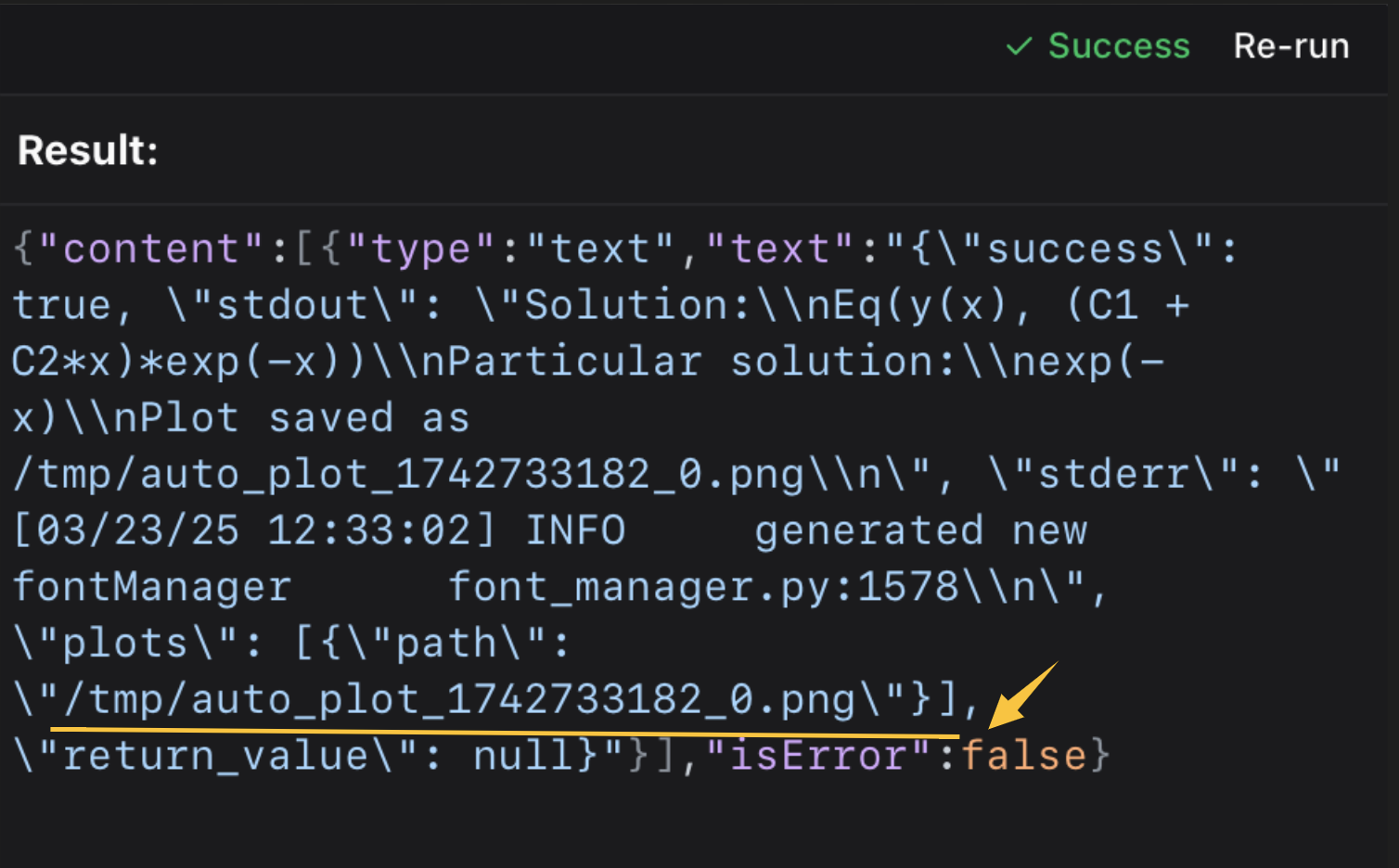 then open it in the terminal or your picture viewer.
⭐️ ⭐️ I use the iterm-mcp-server or other terminals' mcp servers to open the file without interrupting your workflow. ⭐️ ⭐️
-
Support
If you encounter issues, please open a GitHub issue with:
- Error messages
- Your operating system and Docker version
- Steps to reproduce the problem
License
This project is licensed under the MIT License.
For more details, please see the LICENSE file in this project repository.
Facts
- Kind
- MCP server
- Group
- Uncategorized
- Stars
- 10
- License
- MIT
- Last push
- 2025-03-23
- Forks
- 4
- Topics
- formula, quantum-computing, symbolic-computation
- 1REAio.github.morluto/reaReverse engineer anything from your terminal or agent with one CLI and MCP server.125.3k
- 2com.browser-use/browser-usecom.browser-use/browser-useControl a real Chrome browser to complete any task: fill forms, extract data, book flights.117.7k
- 3World Monitorapp.worldmonitor/mcpLive markets, conflicts, country risk, chokepoints, energy, and China decision signals. 93 tools.88.3k
- 4Scrapling MCP Serverd4vinci/scrapling🕷️ An adaptive Web Scraping framework that handles everything from a single request to a full-scale crawl! Don't be shy, join here: https://discord.gg/EMgGbDceNQ and follow here for daily tips and tricks: https://x.com/Scraplingdev86.9k
- 5Everythingmodelcontextprotocol/serversThis MCP server attempts to exercise all the features of the MCP protocol. It is not intended to be a useful server, but rather a test server for builders of MCP clients. It implements prompts, tools, resources, sampling, and more to showcase MCP capabilities.85.8k
- 6Fetchmodelcontextprotocol/serversA Model Context Protocol server that provides web content fetching capabilities. This server enables LLMs to retrieve and process content from web pages, converting HTML to markdown for easier consumption.85.8k


