Obsidian MCP Server
io.github.maxkuminov/obsidian-mcp · 20 stars · Python · MIT
MCP server Self-hosted agent memory as a markdown vault: semantic and keyword search, wikilink graph, OAuth
Install
The repo has no one-line install. Follow its README.
Published as
- Docker
ghcr.io/maxkuminov/obsidian-mcp:v1.0.0Streamable HTTP
From the server's entry in the official MCP Registry.
Configuration
| Name | Set as | What it is |
|---|---|---|
DATABASE_URLRequired · Secret | Env var | PostgreSQL 16 + pgvector (0.8.0+) connection URL for the app's NON-superuser role, e.g. postgresql+asyncpg://obsidian_mcp:<password>@postgres:5432/obsidian_mcp. A superuser role or a CHANGE_ME password is refused at startup. |
VAULT_PATHRequired | Env var | Path of the Obsidian vault inside the container (mount your vault read-write there). |
SECRET_KEYRequired · Secret | Env var | itsdangerous signer for cookies/sessions. Generate with `openssl rand -hex 32`; the app refuses to start on a placeholder. |
MCP_HOSTNAMERequired | Env var | Public hostname your reverse proxy routes to. Also derives BASE_URL, ALLOWED_ORIGINS and ALLOWED_HOSTS as https://<MCP_HOSTNAME> unless those are set explicitly. |
EMBEDDING_PROVIDEROptional | Env var | Embedding provider: `ollama` (self-hosted, default) or `openai` (bring your own key). Switching after deploy requires `make reset-embeddings`. |
OLLAMA_URLOptional | Env var | Ollama endpoint serving bge-m3 (used when EMBEDDING_PROVIDER=ollama). Must be https or loopback unless EMBEDDING_ALLOW_PLAINTEXT is set. |
OPENAI_API_KEYOptional · Secret | Env var | OpenAI (or OpenAI-compatible) API key for text-embedding-3-* (required when EMBEDDING_PROVIDER=openai; the server refuses to start without it). |
Files
Obsidian MCP Server
Your agents' memory, in the vault you already have, reachable from claude.ai, ChatGPT, Claude Code and your phone.
A self-hosted Model Context Protocol server over an Obsidian vault. Three things it does that the alternatives mostly don't:
- Your existing vault, served in place. No imposed note format, no sidecar syntax, no "memory" folder you have to adopt. Agents read what you read, follow your wikilinks, and pick up your folder layout, frontmatter schema and tag conventions from the vault itself.
- Remote and multi-user. OAuth 2.0 PKCE and API keys, so claude.ai, Claude Desktop, Claude mobile, ChatGPT, Claude Code and n8n all read and write the same files, each user confined to their own vault root.
- Writes cannot clobber.
expected_hashpreconditions refuse an edit made from a stale read, every publish is atomic and no-clobber by default, deletes go to.trash/, anddry_runreturns the diff before anything lands.
Connect from Claude Code:
claude mcp add obsidian --transport http \
  --url "https://obsidian-mcp.<your-domain>/mcp" \
  --header "Authorization: Bearer omcp_..."
In claude.ai, Claude Desktop or ChatGPT, add a custom connector at
https://obsidian-mcp.<your-domain>/mcp and sign in through the OAuth
consent page. Connect a client has the rest.
Stack: Python 3.12, FastAPI, PostgreSQL with pgvector. Pluggable
embeddings (Ollama — bge-m3 by default, qwen3-embedding:0.6b in the
reference deployment — or OpenAI text-embedding-3-{small,large}).
Contents
- Why this exists
- A session at the keyboard
- A session away from the keyboard
- What's in the box
- vs. other Obsidian MCP servers
- Who this is for
- Control panel
- Quick start
- Versioning and compatibility
- Upgrading
- Cost expectations
- The self-describing vault
- Multi-user mode
- Configuration
- Architecture
- Project layout
- Development
- Security notes
Why this exists
There are three things going on here, and they're more interesting together than apart.
1. Agent memory that you can actually read
If you let an agent run for a while, it needs memory. Most setups solve this with an opaque vector store, a SQLite blob, or a managed "memory" service that you can't see into. That works until you want to know what the agent thinks it knows about you, or you need to correct something, or you want to understand why it just made a weird suggestion.
This server gives you a different deal. Agent memory lives as markdown files in your vault. Folder structure, file names, frontmatter, all visible. You can open the file in Obsidian and read it. You can edit it. You can delete it. You can grep it. The agent's "memory" is a human-auditable artifact that sits in the same place as your own notes, with the same tools available.
The home lab is the use case that sold me on this. My vault has notes on the rack, the network, and every Home Assistant integration. I can say "set up a night-light mode in the master bathroom, 1% after 11pm" and a sysadmin agent finds the right config, makes the change, and updates the doc in the same pass. Six months later when I've forgotten how it works, the answer is in the vault, not buried in some chat history I can't search.
The semantic search and wikilink graph still work over that material, so retrieval is fast and conceptual. But the substrate is files you own, not a black box.
To be precise about the scope: what the server supplies is MCP-accessible storage, keyword and semantic search, and graph operations over markdown notes, for whatever MCP clients you connect. The agents direct their own reads and writes. There is no extraction or decay pipeline running behind them, and nothing rewrites a note because a model judged it stale: an agent remembers something because it wrote a note, and forgets it because someone deleted one. By late 2026 that is less of a contrarian position than it sounds. Every vendor's consolidation step (the "dreaming" or "sleep-time" job) has turned into a separate process you can inspect, rather than silent extraction inside the write path. This server keeps the agent as the author. The consolidation help it will grow is a hygiene report that proposes merges and flags duplicates, and never writes (#359), not a pipeline that edits your notes while you are not looking.
2. A shared memory layer between you and your agents
The other half runs the other way: the vault isn't only the agents' memory, it's mine. I think of my Obsidian vault as my exocortex. The "big me" that includes notes, calendars, scripts, search, and AI assistants is substantially more capable than the "small me" of the biological brain alone. It's also where I do most of my thinking, because writing something down is itself a form of thought.
The problem is that until recently, the vault was passive. I had to go find things. Agents that wanted to help me had to be briefed from scratch every session, and they had no way to see what I'd already written about a topic.
This server fixes that. Now the same vault feeds my own daily writing and any agent I plug into it. The agent reads what I read, links what I link, follows the same wikilinks, sees the same frontmatter. When I write a project note on Sunday, my Monday-morning briefing agent already knows about it. When the agent leaves notes from a research session, they show up in my normal Obsidian search.
A concrete version of this: I'll spend a session in Claude Code on a project, wrap up, push the commits, and then just say "update Obsidian." The agent reads the vault guide, figures out where project notes live in my structure, picks the right format and frontmatter, and leaves a session log I can later roll into a status report. No path-passing, no telling it what to write — the conventions are already in the vault, and it follows them.
That's the exocortex idea made concrete: one place that holds context, and both the human and the agents reading and writing into it on the same terms.
3. The vault follows you
The thing that still surprises me is that this is internet-facing. Same vault, same notes, reachable from anywhere I happen to be talking to an agent — Claude in a browser tab, Claude on my phone on the train, an n8n workflow firing on a schedule, a Claude Code session on whatever laptop is in front of me. All behind OAuth or a bearer key, all hitting the same source of truth.
So when I hear an interesting podcast on a commute and want to think out loud about it with Claude on my phone, the agent isn't starting cold. It can pull up what I've already written on adjacent topics, surface a note I half-finished six months ago, and at the end of the conversation suggest updates and write them in. The vault doesn't have to be near me to be the thing I'm working in. (A session away from the keyboard walks through exactly one of these.)
A session at the keyboard
To make the abstract concrete, a short transcript from a real session. Tool calls inline; the user types in plain English and the agent picks the right tool.
you  > find anything I've written about why retrieval-augmented
       chat is hard

claude
  → semantic_search(query="why retrieval-augmented chat is hard")
    • 2025-12-03 - RAG failure modes.md
    • 2025-10-18 - Chunking tradeoffs.md
    • 2024-06-22 - Vector recall vs precision.md

  the closest hit is your December note on RAG failure modes. let
  me see what it's connected to.

  → get_neighborhood(path="2025-12-03 - RAG failure modes.md",
                     depth=1)
    8 connected notes. notable ones:
    • "Hybrid search" — a re-ranking design you sketched but
      didn't ship
    • "Out-of-distribution queries" — a half-finished draft from
      October
    • "Embedding model choice" — links to bge-m3, your current
      model

  you have three connected pieces here: a failure-modes catalog,
  an unshipped hybrid-search sketch, and an abandoned O-O-D draft.
  want me to summarize all three together, or pull up the draft
  so you can decide whether to finish it?

you  > pull up the draft, and tag it #revisit-2026 in frontmatter
       while you're there

claude
  → read_note(path="2025-10-18 - OOD queries (draft).md")
  → set_frontmatter(
      path="2025-10-18 - OOD queries (draft).md",
      updates={"tags": ["draft", "rag", "revisit-2026"]}
    )

  here's the draft, and the tag is on. you stopped right before
  the section on confidence thresholds; the open question you
  left yourself was…
Two things to notice. First, the agent didn't need to be told what
folder to look in or what tools to use — it picked them. Second, the
write at the end is structured (set_frontmatter mutating YAML, not
a regex over the file body), so the note round-trips cleanly. The
self-describing vault and the wikilink graph are doing the work that
makes this feel natural.
A session away from the keyboard
The transcript above is the easy case: I'm at a desk, I can see what the agent is doing, and Obsidian is one alt-tab away. The session that actually changed how I think about this server had none of that.
I was out walking with a health podcast in my ears — a long one, two people who clearly disagreed with each other, an hour of it. I had my phone and no intention of going home to a laptop. So I pulled the episode's transcript, handed it to Claude on my phone, and we talked it through while I kept walking: what the actual claim was, which parts I already had notes on, where it cut against something I'd decided months ago and written down at the time.
The agent had the vault the whole way. It surfaced what I'd already written on the topic, flagged that two dates in an older note were wrong, and asked whether a decision I'd recorded last year still stood given what the episode argued. By the time I got back it had written all of it in: the health-related decisions I'd actually landed on during the walk, the date corrections in the old note, a couple of new notes on the episode itself — and, because the conversation kept circling back to it, a durable note on how I decide which experts to trust on medical questions in the first place. That last one is the artifact I keep returning to. It wasn't about the episode at all; it was the reasoning underneath a whole class of decisions, and it now sits in the vault where the next agent will find it.
I never opened Obsidian. Not on the walk, not when I got home. The whole session — retrieval, argument, correction, and the writing that came out of it — went through an agent, and the vault is simply where it landed. Obsidian is how I check the work afterwards, not how the work gets done. That inversion is most of the reason this project looks the way it does.
What's in the box
The server exposes 28 MCP tools across five families, plus the auth and ops layer around them.
Every tool is published with a title and MCP ToolAnnotations, all
four hints set explicitly: readOnlyHint on the eighteen tools that only
read (search, read, list, graph, list_tasks, get_changes, check_upload), destructiveHint on
the eight that can replace or remove something (edit_note,
move_note, delete_note, set_frontmatter, write_file,
delete_file, import_from_url, and request_upload, whose link can
overwrite on redemption), openWorldHint on import_from_url only.
create_note and request_download are additive. Clients that honour
annotations run read-only tools without a per-call confirmation (Claude
Code also runs them in parallel) and keep prompting on destructive ones.
They are hints: the server enforces read-only credentials itself,
regardless of what a client does with them. The initialize result also
carries a short instructions paragraph — what the vault is, which tool
to reach for, and the write-safety rules — for clients that load only
tool names at session start. No description exceeds 4,000 characters on
the wire, so none is cut off by a client's description limit.
Search and discovery
keyword_search(query, folder?, tags?, frontmatter?, limit=20), full-text via PostgreSQLtsvector. A note's title and frontmatteraliasesrank above its body, so a query that is a note's title finds that note first; its tags (frontmatter and inline#tags, a nested#a/balso asaandb) are indexed below the title and above the body, andmatched_innames which oftitle,tagsandbodymatched; bare terms are ANDed, and when the full matches do not fill the page, partial matches follow taggedmatch: any; every row carries asnippet:with the matches highlighted (orhead:, the note's opening words, for a title or tags match). The text-search config(s) are configurable viaFTS_CONFIGS(see Full-text search language(s))semantic_search(query, folder?, tags?, frontmatter?, limit=15, rerank=false), vector similarity via pgvector, one one-line preview chunk per note. Notes are chunked at their headings, and each chunk is embedded under aTitle > Heading > Subheadingcontext prefix. A fresh row names the section it matched:§ "Plan/Risks" (#7)or§ (top of note), andread_note(path, section="#7")reads exactly that section. Previews start on a word; a section too short to stand alone (under 200 characters) is grouped with its neighbour, so a preview can include an inner heading line and its§names the enclosing section. Stale rows, and rows not yet re-embedded since the upgrade to heading-aware chunks, carry no locator. While any of your notes is still on the old chunking, each response says so on anindex_transition:line under its headerhybrid_search(query, limit=10, folder?, tags?, frontmatter?, rerank=false), both of the above fused by reciprocal rank fusion over each arm's top 50, one line per note with its fused score, each arm's rank and the1/(k+rank)terms behind the score. The three are peers, and every description carries the same routing sentence: exact identifiers, code symbols, titles or known phrases go tokeyword_search; conceptual or paraphrased questions tosemantic_search; unsure which,hybrid_search. A single arm can beat the fusion on its own kind of query. If the embedding provider is down,hybrid_searchreturns the keyword ranking markedarms: keyword-only (semantic unavailable: …), never silently degraded: the marker is on every return path, so a keyword-only page cannot pass for a fused one.- Every page of
semantic_searchandhybrid_searchcarries aconfidence: ok | lowheader token.lowmeans no keyword note matched all the terms and the closest semantic candidate is underSEARCH_LOW_CONFIDENCE_SIMILARITY, with a one-line hint to trykeyword_searchorget_neighborhoodwhen it costs no row. Nothing is filtered. The threshold ships at 0 (off: alwaysok) until you calibrate it. rerank=trueon either of the last two asks an optional, operator-configured reranker (RERANK_URL) to reorder the candidates the call already fetched (at most 50 notes). Each note is scored on the best of up to four of its fetched chunks, sent as the same text they were embedded from (title, heading path and tags, then the chunk); a reranked row's preview and§locator show the chunk that scored. The response is either fully reranked (reranked: true (candidates: N), arerank_scoreper row) or the unreranked page markedreranked: false (<reason>); without a reranker it answersreranked: false (not_configured). Its rows are one-line quoted objects, likehybrid_search'slist_notes(folder?, limit=50, since?, until?, order_by?, cursor?), sorted by modified timeget_recent(folder?, limit=20, since?, until?, order_by?, cursor?), recently changed, with each modification time in UTC (YYYY-MM-DD HH:MM UTC). On both,order_by="content_changed"withsincelists notes whose content changed (a touch or a re-sync that keeps the bytes does not count);sinceis inclusive anduntilexclusive, each a UTC date (YYYY-MM-DD, the whole day) or an ISO 8601 datetime with an explicit offset. Any of the four switches to keyset paging with amore: cursor=…footer; a call with none of them is unchangedget_changes(since, folder?, kinds?, by="any", limit=50), the change feed: one line per note created, modified, moved or deleted after a cursor, oldest first, each attributed to the API key or OAuth client that made it ((you)for your own credential) orhuman/syncfor an edit the index discovered (Obsidian, a sync client, git). It returnsnext_since, an exactev:<n>cursor an agent stores in its own notes for the next session;byisany | me | agents | human. Deletions say why (removed,not_indexable,quarantined);gapandresetlines say when the view is incompleteget_tags(limit=50), tag and countlist_tasks(folder?, status="open", due_by?, scheduled_by?, tags?, limit=100, cursor?), checkbox tasks (- [ ],- [x],- [-],- [/], …) across the vault from the index, never reading a note: one line per task with its path and line, Tasks-plugin dates (📅 ⏳ 🛫 ✅), priority, the task's own#tags, its heading path and its text. Ordered by due date (undated last), paged with anextcursor;due_by/scheduled_bymean "on or before". Tasks-plugin query blocks are not evaluated. The header always counts notes not yet scanned for tasks and notes whose tasks could not be indexed, so an empty list is never a silent "nothing open"get_vault_guide(), the Obsidian primer plus this vault'sCLAUDE.md, served live- Retrieval changes are measured with
make search-evalagainst judgments mined from the operator's own usage log (a search followed by a read of one of its results); see the search evaluation harness
Read and write
read_note(path, section?, offset=0, limit?)returns a structured result —path,title,tags,frontmatter_yamland a JSONfrontmatterview,heading(section reads),content, and truncation as data (truncated,offset,next_offset,total_chars,outline,notice). Bounded byMAX_READ_RESPONSE_CHARS(default 40,000) — see Response size limits.section=<heading>returns one section's body instead of the whole note;offsetcontinues a truncated read.create_note(path, content), atomic write, refuses overwriteedit_note(path, …)with four mutually exclusive modes: full replace (default),append=True,find=…(with optionalreplace_all), orsection=<heading>(ATX headings, supportsParent/Childpath-style and#Nordinal disambiguation).dry_run=Truereturns a unified diff without writing. Legacy clients may useoperation="append";operation="replace"explicitly selects full replace.move_note(from_path, to_path, rewrite_links=False), relocates and optionally rewrites incoming[[Old]],[[Old|alias]],[[Old#anchor]],![[Old]], and[[folder/Old]]references in source notesdelete_note(path, permanent=False), soft-delete to.trash/<YYYYMMDD-HHMMSS>-<basename>-<8 hex>by default, via a single non-replacing rename, so it never overwrites an existing trash entry (a filesystem that cannot do that rename makes the soft delete refuse with a named error rather than fall back).permanent=Trueunlinks.set_frontmatter(path, updates, remove?), structured YAML mutation. Body is byte-identical when only frontmatter changes.
File access (non-markdown)
Raw read/write/browse of arbitrary vault files (PDFs, images, skill assets, data files) — distinct peers to the note tools, which stay markdown-only. Pure byte transport: no server-side PDF/text extraction, no embedding or indexing of non-markdown files.
read_file(path, encoding="auto", offset=0, limit?), returns text-like files as text, images as an inline image block that renders in-client, and other binaries as a base64 string.text/base64force the form. Refuses files overMAX_FILE_READ_BYTES(default 10 MB); text results are additionally bounded byMAX_READ_RESPONSE_CHARSand continue viaoffset.hash_only=Truereturns the whole file'scontent_hashwithout content; base64 results include that hash in their header. Text results remain plain text.write_file(path, content, encoding="base64", overwrite=False), lands a file in the vault; base64 for binary,textfor UTF-8. No-clobber by default, auto-creates parent dirs, atomic write. Capped atMAX_FILE_WRITE_BYTES(default 25 MB).list_files(folder=".", pattern="*", recursive=False, limit=200),ls-style browse of files and subdirectories with size and mtime, glob-filterable and result-capped.delete_file(path, permanent=False), soft-deletes a non-markdown file to.trash/<YYYYMMDD-HHMMSS>-<basename>-<8 hex>with a single atomic rename. Refuses markdown (that isdelete_note), directories, and symlinks.
All four reuse the path-traversal guard and exclude any path with a
component starting with . (dot-directories and dot-files)
(.obsidian, .git, .trash, …), matching the indexer's visibility
rule.
Guarding edits against stale reads
Pass a read's content_hash as expected_hash when editing, updating
frontmatter, moving or deleting a note, overwriting a raw file, or deleting
a raw file. The canonical token is sha256:<64 lowercase hex>, computed
over the complete raw file bytes; a section or truncated read_note still
returns the whole-file hash. For raw files, use read_file(hash_only=True)
or the base64 header. Do not hash the returned text yourself.
A stale token refuses the operation before mutation, with a final
MCP-REFUSAL JSON line naming stale_precondition and the current hash.
Re-read and reconsider the edit before retrying. Moves bind the source
note only; moves and deletes still allow an in-place edit after their
preflight comparison. Overwrites retain their separate in-call byte check.
Successful publishing writes report a new hash when available.
The argument is optional by default. WRITE_PRECONDITION_REQUIRED=true
requires it on the supported destructive calls; enable this only after
clients supply tokens. Creation is exempt and refuses a supplied token
as no_incumbent. Files above their read cap cannot be guarded.
File transfer
No MCP client can hand a tool the bytes of a file the user is looking
at, so write_file is only usable when the agent already has the
content. These tools close that gap with short-lived capability links,
redeemed over the public /transfer/* routes.
request_upload(path, overwrite=False, expires_in?), mints a single-use link bound to exactly one destination path. The human opens it, picks a file, and it lands atpath— nothing else can be written with it.check_upload(upload_id), reportspending/uploading/completed(with path, size, sha256 and MIME) /unknown(a stream started and the server never recorded how it ended — read the path before re-minting) /revoked(the credential or vault root changed under the link) /expired, scoped to the identity that minted it.request_download(path, expires_in?), mints a link the human can save one vault file from. Usable more than once until it expires, and bound to the file's exact bytes at mint time.import_from_url(url, path, overwrite=False), fetches a public https asset straight into the vault under an explicit outbound deny policy (no private, loopback, link-local, metadata or tunnelled addresses, in any spelling, re-checked at every redirect).
The token travels in the URL fragment, which browsers never send, so
no server-generated request target or access log contains it. Uploads
are claimed before a body byte is read, published atomically with
no-clobber semantics, and bound at mint time to the file state they
were minted against — a link cannot silently undo an edit made while it
was waiting. MCP_HOSTNAME or BASE_URL must be set; without a public
origin the mint tools refuse rather than emit a localhost link.
Wikilink graph
get_backlinks(path, limit=50), notes linking TOpathget_links(path), outgoing links, both resolved and danglingget_neighborhood(path, depth=1, limit=50), undirected BFS over the resolved-link graph, capped at depth ≤ 5 and limit ≤ 200find_related(path, limit=10), semantic neighbors via averaged chunk embeddings and pgvector cosine distance, deduped per note, with the same section locator andindex_transition:line assemantic_searchfind_orphans(folder?, limit=50), notes with zero in or out resolved links
Auth and ops
- API keys with the
omcp_prefix, stored as SHA-256 hashes, withreadandreadwritepermission scopes. Write tools refuse on read-only keys. - OAuth 2.0 PKCE (S256) flow for public and confidential clients,
including ChatGPT, Claude Desktop, and claude.ai. Dynamic registration
defaults to both vault permission levels; the user chooses the actual
grant on the consent screen. A read-only grant lists 19 tools — the
nine write tools are left out of
tools/list(and still refused if called by name); choose read + write at consent for all 28, and reconnect the client after changing a grant's scope. - Control panel (Jinja2, hand-written CSS, vendored Chart.js, nonce-based CSP) for keys, usage logs, indexer status, embedding-provider info, and a danger-zone reset.
- Every tool call is logged to
usage_logswith name, params (truncated to 200 chars), duration, response size, and the calling credential's name — recorded at call time, so the audit trail survives deleting the key or OAuth client it describes. /healthis unauthenticated and returnsstatusplus two capability fields:transfer_mount_check_available(the kernel supports the mount check transfer writes need) andvault_named_staging_fallback_active(a write has actually staged under a name on this process)./healthalso carries anindexerobject (status,task_running,failing_scopes,embedding_failing_scopes,max_consecutive_failures,quarantined_notes,last_success_at), and the top-levelstatusbecomes"degraded"when the indexer task has died, any index, embedding or enumeration failure counter — or a scope's run of incomplete re-derives — reachesINDEXER_DEGRADED_AFTER_FAILURES, or a note is quarantined. The HTTP code stays 200 — a restart cannot repair vault content or a provider outage, and Kubernetes uses/healthfor liveness — so monitor thestatusfield (a keyword or JSON check for"status":"ok"), not the status code. Counts only: no path, error text or user id.
Every write — note tools, write_file, uploads and imports — stages
the new bytes in a temporary inode, fsyncs them, and only then
publishes. Creation publishes with a kernel-atomic hard link that
refuses to clobber; move_note and the soft delete publish with a
single non-replacing rename; an overwrite is a same-directory rename
onto the destination. The destination directory (and any directory the
call created) is fsynced afterwards, so a crash mid-write can neither
truncate a note nor lose one the server reported as written.
Staging happens in an unnamed inode wherever the filesystem supports
one, so no temporary name is ever visible in the vault. On a mount that
refuses that (some NFS exports do), those writes refuse with an error
naming VAULT_ALLOW_NAMED_STAGING_FALLBACK; setting that flag takes
named staging back on both write paths as a declared, weaker guarantee.
See System requirements.
vs. other Obsidian MCP servers
The field has sorted itself into two shapes since this README was first written, and the axis that matters is not "lightweight versus heavy" but where the agent runs relative to the Obsidian app.
Desktop-local. The tool talks to a running Obsidian. The Local
REST API plugin has shipped its own Streamable HTTP MCP server
since 4.0.0 (2026-05-15), and 5.5.0 (2026-10-17) added If-Match
conditional writes and result caps, so it is no longer "glue" but a
real local MCP endpoint. The official Obsidian CLI (1.12)
reads, writes, searches and walks backlinks, and requires the app to
be running. In-app agent plugins sit in the same group. All of these
get the app's own metadata cache for free; none of them work on a
headless box, and none give claude.ai or a phone a way in without you
exposing your desktop.
Headless and remote. The server works on the vault files directly,
wherever they are mounted, with no Obsidian process. This server is one. Vault Cortex (aliasunder,
September 2026) is a single container with OAuth 2.1, SQLite FTS5 plus
sqlite-vec fused by RRF and a local reranker, tasks and daily-note
helpers, and a bundled Obsidian Headless Sync client; one vault per
container, no multi-user. StevenStavrakis/obsidian-mcp v2
(2026-08) is a stdio server with journaled atomic writes,
etag/if_match preconditions and 30-day recovery snapshots, and no
semantic search. jacksteamdev/obsidian-mcp-tools was archived on
2026-05-13 and is dropped from the table.
If Obsidian is open on the machine the agent runs on and you need no remote access, the official CLI or the REST plugin is the lighter choice. This server is for the headless, remote, multi-client and semantic case: nothing on the box but a container and Postgres, and every client you own hitting the same vault.
As of 2026-10-28:
| This server | REST plugin MCP | Obsidian CLI | Vault Cortex | StevenStavrakis v2 | |
|---|---|---|---|---|---|
| Runs without Obsidian | ✅ | — | — | ✅ | ✅ |
| Semantic search | ✅ pgvector | — | — | ✅ sqlite-vec + RRF + reranker | — |
| Wikilink graph | ✅ backlinks, neighborhood, orphans, related | backlinks | backlinks, orphans, dead ends | backlinks, outgoing, orphans | — |
| Atomic / journaled writes | ✅ staged, fsync, no-clobber publish | ? | ? | ✅ temp + rename | ✅ journaled, rollback, snapshots |
| Write preconditions (hash / etag) | ✅ expected_hash |
✅ If-Match (5.5.0) |
— | — | ✅ if_match |
| Dry-run diff | ✅ | — | — | — | — |
| Soft-delete to trash | ✅ .trash/ |
? | ✅ | ✅ | ✅ 30-day snapshots |
| Multi-user vault roots | ✅ | — | — | — | — (multi-vault, one user) |
| OAuth for claude.ai / ChatGPT | ✅ 2.0 PKCE + API keys | — (API key) | n/a | ✅ 2.1 PKCE + DCR | n/a (stdio) |
| Audit log | ✅ per call, in the panel | ? | — | server logs | transaction journal |
| Setup tax | Postgres + Docker | Obsidian + plugin | Obsidian 1.12 | one container (Sync subscription for the remote image) | Node 22 |
The table reflects each project's documented features on that date,
read from their READMEs and release notes; a ? means I could not
confirm it either way. Verify the specifics before betting on them.
vs. hosted memory systems
The comparison that matters more, now that most of my vault traffic is agents rather than me, is against memory as a service: your agent calls an API, the service stores what it's told, and it hands back what it judges relevant later. mem0, Zep and Letta are the names people usually reach for. What follows is about that architecture — memory behind a service boundary — not about any one product's current feature list, which moves faster than a README can track.
One thing has changed since that paragraph was first true: files
plus search is now the mainstream substrate, not the odd one out.
Letta's MemFS is git-backed markdown; Claude Code's auto-memory is a
MEMORY.md index plus topic files; Anthropic's memory tool is a file
directory; OpenClaw and Hermes keep markdown workspaces. "Readable
markdown memory" on its own no longer sets this server apart. The
closest comparables are Basic Memory (markdown plus a SQLite or
Postgres index, hybrid search, an optional reranker, structured
frontmatter filters; its own folder and note format, AGPL, with a paid
cloud) and doobidoo/mcp-memory-service (self-hosted, remote MCP
over OAuth, opaque memory records rather than files). Against those,
the differences are five, and plain:
- The existing vault, served in place, with no imposed folder or note format.
- Remote and multi-user over OAuth, one vault root per user.
- Destructive-write guards:
expected_hash, atomic no-clobber publish,.trash/, dry-run diffs. - MIT.
- No hosted tier, and none planned.
The difference from memory-as-a-service is where the memory lives and who can open it.
- Readability. When memory sits behind a service API, reading it
means whatever endpoint or console the service exposes, in whatever
shape it stores. Here the memory is the artifact:
Health/2026-08 - Trusting expertise.md, in a folder, in your editor, ingrep. There's no gap between what the agent stored and what you can look at. - Shared with you, and between agents. A memory service is generally scoped to an application and its users; the human's own writing is a different system. Here it's one corpus. I write into it by hand, and every connected client — Claude Desktop, Claude Code, Claude on the phone, an n8n workflow — reads and writes the same files on the same terms. A note I type on Sunday is context for an agent on Monday with no import step.
- Portability. The exit path from a folder of markdown is
cp -r. No export format, no migration script, no question about what you'd be left holding if a project stopped being maintained. That's a property of files, not something this server does for you. - Self-description. The rules live in the corpus rather than in
client config.
CLAUDE.mdat the vault root tells every agent, on its first call, where things go and what frontmatter they carry, so conventions are versioned next to the notes they govern.
What the hosted shape buys you in exchange is real, and worth saying plainly. There's no Postgres to run, no pgvector version to keep current, no container to babysit — you get a memory layer by adding a dependency, which is a genuinely better trade for most people. And systems in that class typically do work this server deliberately doesn't attempt: pulling facts out of a conversation automatically, reconciling ones that contradict each other, and scoring relevance or decaying old memories so they stop crowding out new ones. Here an agent remembers something because it decided to write a note, and the judgment about what's worth keeping is the agent's, not the server's. The consolidation help planned here is a report that proposes and never writes (#359). If you want memory that curates itself, that's a fair reason to pick the other shape.
vs. an agent with raw file access
The other baseline isn't an MCP server at all: point Claude Code, a
generic filesystem MCP, or any agent with file tools straight at the
vault folder. That works — until a write goes wrong. An agent
rewriting a whole file from its memory of an earlier read will
eventually clobber a note, follow a symlink somewhere it shouldn't,
or "tidy up" your .obsidian config. Nothing in a raw file API
pushes back. This server's write path is shaped by exactly that kind
of incident, and it assumes the caller will eventually do something
wrong:
- Targeted edits instead of rewrites.
edit_notecan address a find-string or a single section rather than replacing the file, anddry_run=Truereturns the unified diff before anything lands.set_frontmattermutates YAML structurally and leaves the body byte-identical. - No-clobber defaults.
create_noteandwrite_filerefuse to overwrite an existing file; replacing one is an explicit opt-in. - Atomic writes. Content is staged and renamed into place against a descriptor opened at validation time — a note is never left half-written, and the file that gets replaced is the file that was checked.
- Reversible deletes.
delete_noteanddelete_filesoft-delete into.trash/with a non-replacing rename;permanent=Trueis the explicit escape hatch, not the default. - Kernel-proved containment. Paths resolve under the vault root
via
openat2(RESOLVE_BENEATH | RESOLVE_NO_SYMLINKS | RESOLVE_NO_MAGICLINKS), writes refuse a symlink as the final component, and dot-directories (.obsidian,.git,.trash) are out of reach of every tool. - Bounded responses. Reads are capped and truncation is data
(
truncated,next_offset, an outline) rather than silent loss, so one huge note can't flood an agent's context into a bad edit. - An audit trail. Every call is attributed to a key and logged; the control panel shows who touched what, and when.
When an agent misbehaves through this server you get a refused call,
a diff, a trash entry, and a usage-log line. When it misbehaves with
raw file access you get whatever git diff can recover — if the
vault was in git at all.
Who this is for
- Homelab folks who already run Postgres and Docker, or are happy to spin them up. The setup tax is the price of admission for the semantic and graph layers.
- People who keep an opinionated vault — task placement logic, frontmatter schemas, tag taxonomy — and want agents to follow those conventions on the first call instead of being briefed every session.
- Anyone running more than one MCP client (Claude Desktop, Claude Code, Claude in a browser, n8n) against the same notes and tired of re-explaining the vault to each.
- Folks who want agent memory to live as plain markdown files they can read, edit, grep, and version-control, not in an opaque vector store or a managed memory service.
Who this isn't for
- "I just want Claude to read my notes" with the lightest possible setup. Use one of the desktop-local tools above; you don't need this.
- Obsidian is open on the machine the agent runs on and you need no remote access. The official CLI or the Local REST API plugin's MCP server is the lighter choice.
- Anyone unwilling to run a database. There is no SQLite fallback; pgvector is doing real work, and a managed Postgres with pgvector support is part of the stack.
- People who want a turnkey hosted product. This is a self-hosted server you run yourself.
Control panel
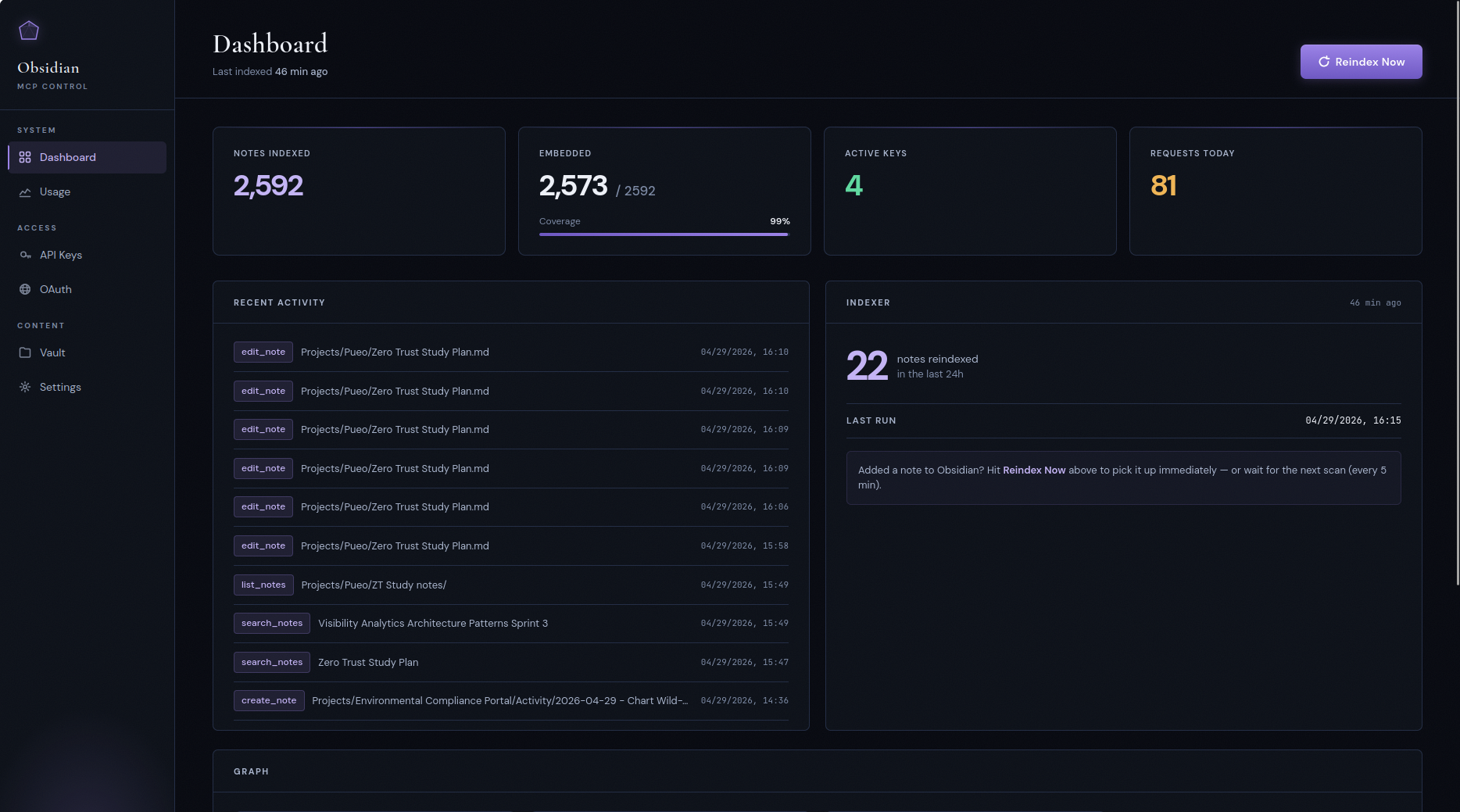
The server ships with a built-in admin UI for the parts of operations that are easier to look at than to query: minting keys, watching the indexer, eyeballing tool-call traffic, and resetting embeddings when you switch providers.
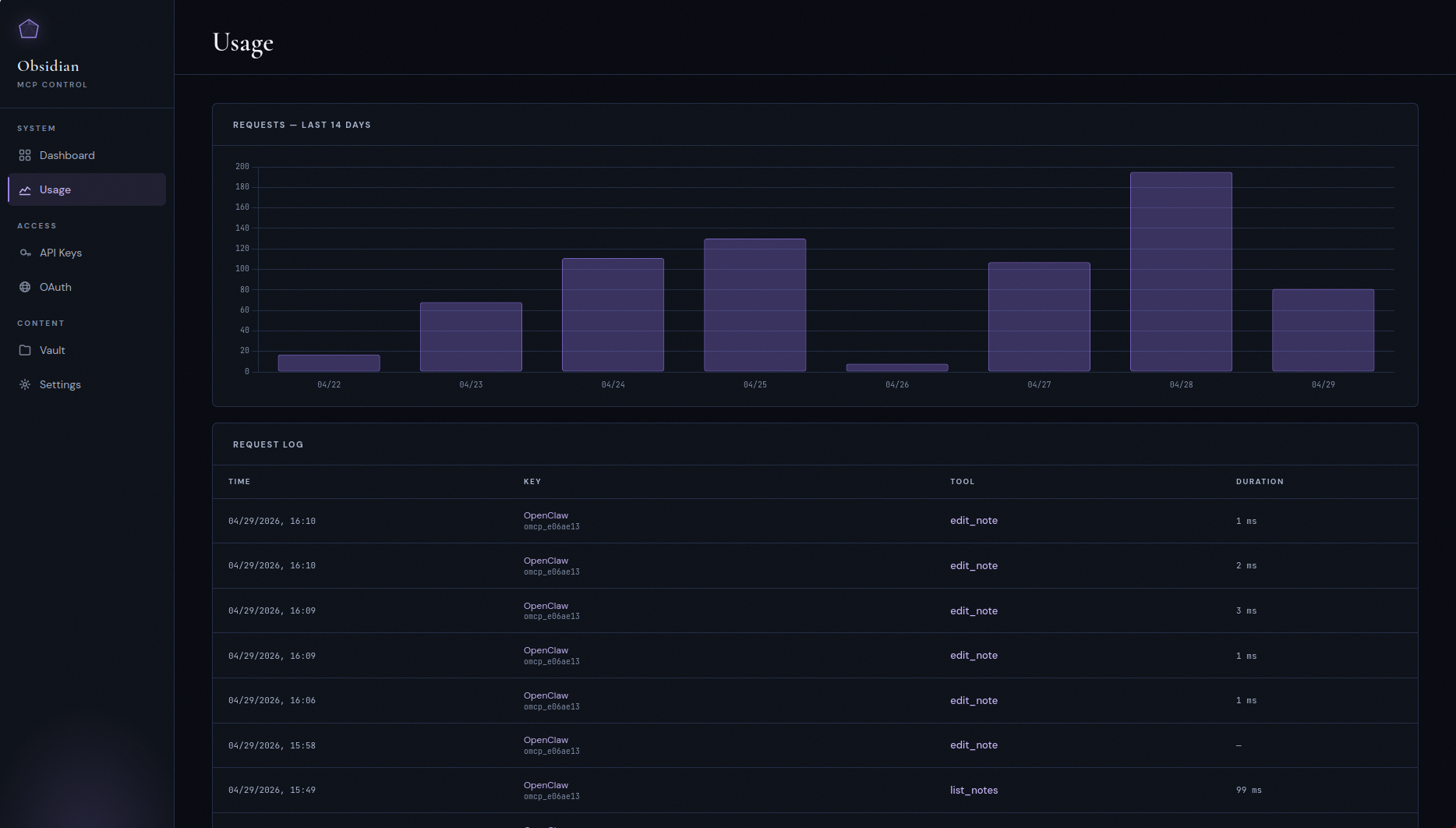
Usage
Per-tool-call audit log with a 14-day request histogram. Every MCP call is recorded with the calling key, tool name, duration, and response size — useful for noticing a misbehaving agent burning tokens on something it shouldn't.
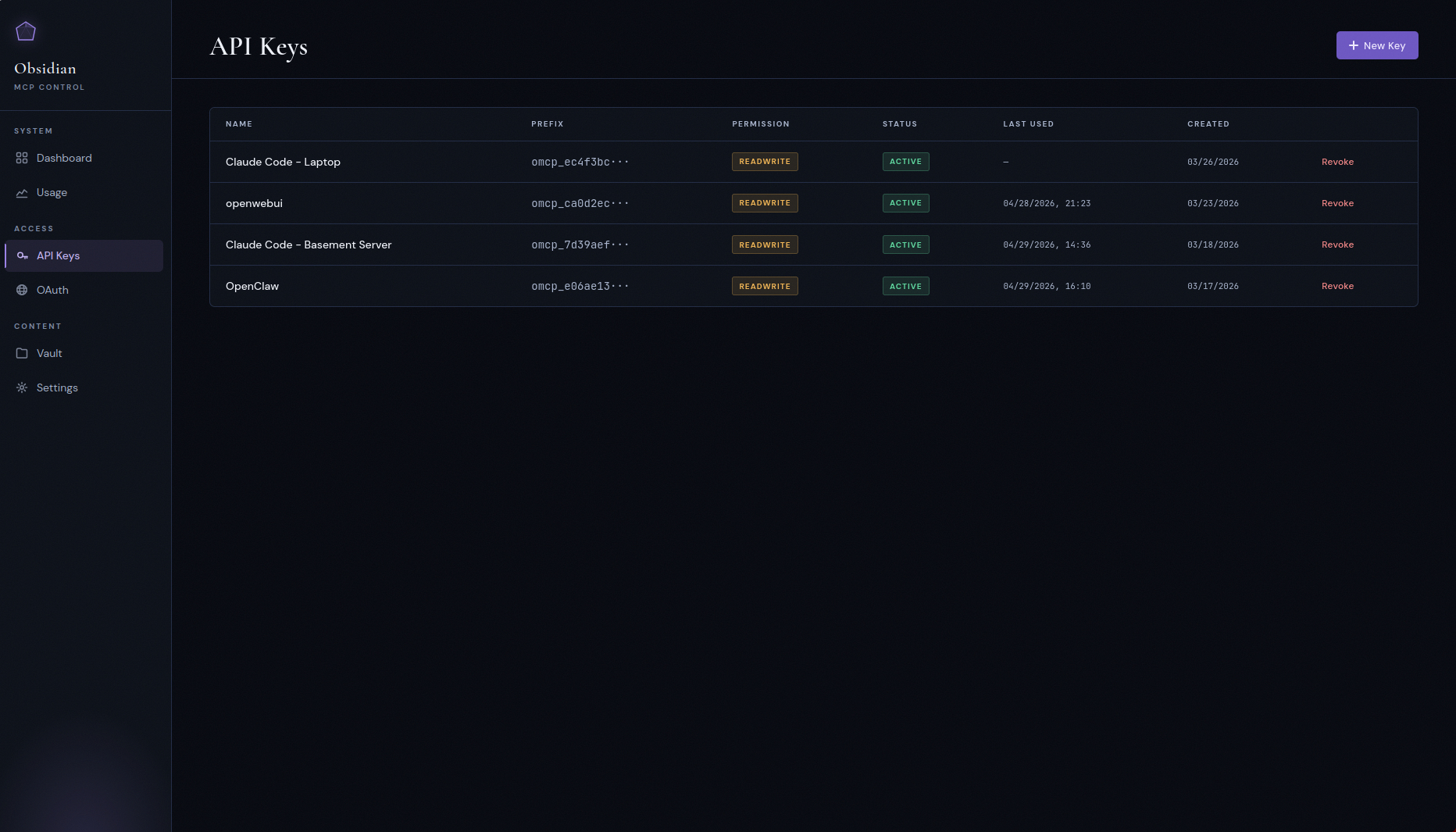
API keys and OAuth clients
Bearer keys with read / readwrite scopes for API clients, and a
separate OAuth 2.0 PKCE flow for clients like ChatGPT, Claude Desktop,
and claude.ai that expect a proper authorization-code dance. The OAuth
server supports public (none) and confidential (client_secret_post)
token-endpoint authentication plus refresh tokens.
Clients identify themselves in one of two ways:
- A Client ID Metadata Document (CIMD, the MCP 2026-07-28 default). The
client's
client_idis anhttpsURL to a JSON document it publishes, and the server fetches it through the same hardened, SSRF-guarded client asimport_from_url. Claude (claude.ai, Desktop, mobile), Claude Code and ChatGPT use this whenever the server advertises it, which it does by default. Claude Code's loopback callback (http://localhost:<any port>/callback) works this way. - Dynamic Client Registration (
/register, RFC 7591, deprecated by MCP but kept) remains the fallback for any client that sends no URL.
The consent page names a CIMD client by the host its document was fetched
from, never by the name the document gives itself. Every authorization
response carries the RFC 9207 iss parameter.
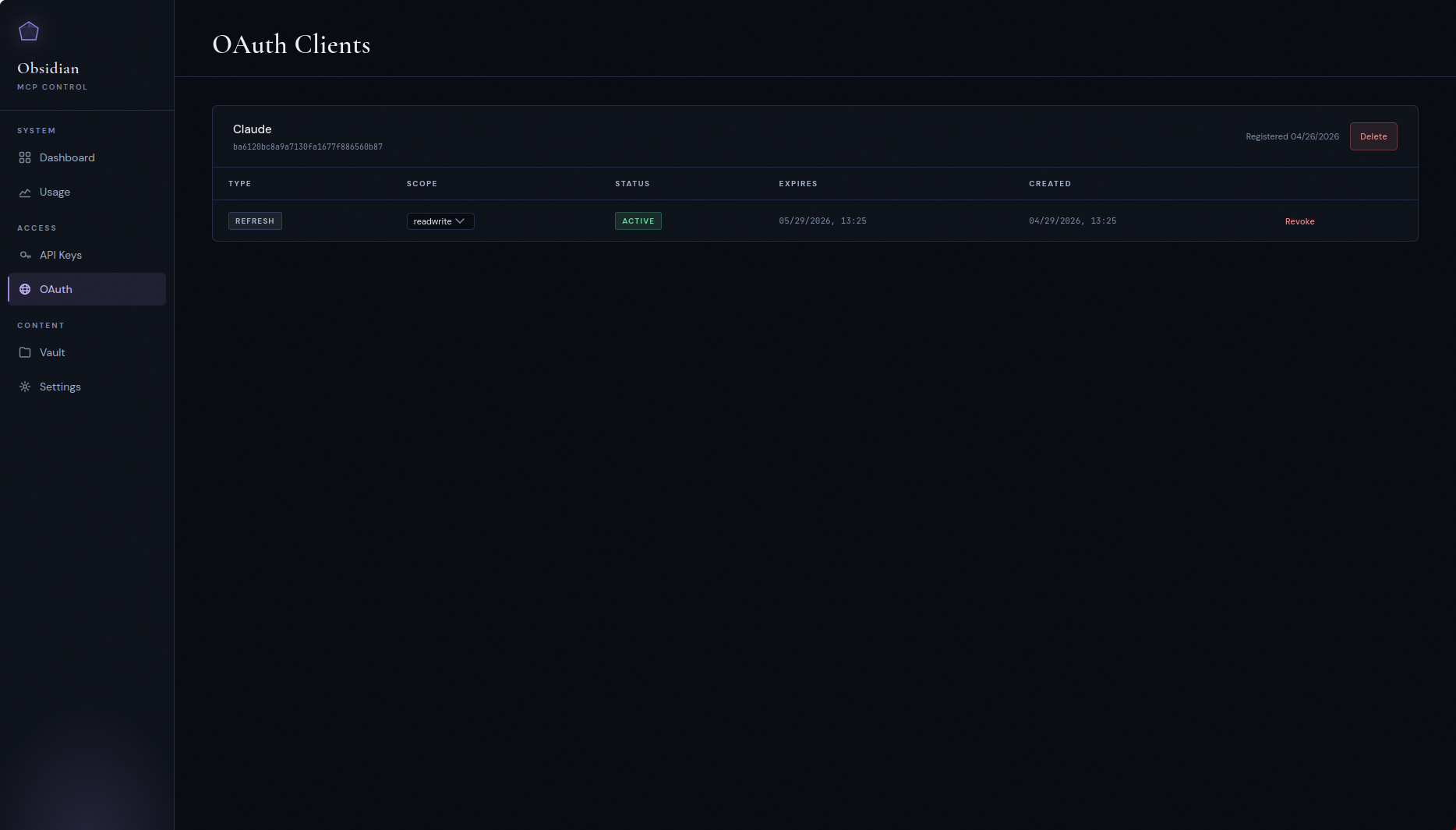
Each client's page lists its grants — one row per /authorize approval,
not per token — with a Revoke control and a permission select per grant,
so revoking really ends the session instead of leaving a refresh token
to mint a replacement. Revoked and expired rows stay listed, dimmed, for
a week.
Vault browser
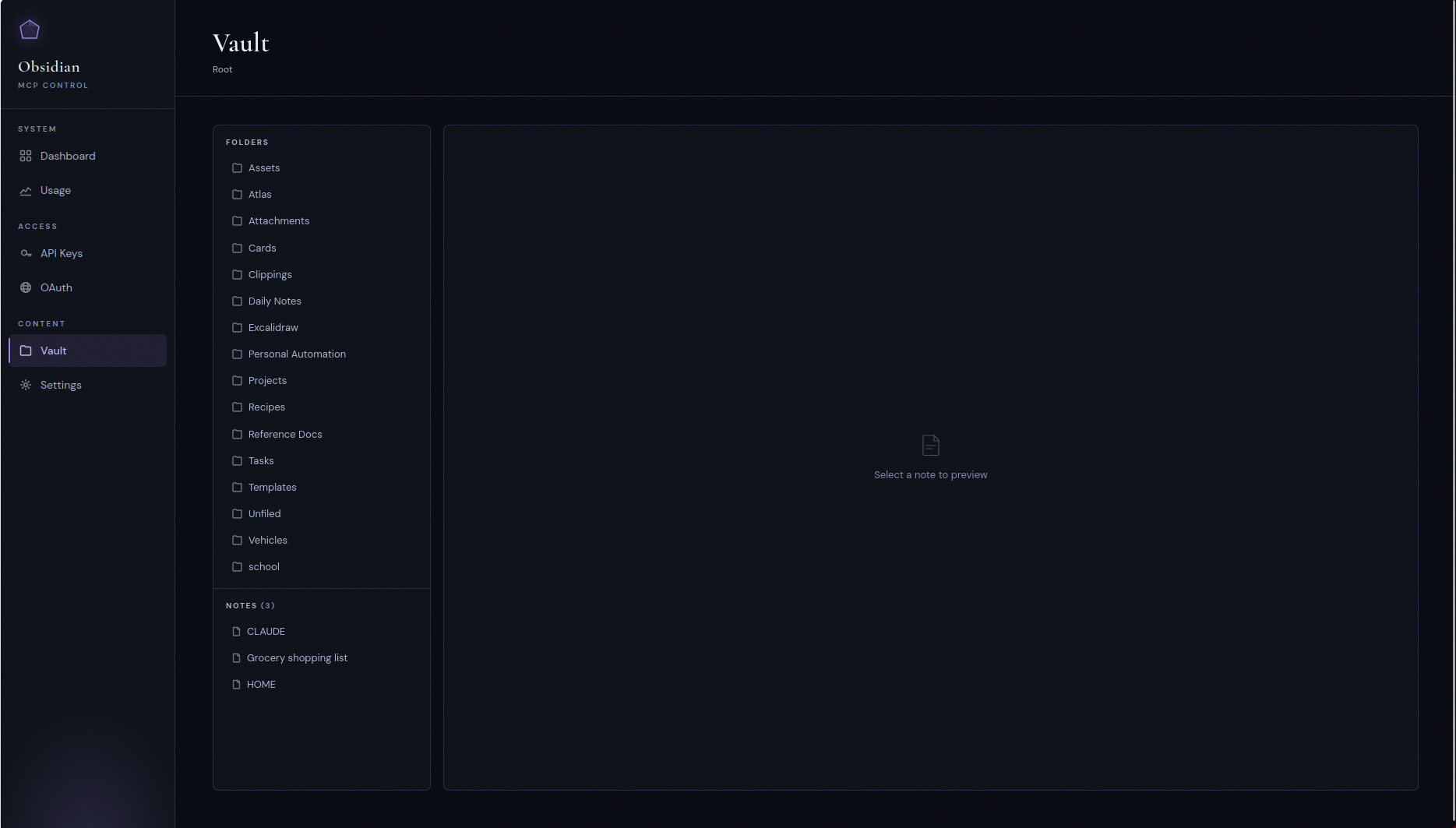
A read-only file tree of the mounted vault, mostly for sanity-checking that the container sees what you think it sees.
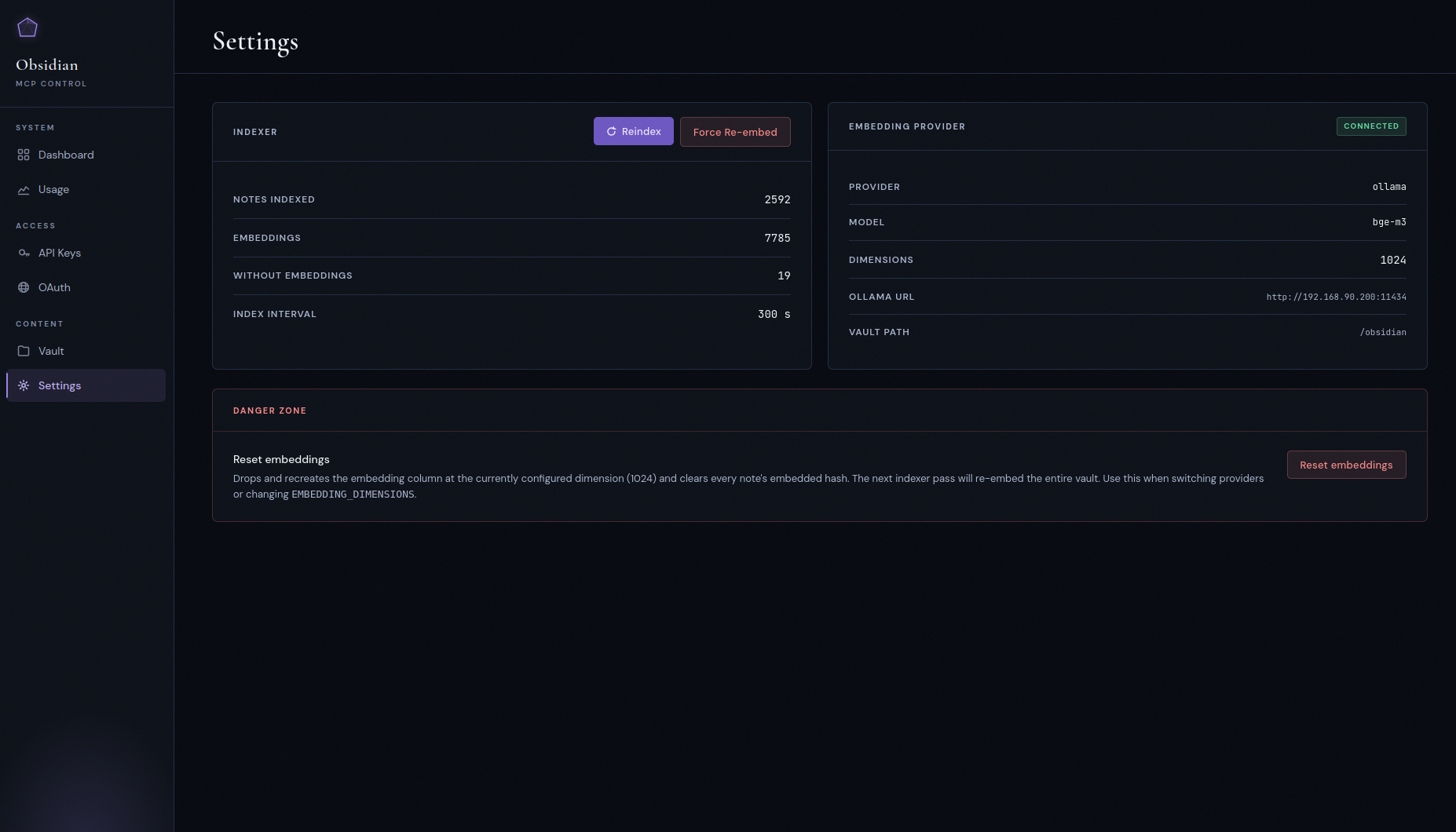
Settings
Indexer status, current embedding provider and model, vault path, and the danger zone: Reset embeddings (drops and recreates the embeddings column at the configured dimension — use it when switching providers) and Force re-embed (keeps the column, clears every note's embedded-content hash so the next pass re-embeds the vault). Both pause the indexer while they run.
The dashboard separates two things that used to be conflated: Last
run is the indexer's own heartbeat — the last pass that completed,
whether or not anything had changed — and Last change detected is
the newest indexed_at on any note. A quiet vault makes the second one
old while the indexer is perfectly healthy.
Quick start
Deploying on a VPS from scratch? See
DEPLOYMENT.mdfor the full walkthrough: Postgres setup, Caddy and TLS, vault sync via Nextcloud, and the gotchas that bite first-time deploys. Running Kubernetes? Seedocs/deployment-kubernetes.mdand the kustomize manifests indeploy/kubernetes/.
The bundled Caddy configuration fails closed on /admin, /api, and
/authorize; replace its placeholder basic-auth hash before starting it.
Prerequisites
- Docker and Docker Compose
- A PostgreSQL 16 instance reachable from the container, with
pgvector0.8.0 or newer installed - Either an Ollama instance running an embedding model (
bge-m3, the default, orqwen3-embedding:0.6b, which the reference deployment runs; see Embedding model choice), or an OpenAI API key. Anything that speaks the OpenAI embeddings protocol works (Azure OpenAI, OpenRouter, Together, etc.). - Linux, kernel 5.6 or newer (see below)
System requirements
The server checks these at startup and tells you which one failed rather than misbehaving later.
Linux kernel ≥ 5.6. Every directory below the vault root is opened
with a single openat2(RESOLVE_BENEATH | RESOLVE_NO_SYMLINKS | RESOLVE_NO_MAGICLINKS), which is what makes the kernel — not the
application — prove that a write stayed inside the vault. There is no
fallback: on an older kernel, or under a container seccomp profile that
blocks openat2, the server logs the reason and exits non-zero.
Kernel ≥ 5.8 for file transfer. statx()'s STATX_MNT_ID is how a
publication refuses a destination that sits on a different mount than
the staging directory (a nested bind mount under the vault root would
otherwise fail only after a whole upload body had streamed). Below 5.8
the server logs one warning and starts: request_upload,
import_from_url and PUT /transfer/upload refuse, and everything else
— reads, note writes, search, downloads, the panel, OAuth — is
unaffected. /health reports it as transfer_mount_check_available.
pgvector ≥ 0.8.0. Filtered semantic search needs
hnsw.iterative_scan, which landed in 0.8.0. An older extension accepts
the setting as an unknown placeholder and silently runs a plan that
drops post-filter candidates — silently worse search results — so the
server exits instead. Fix with ALTER EXTENSION vector UPDATE or a
newer database image.
Filesystem. Case-sensitive and non-normalising (ext4, xfs, and the
usual bind mounts). It must support hard links within the vault root and
renameat2(RENAME_NOREPLACE); without those, note creation, move_note
and the soft delete refuse with a named error rather than degrading to a
publish that can clobber. O_TMPFILE is wanted but optional: where it
is unavailable, set VAULT_ALLOW_NAMED_STAGING_FALLBACK=true to accept
named staging instead (see Configuration). macOS and
Windows hosts are out of scope; run the container on a Linux VM.
1. Clone, configure, point at your vault
git clone https://github.com/maxkuminov/obsidian-mcp.git
cd obsidian-mcp
cp .env.example .env
$EDITOR .env
Using a bundled stack (docker-compose.simple.yml or
docker-compose.proxy.yml)? It runs PostgreSQL with two identities: set
OBSIDIAN_DB_PASSWORD in .env (the app's non-superuser role, from
which the compose file builds DATABASE_URL) and copy
postgres.env.example to postgres.env with its own
POSTGRES_PASSWORD (the database superuser, which only the postgres
container sees). make init generates both. See
DEPLOYMENT.md.
In docker-compose.yml, point the /obsidian volume at your vault:
volumes:
  - /path/to/your/vault:/obsidian
2. Pick an embedding backend
Option A, OpenAI (zero local infra):
EMBEDDING_PROVIDER=openai
OPENAI_API_KEY=sk-...
EMBEDDING_DIMENSIONS=1024
OPENAI_EMBEDDING_MODEL=text-embedding-3-small
The server validates OPENAI_API_KEY at startup and refuses to boot
if it's missing.
Option B, Ollama (self-hosted, GPU recommended):
EMBEDDING_PROVIDER=ollama
OLLAMA_URL=http://your-ollama-host:11434
EMBEDDING_ALLOW_PLAINTEXT=true
EMBEDDING_MODEL=bge-m3
EMBEDDING_DIMENSIONS=1024
This is the default. Omitting EMBEDDING_PROVIDER falls back to
Ollama. On a new install, consider qwen3-embedding:0.6b (also 1024
dimensions) with a query instruction, which is what the reference
deployment runs; read Embedding model choice
before the first index pass, because changing the model later means a
full re-embed.
The embedding URL must be https, or http to a loopback host
(localhost, 127.x, ::1). Plaintext http to any other host —
another container such as http://ollama:11434 included — refuses to
start unless EMBEDDING_ALLOW_PLAINTEXT=true acknowledges that chunks
and queries cross that hop unencrypted. .env.example ships with it
set for that reason; drop it once the endpoint is https (use
EMBEDDING_CA_FILE for an internal CA). Inside a container, localhost
is the container itself, so an Ollama on the Docker host still needs
the override.
3. Deploy
make init       # data dirs and .env from template (skip if you've already edited)
make db-init    # create database, user, and pgvector extension
make deploy     # build, push to local registry, run migrations, recreate container
The first deploy backfills the index, the wikilink graph, and the
embeddings. For a 2 to 3k-note vault on Ollama with a GPU this takes
a few minutes. On text-embedding-3-small it's seconds.
Prebuilt images are public at ghcr.io/maxkuminov/obsidian-mcp
(:v<release> per release tag, :main for the tip), built and scanned
by CI; a release tag is the image CI proved for that commit, retagged,
never rebuilt. docker pull ghcr.io/maxkuminov/obsidian-mcp:v<release>
needs no token. Or build locally as above.
4. Connect a client
Mint an API key in the control panel, then point your MCP client at:
URL:  https://obsidian-mcp.<your-domain>/mcp
Auth: Bearer omcp_...
For Claude Desktop, add to claude_desktop_config.json:
{
  "mcpServers": {
    "obsidian": {
      "url": "https://obsidian-mcp.<your-domain>/mcp",
      "headers": { "Authorization": "Bearer omcp_..." }
    }
  }
}
For Claude Code:
claude mcp add obsidian --transport http \
  --url "https://obsidian-mcp.<your-domain>/mcp" \
  --header "Authorization: Bearer omcp_..."
The first thing any agent should do in a new session is call
get_vault_guide(). That's how it learns your folder structure,
naming conventions, and YAML schema before it writes anything.
Versioning and compatibility
From 1.0 the version number is a promise about the MCP tool contract:
the 28 tools' names, their argument schemas, the shape of their result
lines, and the MCP-REFUSAL codes. An agent written against 1.0 keeps
working against every 1.x.
- The wire form is pinned.
tests/fixtures/tools_list_full_v1.jsonis the completetools/listresult an API key or areadwriteOAuth grant sees (every field of all 28 tools), andtests/fixtures/tools_list_readonly_oauth.jsonpins the 19 names a read-only OAuth grant lists. CI fails on any drift; a deliberate change regenerates the fixture and says so in its spec. Result line shapes are specified inopenspec/specs/and pinned by each tool's tests, not by one fixture. - Refusal codes are a closed set. Every code an
MCP-REFUSALline can carry is declared insrc/services/refusals.py(CODES), and a refusal with any other code cannot be constructed. That module is the catalogue; there is no separate list. The transport 429s (failed authentication, transfer redemption,body_memory) are outside that line by design. - Within 1.x, additions only: new tools, new optional arguments whose default leaves the old result byte-identical, new header tokens or trailing fields, new refusal codes. Never a rename, a removal, a changed default that alters an existing result, or a changed meaning of an existing field or code. A change of that kind is 2.0, announced one minor release earlier in the release notes. Unknown arguments are refused, so a client that sends a newer argument to an older server gets a refusal, not a silently ignored filter.
- Settings. A new setting ships with a default that keeps the previous
behaviour. Every setting change is in the release's upgrade notes, in
the Configuration table and in
.env.example. - Schema. Every release names its migrations and says whether they
refuse startup or need a rebuild or re-embed, and
DEPLOYMENT.mddocuments each one's downgrade (it does so for every migration from 033 on).
Not part of the contract: the control panel and its /api/* endpoints,
log fields, the search-evaluation harness (scripts/search_eval/), the
internal MCP SDK version, and ranking quality. Which notes come back, and
in what order, moves with the index, the embedding model and the
reranker; the harness measures it
(docs/architecture/search.md).
MCP_SANDBOX_MODE, the registry-evaluation switch, is outside the promise
too.
Upgrading
Pull, then make deploy (or rebuild your compose stack); migrations
run on start.
Across the reranker-documents release (#402):
- No migration, nothing re-derived or re-embedded.
rerank=truenow sends each candidate note's embedding input (title, heading path, tags, then the chunk) for its cosine-best chunk and up to three more of its already-fetched chunks, at mostRERANK_MAX_DOCUMENTSper call (new, default 100, 50–200;50restores the previous count); a note scores the best of its documents.rerank=falseis byte-identical. The usage row gainsrerank_documents. RERANK_TIMEOUT_MSaccepts 100–30000; the default stays 1,500. Size it with the document budget:RERANK_TIMEOUT_MS ≥ RERANK_MAX_DOCUMENTS × average characters × per-character cost, doubled when the GPU is shared with the embedding model. The reference deployment runs20000(DEPLOYMENT.md, "Reranker (optional)"). UnderMCP_CONCURRENCY_MODEqueueorenforce, keep it at or belowMCP_CONCURRENCY_WAIT_SECONDS × 1000unlessmake concurrency-reportpasses withrerank=truetraffic.- Rollback is a redeploy of the previous image. Set
RERANK_TIMEOUT_MSto 10000 or less first: the previous image's range ends there and refuses to start above it.
Across the Client ID Metadata Documents release (migration 036, #357):
- Migration 036 adds one nullable column and one CHECK to
oauth_clients, with no backfill, and takes seconds. Its downgrade refuses while CIMD clients exist (delete them in the panel first). - Connectors switch to CIMD on their next connection. Existing DCR
grants keep working. claude.ai, Claude Code and ChatGPT stop calling
/register.OAUTH_CIMD_ENABLED=falseis the rollback lever. - Every authorization redirect now carries
iss(RFC 9207). A client that compares it does so against the metadataissuer, which is unchanged. resource(RFC 8707) is logged, not enforced. Each/authorizeand/tokenrequest is classified (resource_class) in the security log. Refusing a foreignresourceis a later change, gated on 14 days of these logs (DEPLOYMENT.md).- The consent page's CSP gains
form-action http://localhost:* http://127.0.0.1:*for native loopback callbacks.
Across the scoped tools/list release (#358):
- No migration and no setting. An OAuth grant without
readwritenow lists 19 tools: the nine write-required tools (create_note,edit_note,move_note,delete_note,set_frontmatter,write_file,delete_file,import_from_url,request_upload) are left out. API keys of either permission andreadwritegrants still list all 28, byte-identical to before. A read-only client that cached the 28 and calls a hidden tool getspermission_denied, as before. - No
list_changedis sent. After a grant's scope is changed in the panel, the connector sees the new list when it reconnects. - One refusal changes for read-only callers. The refusals
write_file/delete_filemade before their permission check (a malformedexpected_hash,no_incumbentforwrite_file(overwrite=false)) are nowpermission_denied; areadwritecaller's refusals are unchanged.
Across the keyword-tags release (migration 035, #391):
- Tags become searchable at once. Migration 035 adds each note's tags
to its keyword vector in place, in SQL, under the index generation lock
(tens of seconds on a few thousand notes); nothing is re-embedded or
re-derived and no setting is new.
make deploystops the app before the migration; on a hand-driven compose stack: stop →alembic upgrade head→ start. - Run the read-only check first. 035 aborts with nothing written if a
tagged vector would cross PostgreSQL's 1 MiB tsvector limit; under
Kubernetes
Recreatethat is downtime until the digest is reverted. DEPLOYMENT.md, "Upgrading across migration 035" has the statement to run against the live database before merging and the remedy. - Rollback:
alembic downgrade 034with the new image strips the tags part, then deploy the previous image.
Across the chunk-minimum release (CHUNKING_VERSION 2, #390):
- No migration and no new setting, but a second gradual re-embed. Chunks shorter than 200 characters are no longer stored (a short section is grouped with its neighbours), windows are cut at a line or word start, and long whitespace runs are sent collapsed. Startup does not refuse; every note is selected again in the background under the per-tenant embed budgets.
- Until your notes drain, the
index_transition: N notes not yet re-chunked; …line returns onsemantic_search,find_relatedandhybrid_search, and/healthreadsindexer.rechunk: "in_progress", then"complete". A section that did not change keeps its vector; each pass logsEmbedding complete: N notes, X chunks (S submitted, R reused). - Rollback is a redeploy of the previous image, which re-embeds every note stamped 2 in full (DEPLOYMENT.md).
Across the search-confidence release (#389):
- No migration. Every
semantic_searchandhybrid_searchpage gains one header token:— confidence: ok(at the default threshold 0 that is the only byte that changes). A parser that matched the old header exactly needs to allow it. Usage rows gainconfidence,top_similarityand (hybrid)keyword_all. One optional setting,SEARCH_LOW_CONFIDENCE_SIMILARITY(default 0 = off); leave it at 0 until the calibration recipe inDEPLOYMENT.mdpasses for both tools. - The search-eval harness reports recall@20 and recall@50, runs at
--depth50 by default and writesreport.jsonschema_version2; arunfile:baseline staged at depth 20 scores a null recall@50, so re-run it for a delta. It gains aconfidencesubcommand. - Rollback is a redeploy of the previous image; the new usage keys stay and are ignored.
Across the reranker release (#367):
- No migration, nothing re-derived or re-embedded.
semantic_searchandhybrid_searchgain an optionalrerankargument (default false, output unchanged), and four optional settings (RERANK_URL,RERANK_MODEL,RERANK_TIMEOUT_MS,RERANK_ALLOW_PLAINTEXT). Nothing changes until you setRERANK_URL. The concurrency class mapping is unchanged, so readiness evidence carries over. A reference setup is in Reranker reference setup. - Rollback is a redeploy of the previous image. A client that keeps
sending
rerankis then refused by the unknown-argument rule, which is the normal cost of rolling back a new argument.
Across the hybrid-search release (#354):
- No migration, nothing re-derived or re-embedded. A new tool,
hybrid_search, and one optional setting,HYBRID_RRF_K(default 60). - A new concurrency-readiness epoch.
hybrid_searchshares theembeddingclass withsemantic_search, soCLASS_MAPPING_VERSIONmoves to 5 andmake concurrency-reportevidence gathered before the upgrade does not carry over. - Rollback is a redeploy of the previous image; the tool's usage rows stay and are ignored.
Across the change-feed release (migration 033, #351):
- One migration, no re-derive. 033 adds
notes_metadata.content_changed_at(backfilled from each note's modification time) and three change-feed tables. Nothing is re-parsed or re-embedded. The feed starts with the first pass after the upgrade; nothing before 033 has events. - The feed tables are durable.
make db-backupand the Kubernetes backup Job dump their rows (history, cursors and retention watermarks cannot be rebuilt from the vault). A restore rolls the feed back to the dump, so a cursor taken after it is refused and the agent restarts from a date. - A new concurrency-readiness epoch.
get_changesjoins thescanclass, soCLASS_MAPPING_VERSIONmoves to 4 andmake concurrency-reportevidence gathered before the upgrade does not carry over. - Four new settings, all with working defaults:
CHANGE_FEED_RETENTION_DAYS,CHANGE_FEED_MAX_EVENTS_PER_SCOPE,CHANGE_FEED_MAX_EVENTS_PER_PASS,CHANGE_FEED_LOCK_TIMEOUT_MS(see Configuration). - Rollback: the previous image neither reads nor writes any of these
objects;
alembic downgrade 032drops them and loses only the feed's history.
Across the task-listing release (migration 032, #350):
- One full re-derive pass after the upgrade, and no re-embedding.
The extraction version moves to 4, so the first pass re-parses every
note once and stores its checkbox tasks for the new
list_taskstool — the same cost as the earlier extraction-version bumps. Version 4 shares version 3's embedding cleaner, so nothing is re-embedded and no provider call is made. Until that pass finishes,list_tasksreports the notes it has not scanned yet in its header, andmove_note(rewrite_links=True)refuses withindex_not_readyas it does after every bump. - A new concurrency-readiness epoch.
list_tasksjoins thescanclass, soCLASS_MAPPING_VERSIONmoves to 3 andmake concurrency-reportevidence gathered before the upgrade does not carry over. - Rollback is roll-forward. A bare redeploy of the previous image
re-extracts every note once, and because it has no version-4 cleaner it
also clears every note's embedding certification; the embed pass then
re-chunks every note and reuses every stored vector (no provider calls),
with
semantic_searchmarking those notes stale until it catches up. Rolling forward again is one more re-derive pass. - No new setting.
Read this first when upgrading across the keyword-ranking release (migration 031, #344):
- Keyword ranking changes at once; snippets need one rebuild.
Migration 031 rewrites every keyword vector in place so titles and
aliases rank above bodies — no operator step, and
make deploynow stops the app before a pending migration and recreates it after (on a hand-driven compose stack: stop →alembic upgrade head→ start; Kubernetes alreadyRecreates). Snippets come from an excerpt that only a write stores, so notes indexed before 031 show no snippet (the header counts them and startup logs the count) until they are edited or you runmake rebuild-tsvectorsonce (on Kubernetes,deploy/kubernetes/base/rebuild-tsvectors-job.example.yamlwith the app scaled to zero). No embeddings are touched, no API calls are made. - New optional settings:
RANK_WEIGHTS,KEYWORD_EXCERPT_CHARS,KEYWORD_SNIPPET_ROWS. See Configuration.
And across the internal-transport and panel-CSP release:
- Breaking: the server refuses to run as a PostgreSQL superuser
(#324). A Compose install created from
docker-compose.simple.ymlordocker-compose.proxy.ymlbefore this release connects as the cluster superuser and must run the one-time conversion in DEPLOYMENT.md, "Upgrading: split database roles" (a backup, a newpostgres.env,OBSIDIAN_DB_PASSWORDin.env, one script); the new compose files will not serve on an unconverted volume. Any other deployment whoseDATABASE_URLnames a superuser is refused at startup with a message; switch it to a non-superuser owner of the database, or setDATABASE_ALLOW_SUPERUSER=trueas a stop-gap. The Kubernetes bundle is unaffected. ADATABASE_URLpassword ofchangeme/CHANGE_MEis now refused, and the built-in default URL carries no password. - Breaking: plaintext embedding endpoints must be acknowledged. If
the active embedding URL (
OLLAMA_URL, orOPENAI_BASE_URLwith the OpenAI provider) ishttp://to a non-loopback host — thehttp://ollama:11434default included — addEMBEDDING_ALLOW_PLAINTEXT=trueto.envbefore deploying, or the server refuses to start with a message naming the setting. - Database TLS has one source. A TLS parameter in
DATABASE_URL(?ssl=…,?sslmode=…) or anyPGSSL*environment variable is refused at startup; move it toDATABASE_SSL_MODE. The default,prefer, is the behaviour you had before. - Embedding clients ignore the environment's network settings.
HTTP(S)_PROXY,SSL_CERT_FILE/SSL_CERT_DIRand.netrcno longer apply to the embedding hop. UseEMBEDDING_CA_FILEfor an internal CA. - The panel now sends a nonce-based Content-Security-Policy
(
PANEL_CSP=enforce), and htmx is gone from it. If a panel control misbehaves, setPANEL_CSP=report-only(oroff) and recreate the container; no rebuild. - New optional settings:
DATABASE_SSL_MODE,DATABASE_SSL_CA_FILE,DATABASE_SSL_CERT_FILE,DATABASE_SSL_KEY_FILE,EMBEDDING_ALLOW_PLAINTEXT,EMBEDDING_CA_FILE,PANEL_CSP. See Configuration, andDEPLOYMENT.mdfor moving both hops to verified TLS.
Cost expectations
If you go the OpenAI route (the realistic path on a CPU-only VPS), the first-index spend is small and the steady state is nearly free. Rough numbers assuming an average note around 1,500 tokens (three 512-token chunks), at OpenAI's published rate at time of writing:
| Model | $/1M tokens | 1k notes | 10k notes | 100k notes |
|---|---|---|---|---|
text-embedding-3-small |
$0.02 | ~$0.05 | ~$0.50 | ~$5.00 |
text-embedding-3-large |
$0.13 | ~$0.30 | ~$3.00 | ~$30.00 |
After the first index, only changed notes are re-embedded. Ongoing cost is proportional to edits — pennies a month for a typical vault.
If you self-host Ollama with a GPU, embedding cost is whatever your power bill is. Ollama on CPU works but is too slow to be usable on a vault of more than a few hundred notes.
The self-describing vault
This is the part most "MCP for Obsidian" projects miss. They stop at read, write, and list. The interesting question isn't "can the agent reach the files," it's "does the agent know the rules?"
If you have an opinionated vault — task placement logic, folder conventions, required frontmatter, tag taxonomy — an agent with write access can do real damage without that context. Tasks land in the wrong folder. Bare-date filenames collide with templates. Wrong tags break Dataview queries. The data layer works fine; the context layer is where the failures show up.
The fix is small. Keep a machine-readable instruction file
(CLAUDE.md at the vault root) that describes the system's own rules.
Expose it as a dedicated tool. Every connecting agent calls it once at
the start of a session and immediately knows how the vault works.
Update the file, every agent sees the change on the next call. No
client-side config. No system-prompt injection. The vault is
authoritative about its own rules.
get_vault_guide() does exactly this. It returns a generic Obsidian
primer (wikilink syntax, embed syntax, tag conventions, common plugin
literals) plus the vault's CLAUDE.md live. The write-tool
descriptions and the server's instructions both point at it — as a
description of where the vault's conventions live, not as an order —
so the agent gets pulled into the right behavior even without
prompting.
Multi-user mode
Single-user mode is the default and works exactly as described above — one vault, one set of API keys, no in-app user concept. Multi-user mode is an opt-in flag that turns the same container into a small multi-tenant deployment: in-app username/password login, per-user vault scoping, an admin role for troubleshooting, and a regular-user role that sees only its own keys/OAuth clients/usage. One container, one Postgres, strict isolation between users.
Enable it on an existing deployment with no data loss — your current vault and keys carry over to the bootstrap admin.
Enabling
- Set
MULTI_USER_MODE=trueand a strongSECRET_KEYin.env(openssl rand -hex 32is fine). The app refuses to start with a placeholderSECRET_KEYunconditionally — single-user mode included — so this is not something the flag turns on. make deploy(ordocker compose up -d --force-recreate).- Visit the panel. Because the
userstable is empty, you're routed to/admin/register— the one-time bootstrap form. It's still behind Traefik'schain-oauth@filemiddleware, so only people Traefik already trusts can claim admin. - Register with a chosen username and password. The bootstrap form
pre-fills
vault_pathwith whateverVAULT_PATHwas set to, so your existing notes immediately belong to this new admin. No re-index, no re-embed, no data loss — every previously indexed note, API key, OAuth client, and usage log row gets backfilled to the bootstrap user in a single transaction.
Inviting users
-
Edit
docker-compose.ymlto add a volume mount for the new user's vault under/vaults/<username>. Host paths with spaces must be quoted as a single YAML string:volumes: - "/storage/vaults/alice:/vaults/alice" - "/storage/shared/bob/Obsidian:/vaults/bob"
make deployto apply. -
In the panel,
/admin/users/create— pick a username and set an initial password. -
/admin/users/{id}/edit— set the user'svault_pathto the container path you just mounted (e.g./vaults/bob). The form shows a dropdown of unassigned/vaults/*directories that exist on disk. -
Share the credentials out-of-band. The user logs in at
/admin/auth/login, gets their own keys/OAuth/usage views, and cannot see other users' notes.
What admins see
Admins see API keys, OAuth clients, and usage logs for all users; they
own the Settings page (embedding provider, indexer trigger, danger
zone) and the Users page. Admins do not browse other users' vault
contents through the panel — that's intentional. Troubleshooting
another user's vault means either inspecting it via docker exec or
temporarily reassigning their vault_path, not UI snooping.
Rolling back
Set MULTI_USER_MODE=false, restart. Existing API keys keep working
(per-user filters skip when no user context is set), the login UI and
session cookies disappear, and the panel falls back to its
Traefik-OAuth-only mode. The schema stays in place, so flipping back
to multi-user later resumes where you left off without re-bootstrapping
(the users table is non-empty, so /admin/register is closed).
Constraints and known limits
- The indexer iterates active users sequentially each cycle. Fine for tens of users; hundreds would need parallelization.
- Password recovery is admin-driven — there's no email-based reset. A
signed-in user can rotate their own password at
/admin/account(current password, new password, confirmation; minimum 12 characters), which signs their other browsers out and keeps the one they changed it from signed in. The admin reset stays the recovery path for somebody who cannot sign in at all, and it also ends every live session of the account it resets. /admin/auth/loginand/admin/account/passwordare rate-limited at 5 requests per minute; the login limit is keyed on the client address, and the password change carries two independent limits — one per account, one per address. The limiter's storage is in-memory and per-process, so counters reset on restart. The Traefik OAuth gate in front of the panel is still the main brute-force defense; if you expose/admin/auth/loginto the open internet, put a rate-limit middleware in front of it as well.- Panel sessions are server-side rows (
user_sessions), so logging out, changing a password, a deactivation or a delete really ends them. The trade-off: the first deploy of the build that introduced the registry signs every live panel session out once, because a cookie issued before it carries no session id and is refused rather than grandfathered. Everyone signs in again; nothing else changes. - The
vault_pathvalidator does not resolve symlinks, so an admin can technically point a user at host files via a symlinked/vaults/<name>. Treat/vaults/as an admin-trust boundary. What is checked, since the vault-root overlap guard: two active users' roots may not name overlapping directories. Each root is opened once and compared by inode identity —(st_dev, st_ino), which catches a symlink alias or a bind mount naming one directory twice — and by a component-wise containment test over the two canonical real paths in both directions, which catches an ancestor/descendant pair like/vaults/teamand/vaults/team/private. A conflicting assignment is refused in the panel naming the other user, and the same checks re-run before every index pass, so an alias created after the assignment quarantines both accounts: their MCP tools, index passes and transfer redemptions are refused until an administrator corrects it, and no index rows are deleted. A root that cannot be opened at all quarantines only its own account. What is still not detected, and the consequence: a bind mount that grafts one user's vault — or any mount nested inside it — to a path inside another user's root.mount --bind /vaults/b /vaults/a/innerleaves both root inodes distinct and both canonical paths outside each other, so neither check sees it, and user A can then read, overwrite and delete every note in user B's vault through the ordinary write tools, while A's index pass files B's notes under A's account so A's searches return B's content. The same gap covers an accessible alias of a root that could not be examined: that peer keeps serving. Neither condition is reported anywhere. Both require an administrator to write a bind mount into the deploy configuration — which is why/vaults/and the compose file's mounts are the admin-trust boundary, not just the path strings. This is a permanent, stated limit rather than a pending fix: mount detection was specified, failed on a new topology in each of three review rounds, and was dropped. The operator rule: never mount one user's directory, or anything nested in it, inside another user's root.
Configuration
Facts
- Kind
- MCP server
- Group
- Uncategorized
- Stars
- 20
- License
- MIT
- Language
- Python
- Last push
- 2026-11-01
- Forks
- 9
- MCP Registry
- io.github.maxkuminov/obsidian-mcp
Same name on this shelf 5
- 381Obsidian Mcp Servercyanheads/obsidian-mcp-serverRead, write, search, and surgically edit Obsidian vault notes, tags, and frontmatter via MCP. STDIO or Streamable HTTP.716
- 3315Obsidian MCP Servermarcelmarais/obsidian-mcp-server33
- 4404Obsidian MCP Serverpmmvr/obsidian-api-mcp-serverMCP server enabling AI agents to perform natural knowledge discovery and analysis across Obsidian vault21
- 4543Obsidian Mcp Serversmith-and-web/obsidian-mcp-server20
- 5377Obsidian MCP ServerMinhao-Zhang/obsidian-mcp-serverA MCP Server backend for Obsidian14


Next on this shelf
- 4620HA NOVAio.github.markusleben/ha-novaAsk about your Home Assistant and change it from an AI chat, with your OK for risky actions.20
- 4621NYC Budgetio.github.BetaNYC/nyc-budget-mcpNYC Council budget data: discretionary awards, capital designations, Schedule C, OMB capital20
- 4622什么值得做 Stringersio.github.komako-workshop/stringersDaily verdicts on which small-product directions are worth building, from 15 data libraries20
- 4623behaveio.github.emirmrkaljevic/behaveRecord how any CLI behaves and check that a rewrite behaves the same (golden tests).20
- 4624DiffuGen - Advanced Local Image Generator with MCP IntegrationCLOUDWERX-DEV/DiffuGenDiffuGen is a powerful yet user-friendly interface for local\edge image generation. Built on the Model Control Protocol (MCP), it provides a seamless way to interact with various Stable Diffusion models including Flux, SDXL, SD3, and SD1.5. Diffugen also features an OpenAPI Serve19
- 4625MCP Python StarterSamMorrowDrums/mcp-python-starterA starter MCP server in Python.19


