Maple
io.github.maple-kit/maple · 20 stars · TypeScript · Apache-2.0
MCP server Review comments pinned to a running frontend, read and resolved by your coding agent.
Install
The repo has no one-line install. Follow its README.
Published as
- npm
@maple-kit/mcpstdio
From the server's entry in the official MCP Registry.
Configuration
| Name | Set as | What it is |
|---|---|---|
GITHUB_TOKENOptional · Secret | Env var | A token that can read and write the repository's pull request comments. Required for the github store. |
MAPLE_GITHUB_OWNEROptional | Env var | The repository's owner. Required for the github store. |
MAPLE_GITHUB_REPOOptional | Env var | The repository. Required for the github store. |
MAPLE_STOREOptional | Env var | github, the default when a forge is configured, or file, the comments under .maple/ on this machine. |
Files
@maple-kit/mcp
The Model Context Protocol server that hands a coding agent the review comments Maple collected on a preview deployment.
Pre-release. Every package here is 0.x and makes no compatibility promise.
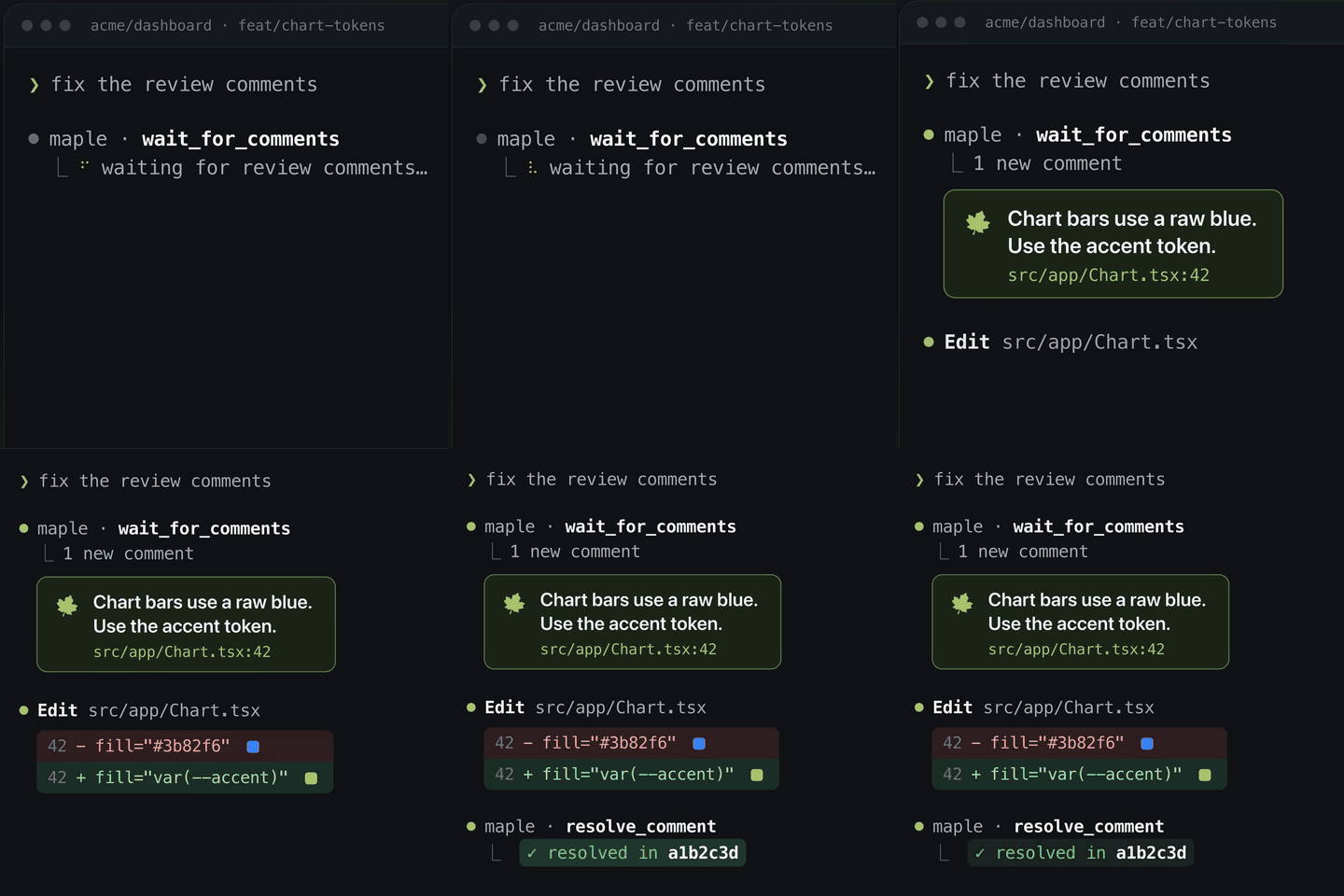
The agent waits for a comment, reads it with its context — file:line from
the tagger, the viewport, the screenshot, the mock it was written under — makes
the change, and resolves it against the commit that fixed it. The reviewer's
half is the overlay; the two meet in the store.
Install
npm install @maple-kit/mcp
Two binaries ship: maple-mcp, the server, and maple-stop-hook, which stops
an agent from calling itself finished while comments are still open.
Connect an agent
A client starts the server with no arguments, so it is configured through the
environment. In Claude Code's .mcp.json:
{
  "mcpServers": {
    "maple": {
      "command": "npx",
      "args": ["-y", "-p", "@maple-kit/mcp", "maple-mcp"],
      "env": { "MAPLE_GITHUB_OWNER": "acme", "MAPLE_GITHUB_REPO": "web" }
    }
  }
}
and run the client under op run --env-file so GITHUB_TOKEN never lands in a
file. A missing value fails at startup rather than on the first tool call.
| Name | Secret | What it is |
|---|---|---|
GITHUB_TOKEN |
Yes | A token that can read and write pull-request comments. Required for the github store. |
MAPLE_GITHUB_OWNER |
No | The repository's owner. Required for the github store. |
MAPLE_GITHUB_REPO |
No | The repository. Required for the github store. |
MAPLE_GITHUB_API |
No | The API root, for Enterprise Server. |
MAPLE_STORE |
No | github, the default when a forge is configured, or file, the default when none is: the comments under .maple/. |
MAPLE_BRANCH |
No | The branch the Stop hook checks, else the one checked out. The server ignores it. |
MAPLE_URL |
No | The deployed route's mount URL. A resolve asks it to republish the gate. |
MAPLE_GATE_TOKEN |
Yes | For CI only: the gate App's installation token. Not with MAPLE_URL. |
MAPLE_GATE_APP_ID |
No | The gate App's id, so it updates its own check run rather than another's. |
MAPLE_REQUIRE_APPROVAL |
No | true to hold the gate until somebody approves, matching the route and CI. |
With no forge
Set none of GITHUB_TOKEN, MAPLE_GITHUB_OWNER and MAPLE_GITHUB_REPO and the
server reads and writes the comments fileStore() keeps under .maple/ in its
working directory's repository, so the loop works on a laptop with no pull
request. MAPLE_STORE=file says so explicitly. It is a laptop's store, not a
preview pod's: docs/connectors.md has the argument. The Stop hook reads the
same folder for the branch checked out in the session's working directory, and
stays silent where there is no .maple/ folder, no comments for the branch or
no repository.
Tools
| Tool | Reads | What it does |
|---|---|---|
list_comments(branch, statuses?) |
✓ | Return the review comments on a branch, newest first. |
wait_for_comments(branch, cursor?, timeoutMs?) |
✓ | Block until a new comment arrives or the wait elapses. Returns status "timeout" rather than failing when nothing arrives. |
resolve_comment(id, sha, note?) |
Mark a comment resolved, recording the commit that addressed it. | |
get_comment_context(id, branch) |
✓ | Return everything needed to act on one comment: anchor, viewport, surrounding markup and any replay link. A comment written under a Maple Mock carries mock.recipe and mock.replay, a link to the page in that state. |
start_solo(previewUrl) |
Start a bridge on localhost and return the link that pairs a deployed preview with it. The reviewer opens the link in their browser and the comments they write there land in .maple/ for list_comments and wait_for_comments to read. They never count toward the merge gate. |
wait_for_comments is clamped to 55 seconds because every coding client cuts a
tool call off at 60, and it emits notifications/progress every 15 seconds. A
timeout is a result: an agent that treats one as an error stops looping the
first time nobody is looking. Its cursor is a timestamp; omit it on the first
call to drain whatever is already waiting.
The Stop hook
MCP gives a server no way to interrupt a client, so the loop is closed from the
other end. Claude Code's Stop hook runs when the agent believes it is
finished, and Maple's answers with the comments still open:
{
  "hooks": {
    "Stop": [
      { "hooks": [{ "type": "command", "command": "npx -y -p @maple-kit/mcp maple-stop-hook" }] }
    ]
  }
}
The Maple Claude Code plugin registers it for you. It blocks while a comment
is open or needs_reverify, at most eight stops in a row per session; on the
ninth it lets the session end and says what is still open, which beats an agent
resolving comments to escape. The count is kept per session_id in the system
temp directory, and a stop no block caused starts it again.
The hook does not see .mcp.json's env. That block is handed to the MCP
server alone; a hook runs in the client's own environment. So
MAPLE_GITHUB_OWNER, MAPLE_GITHUB_REPO and GITHUB_TOKEN have to be set
where the client itself starts — under the same op run --env-file — or the
hook fails naming the one missing. With neither of the first two set, it reads
the comments under .maple/ for the current branch instead, and lets every
stop through where there are none. MAPLE_BRANCH defaults to the branch checked out in the
session's working directory.
Resolving clears the gate
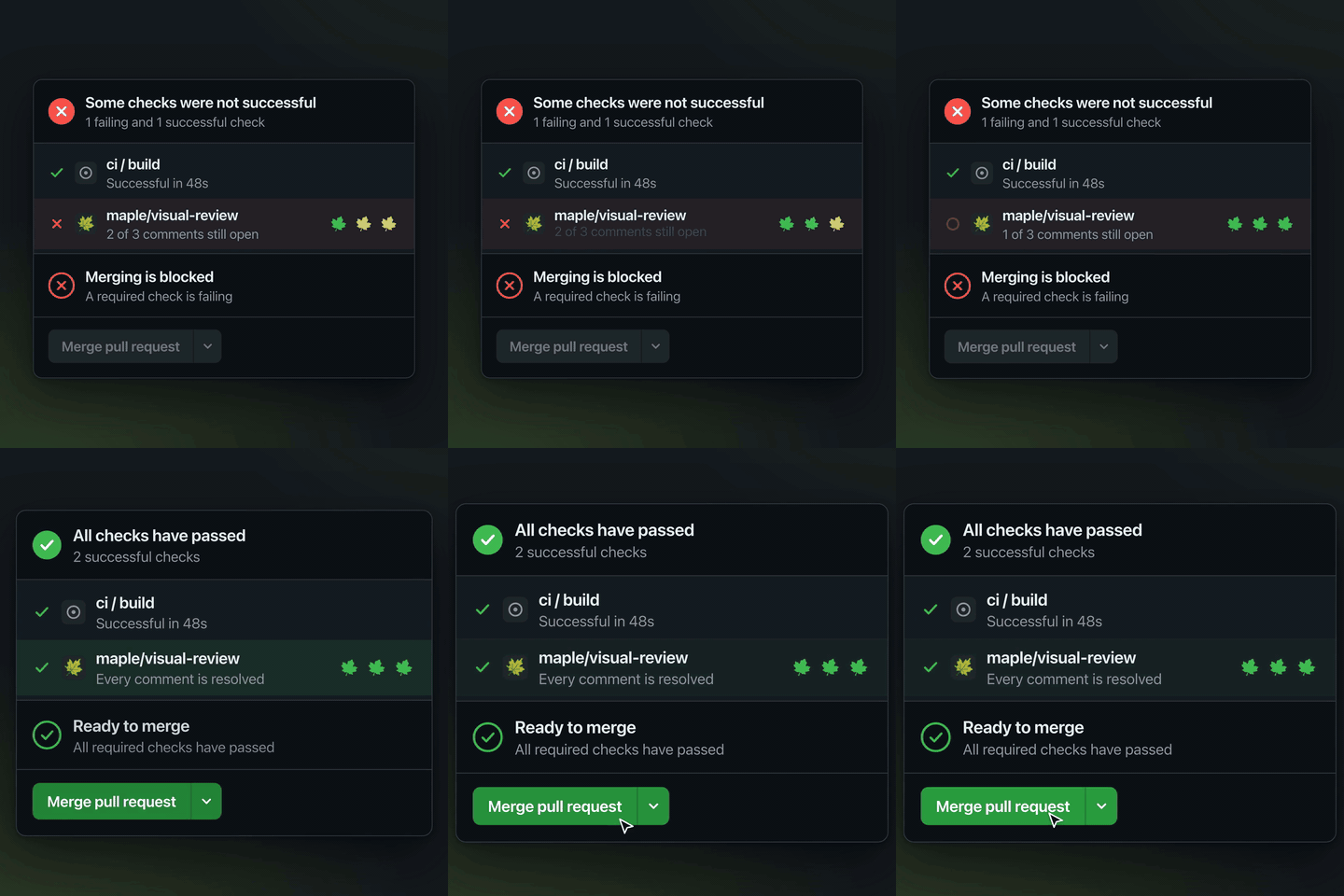
With MAPLE_URL set to a deployed route's mount URL, such as
https://web-482.preview.acme.dev/api/maple, resolve_comment asks that route
to republish maple/visual-review, so an agent that resolves the last comment
with nothing left to push does not leave the check holding on finished work.
The request carries the branch and GITHUB_TOKEN, which must be able to push
to the repository. The route decides the verdict and publishes with the gate
App's own credentials, which never leave it. A failed refresh is logged to
stderr and the resolve is still recorded.
MAPLE_GATE_TOKEN is the other way, for CI: a gate App installation token the
server publishes with directly. It expires an hour after it is minted, so it
suits a job, not a session. Setting both fails at startup.
Documentation
- The agent loop
- The merge gate
- The
maple-reviewskill turns a pull request's```maplecomments into a worklist without the server.
Licence
Apache-2.0. See LICENSE and NOTICE.
Facts
- Kind
- MCP server
- Repo
- maple-kit/maple
- Group
- Uncategorized
- Stars
- 20
- License
- Apache-2.0
- Language
- TypeScript
- Last push
- 2026-10-11
- Forks
- 3
- MCP Registry
- io.github.maple-kit/maple
- Homepage
- maple-kit.org
- 1REAio.github.morluto/reaReverse engineer anything from your terminal or agent with one CLI and MCP server.125.3k
- 2com.browser-use/browser-usecom.browser-use/browser-useControl a real Chrome browser to complete any task: fill forms, extract data, book flights.117.7k
- 3World Monitorapp.worldmonitor/mcpLive markets, conflicts, country risk, chokepoints, energy, and China decision signals. 93 tools.88.3k
- 4Scrapling MCP Serverd4vinci/scrapling🕷️ An adaptive Web Scraping framework that handles everything from a single request to a full-scale crawl! Don't be shy, join here: https://discord.gg/EMgGbDceNQ and follow here for daily tips and tricks: https://x.com/Scraplingdev86.9k
- 5Everythingmodelcontextprotocol/serversThis MCP server attempts to exercise all the features of the MCP protocol. It is not intended to be a useful server, but rather a test server for builders of MCP clients. It implements prompts, tools, resources, sampling, and more to showcase MCP capabilities.85.8k
- 6Fetchmodelcontextprotocol/serversA Model Context Protocol server that provides web content fetching capabilities. This server enables LLMs to retrieve and process content from web pages, converting HTML to markdown for easier consumption.85.8k


