Silica Core
io.github.kiycoh/silica-core · 67 stars · Python · MIT
MCP server Retrieval over the folder the session opened: files, search, read, code_pack, write_note.
Install
The repo has no one-line install. Follow its README.
Published as
- PyPI
silica-corestdio
From the server's entry in the official MCP Registry.
Configuration
| Name | Set as | What it is |
|---|---|---|
SILICA_VAULTOptional | Env var | Folder to index and serve. Unset means the directory the client launched the server in. |
Files
Lightweight, local evidence retrieval tools for code and research
Silica locates the source, symbol, page, or passage you and your agents need. Maximum signal, minimum machinery.
Silica indexes the markdown, code, PDFs and office files under one root and serves them to Claude Code, Cursor, Hermes, Codex, OpenCode and every other popular harness, as MCP tools or as shell commands that print the same JSON. A hit is a path, a section, a line, a window of text and the numbers to judge it by. The harness owns the loop.

Three commands, then a question asked the way you would ask any other. The
harness calls silica_search, and the answer carries the file, the page and
the line it came from.
Install
uv tool install 'silica-core[mcp]'         # BM25 over documents and their sections (faster, lighter)
uv tool install 'silica-core[mcp,dense]'   # in addition the dense leg: numpy, a static model (still fast, more precise)
The second line adds the dense leg: numpy and a static model2vec model, no
torch and no GPU. It stays inert until the model is named and the sections
are embedded — the last stanza of the Quickstart. Take it when the questions
are paraphrases that share no words with the text; an exact term or an
identifier is answered by the lexical leg either way, and only that leg
reports terms_absent.
pipx works the same. The package and the command are silica-core, the
tools are silica_*.
Upgrading from 0.9 or older: the silica command is silica-core since
0.10.0 (silica belongs to silica-harness). A client registered by an older
silica setup still launches silica mcp, which stops starting once uvx
fetches 0.10.0. Run silica-core setup <client> once and it rewrites that
entry.
Quickstart
In any folder of markdown, code, PDFs or office files:
silica-core init                              # adopt the folder: ignore file, vault.yaml, first index; the MCP server serves adopted folders only
silica-core search "leveled compaction" -k 5  # the best located passages
silica-core setup claude                      # register the MCP server, write the guidance block into ~/.claude/CLAUDE.md

# optional, with the [dense] extra: the dense leg, a static model, nothing leaves the machine
export SILICA_EMBEDDING_MODEL=model2vec/minishlab/potion-retrieval-32M
silica-core index --embed
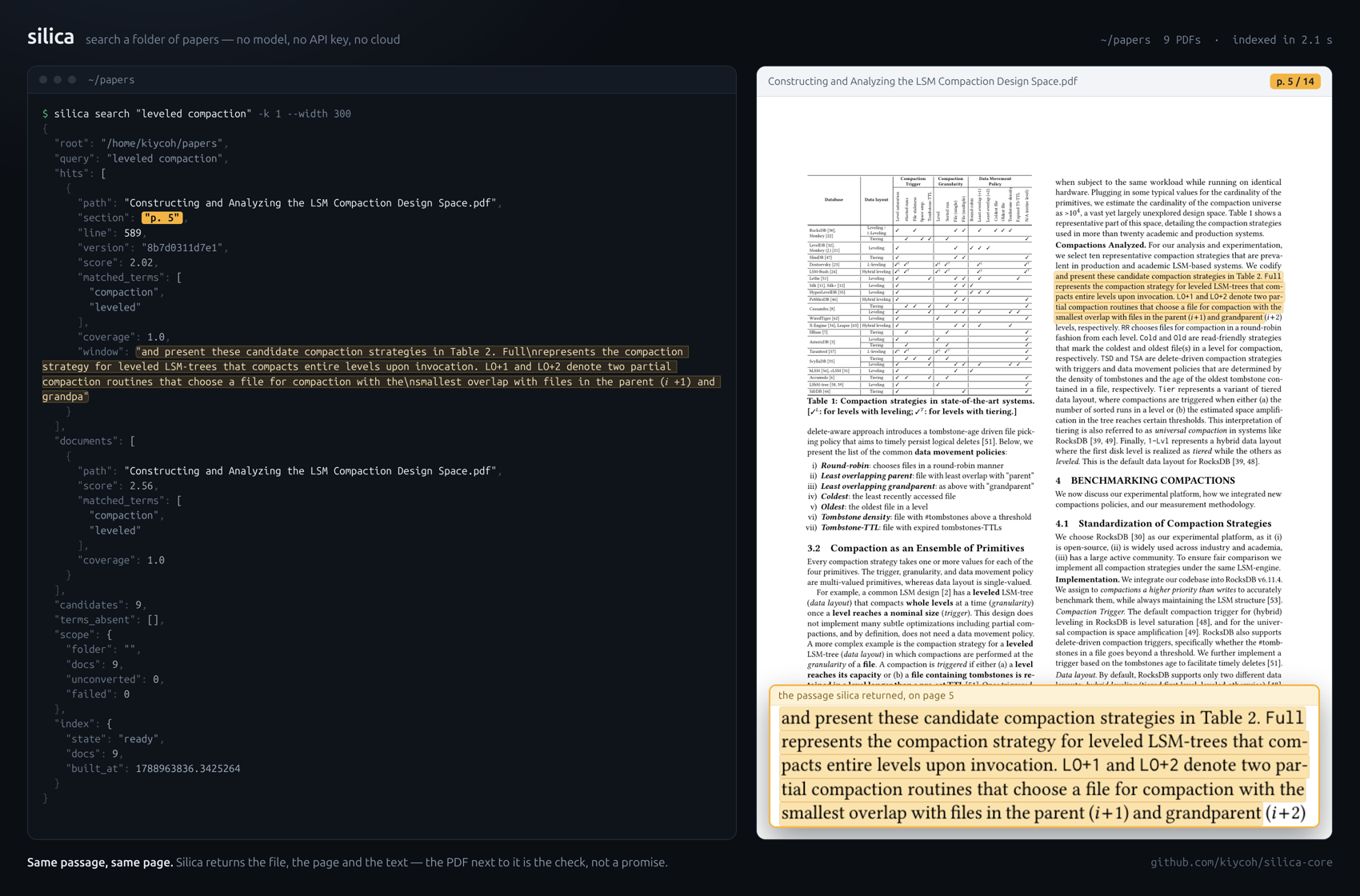
Nine arXiv papers, indexed in 2.1 s. The hit names the file, the page and the passage; the page beside it is the check.
Tools
| Tool | Shell | Returns |
|---|---|---|
silica_files |
silica-core files |
the inventory and what the index did with each file: indexed, changed, excluded, failed, unconverted |
silica_search |
silica-core search |
ranked passages: path, section, line, BM25, matched terms, coverage, and the query terms absent from the corpus |
silica_read |
silica-core read |
a slice by lines or by heading (a page, in a PDF), the outline, and a version to carry forward |
silica_code_pack |
silica-core code-pack |
an AST context pack for one source file inside a character budget |
silica_write_note |
silica-core write-note |
one atomic write, linted for structure and unresolved wikilinks |
In a source tree every function, method, class and constant is its own unit:
a hit's section is the symbol, span its lines, and
silica_read(path, section=…) serves the body. For a symbol whose name is
known, grep wins; for a question that names none, the search comes first:
the tool description and the block silica-core setup claude writes say so. The
contract, the reply shapes and the acceptance checks are in
TOOLS.md. Nothing needs an API key or a network.
How search says no
A ranked list always has a top, even when the corpus does not answer. Three fields say how much the result is worth:
coverage: the share of the query's idf mass the hit's matched terms carry. Near 1, every rare term matched; near 0, only common words did.terms_absent: query terms that occur nowhere in the corpus.matched_terms: the words this hit actually contains.
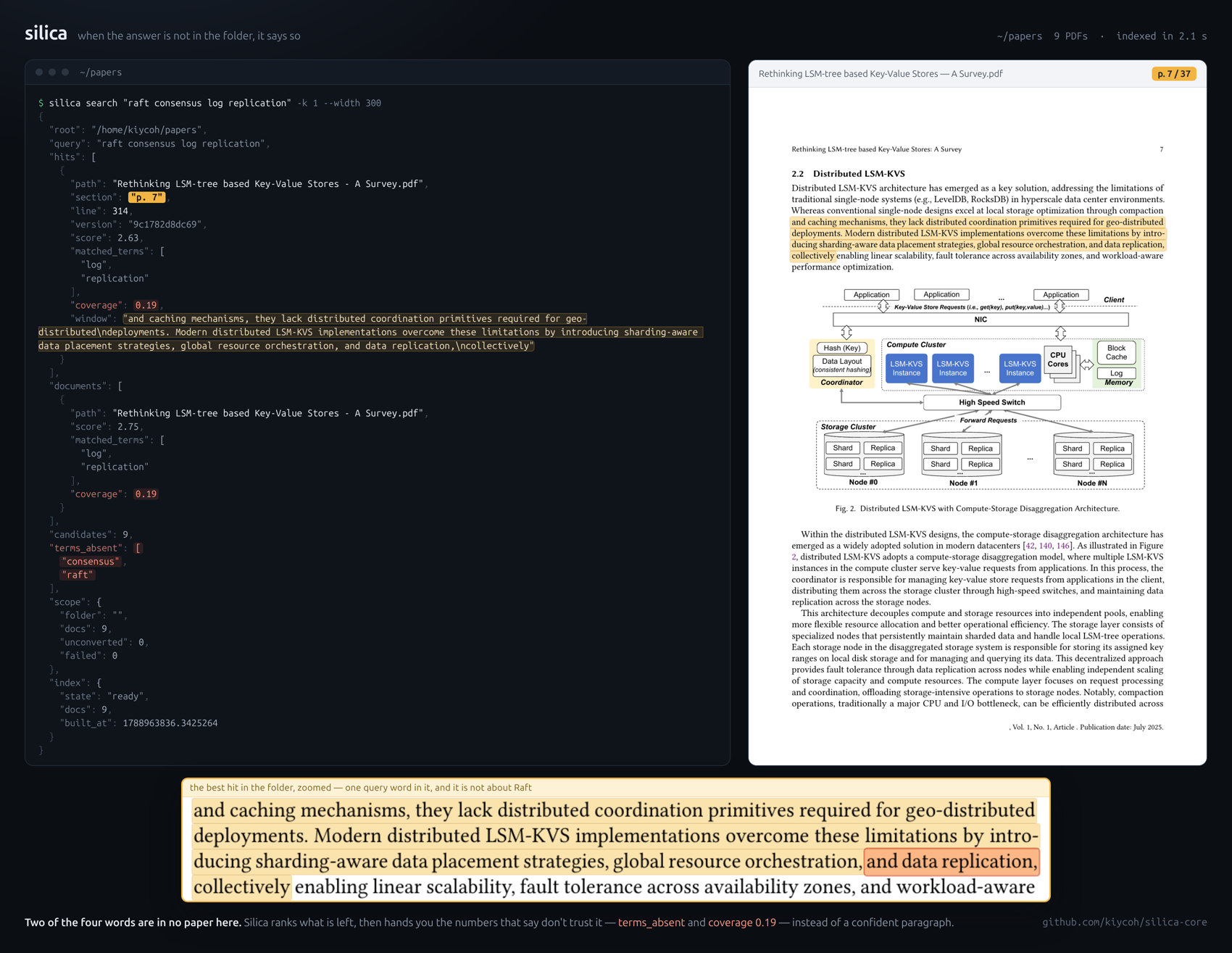
raft consensus log replication over the same nine papers: raft and
consensus occur in none of them, coverage falls to 0.19, and the top hit
is about data replication. On 254 papers the top hit of an answered question
carries 0.69 to 1.00; a question the corpus does not cover, 0.44. Silica
exposes the signals; the harness decides whether to stop, read or rephrase.
Benchmarks
nDCG@10 on BEIR SciFact · NFCorpus, the same documents and queries for every arm. BEIR's published BM25 baselines are 0.665 · 0.325. Silica's lexical index needs no model; the others serve lexical search from an index that also holds embeddings.
| Mode | Silica | zvec-grep 0.2.2 | ck 0.7.11 |
|---|---|---|---|
| Lexical | 0.662 · 0.311 | 0.649 · 0.297 | 0.630 · 0.289 |
Hybrid, same potion-retrieval-32M embedder |
0.675 · 0.328 | 0.672 · 0.330 |
Code, on the twenty SWE-QA questions zvec-grep publishes for its own benchmark, same embedder, k = 10, scored on the files and symbols the reference answer rests on.
| Arm | file hit@5 · @10 | file MRR | symbol hit@10 | symbol recall | chars returned |
|---|---|---|---|---|---|
| Silica, hybrid | 0.85 · 0.90 | 0.68 | 0.75 | 0.24 | 8,266 |
| Silica, vectors | 0.80 · 0.85 | 0.67 | 0.65 | 0.21 | 6,225 |
| Silica, lexical | 0.65 · 0.75 | 0.47 | 0.45 | 0.14 | 8,194 |
| zvec-grep 0.2.2, hybrid | 0.65 · 0.75 | 0.54 | 0.55 | 0.17 | 7,326 |
| zvec-grep 0.2.2, vector | 0.60 · 0.80 | 0.61 | 0.55 | 0.18 | 6,821 |
| zvec-grep 0.2.2, FTS | 0.45 · 0.60 | 0.36 | 0.45 | 0.11 | 6,690 |
On BEIR the two hybrids tie at the 95% interval: the same vectors rank the same, with no daemon and no vector store. On code, Silica's hybrid file MRR is +0.135 over zvec-grep's hybrid (95% interval +0.01 to +0.27), paired per question. The fusion also gains +0.21 MRR and +0.30 symbol hit over Silica's lexical arm; no reranker or graph expansion is involved.
On this measured scope, Silica is a compact, local, SOTA-competitive retriever: it matches zvec-grep on BEIR and leads the paired SWE-QA code-localization replay with the same embedder.
Retrieval matters only if the agent does less work without losing the answer. These are separate experiments and are not pooled:
| Workload and arm | Runs | Quality | Search used | Turns | Tool calls | Seconds | Warm cost |
|---|---|---|---|---|---|---|---|
| Repository, search-first contract | 20 | Judge 59.7 | 17/20 | 4.7 | — | 24 | $0.197 |
| Repository, same plugin without contract | 20 | Judge 50.6 | 0/20 | 6.5 | — | 28 | $0.180 |
| Documents, resident Silica tools | 12 tasks | 12/12 correct | 12/12 | 3.9 | 2.9 | — | $0.20 |
| Documents, no plugin | 12 tasks | 12/12 correct | — | 5.0 | 4.0 | — | $0.22 |
The repository result is one repetition: turns improve by 1.75 (95% interval 0.55 to 3.05 fewer), while Judge and cost remain inconclusive. The document rows belong to a 144-run study over twelve questions and a 5.5M-token corpus. They establish less work on that workload, not a universal agent claim.
Corpora, intervals, per-task exceptions and reproduction commands are in benchmarks.
Harnesses
silica-core setup <client> writes the registration into the client's own config
and backs up what was there; for claude it also puts a guidance block, when
to search before grep, into ~/.claude/CLAUDE.md. silica-core setup --list
names the clients: claude, codex, cursor, windsurf, zed, cline,
roo, continue, goose, opencode, openhands, gemini, antigravity, dsh,
hermes, openclaw, agent-zero, claude-desktop, lmstudio,
anythingllm and librechat; shell, python and generic print recipes
for anything else. The server serves the folder the client opens in;
--vault DIR or SILICA_VAULT fixes the root.
Every written block, and the Claude Code plugin, run silica-core mcp --retrieval local-hybrid: potion-retrieval-32M in the server process, index and
vectors built in the background at start, the search lexical and dense: warming until they land. Nothing leaves the machine; the one download is
the model, once. npx skills add kiycoh/silica-core installs the skills (the one
that tells an agent when to reach for the tools, and five that explain,
summarize, compare, schematize and diagram from the indexed documents), and
nothing else. Shell recipes,
Docker and the REPL are in public/harnesses.md.
How the Claude Code plugin works
The plugin is an MCP server plus a small mod, hooks/register.ts. Neither
one sends your files, prompts or conversation anywhere.
- The server starts with
uv run --frozen --project <plugin folder>. The first time, uv installs the packages pinned inuv.lockfrom PyPI (and a Python build if the machine has no Python 3.11 or newer), and the server downloads thepotion-retrieval-32Mmodel from Hugging Face. Nothing else is downloaded. - Indexing. In a folder that isn't indexed yet, the mod shows an
Index button above the prompt;
/silica-initdoes the same. Either one runsuv run --project <plugin folder> --extra mcp --extra dense silica-core initin that folder, which writesvault.yamlthere (plus.silicaignorein a code repository) and builds the index under~/.silica. Not here hides the button for that folder. Nothing is indexed until you ask. - Search hints. In an indexed folder, when you ask a question that names
no file or symbol, the mod adds one line asking Claude to try
silica_searchbefore grep. It also adds the search guidance to the system prompt, unless yourCLAUDE.mdalready has it. The mod reads three environment variables,CLAUDE_CONFIG_DIR,HOMEandUSERPROFILE, only to find thatCLAUDE.mdand to skip your home folder.
Notes
- What it reads: markdown,
.txt,.rstand PDFs with a text layer directly, one PDF page per section; DOCX, EPUB, FB2, RTF, XLS and ODF converted with no extra; scanned PDFs, images, PPTX and XLSX throughsilica-core importwith MinerU; audio and video withffmpegplusSILICA_STT_BASE_URL; CSV readable by line, excluded from search. In a source tree the code lane adds source files and theirjson,yaml,toml,cfgandini.silica-core doctorsays which lanes this machine has. - The dense leg: section embeddings that catch a paraphrase sharing no rare word with the answer.
uv tool installstays lexical untilsilica-core index --embed, with the[dense]extra's local model or any OpenAI-compatible/v1/embeddingsendpoint. Text leaves the machine only for a remote endpoint, and only aftersilica-core index --embed --allow-remotegrants that host once. Variables and reply states in TOOLS.md, the ollama recipe in public/harnesses.md. - More surfaces:
silica-core mcp --extendedadds the wikilink tools;silica-core connect(extra[connect]) hosts the bridge the Obsidian plugin dials into, so writes land through the vault API while the app is open;silica-core replruns a small reference agent over the same tools, the one surface that needs a model (SILICA_MODEL). - Not in the core: no memory lane, prompt injection, summaries or undo journal. Undo is git.
License
MIT. See LICENSE.
Facts
- Kind
- MCP server
- Group
- Uncategorized
- Stars
- 67
- License
- MIT
- Language
- Python
- Last push
- 2026-10-11
- Forks
- 8
- MCP Registry
- io.github.kiycoh/silica-core
- Topics
- obsidian, ai, ai-agents, claude, codex, llm, bm25, mcp, python, retrieval, search
- 1REAio.github.morluto/reaReverse engineer anything from your terminal or agent with one CLI and MCP server.125.3k
- 2com.browser-use/browser-usecom.browser-use/browser-useControl a real Chrome browser to complete any task: fill forms, extract data, book flights.117.7k
- 3World Monitorapp.worldmonitor/mcpLive markets, conflicts, country risk, chokepoints, energy, and China decision signals. 93 tools.88.3k
- 4Scrapling MCP Serverd4vinci/scrapling🕷️ An adaptive Web Scraping framework that handles everything from a single request to a full-scale crawl! Don't be shy, join here: https://discord.gg/EMgGbDceNQ and follow here for daily tips and tricks: https://x.com/Scraplingdev86.9k
- 5Everythingmodelcontextprotocol/serversThis MCP server attempts to exercise all the features of the MCP protocol. It is not intended to be a useful server, but rather a test server for builders of MCP clients. It implements prompts, tools, resources, sampling, and more to showcase MCP capabilities.85.8k
- 6Fetchmodelcontextprotocol/serversA Model Context Protocol server that provides web content fetching capabilities. This server enables LLMs to retrieve and process content from web pages, converting HTML to markdown for easier consumption.85.8k


