io.github.ictinnovations/pbx-mcp
io.github.ictinnovations/pbx-mcp · 17 stars · TypeScript · MIT
MCP server Inspect and control Asterisk (AMI) and FreeSWITCH (ESL) PBX servers from your AI assistant.
Install
The repo has no one-line install. Follow its README.
Published as
- npm
pbx-mcpstdio
From the server's entry in the official MCP Registry.
Configuration
| Name | Set as | What it is |
|---|---|---|
ASTERISK_AMI_HOSTOptional | Env var | Hostname or IP of the Asterisk server. Set this to enable the Asterisk tools. |
ASTERISK_AMI_PORTOptional | Env var | Asterisk Manager Interface port. Defaults to 5038. |
ASTERISK_AMI_USERNAMEOptional | Env var | AMI username from manager.conf. |
ASTERISK_AMI_PASSWORDOptional · Secret | Env var | AMI secret from manager.conf. |
ASTERISK_AMI_TLSOptional | Env var | Connect to AMI over TLS. Set true if tlsenable=yes in manager.conf. |
FREESWITCH_ESL_HOSTOptional | Env var | Hostname or IP of the FreeSWITCH server. Set this to enable the FreeSWITCH tools. |
FREESWITCH_ESL_PORTOptional | Env var | FreeSWITCH inbound event socket port. Defaults to 8021. |
FREESWITCH_ESL_PASSWORDOptional · Secret | Env var | Event socket password from event_socket.conf.xml. Defaults to ClueCon, which you should change. |
PBX_MCP_ALLOW_WRITEOptional | Env var | Unlocks call control. When false the server is read-only and the originate and hangup tools are not registered at all. Placing a call on a live trunk costs real money, so leave this off unless you mean it. |
PBX_MCP_TIMEOUT_MSOptional | Env var | Per command timeout in milliseconds. Defaults to 10000. |
Files
pbx-mcp
An MCP server that lets an AI assistant inspect and control Asterisk and FreeSWITCH.
Ask "which extensions are offline right now?" or "why is my SIP trunk not registering?" and get a real answer from the live switch, not a guess.
Developed by Tahir Almas at ICT Innovations, the team behind ICTCore, ICTContact, ICTDialer, ICTFax and ICTPBX. The AMI and ESL clients in this repo are the same protocol groundwork those products run on.
Why
Debugging a PBX means memorising two very different command sets. Asterisk speaks AMI and a CLI with hundreds of verbs. FreeSWITCH speaks ESL with its own vocabulary. If you run both, you're context switching all day.
pbx-mcp puts a single, well described tool surface in front of both, so your assistant can go from "calls are failing" to sofia status gateway without you spelling out each step.
New here? The user guide walks through PBX setup, client config, worked examples and troubleshooting. This README is the quick reference.
What your assistant sees
Twelve read-only tools, six per engine, each one described well enough that the model picks the right one without being told. This is the server running under the MCP Inspector:
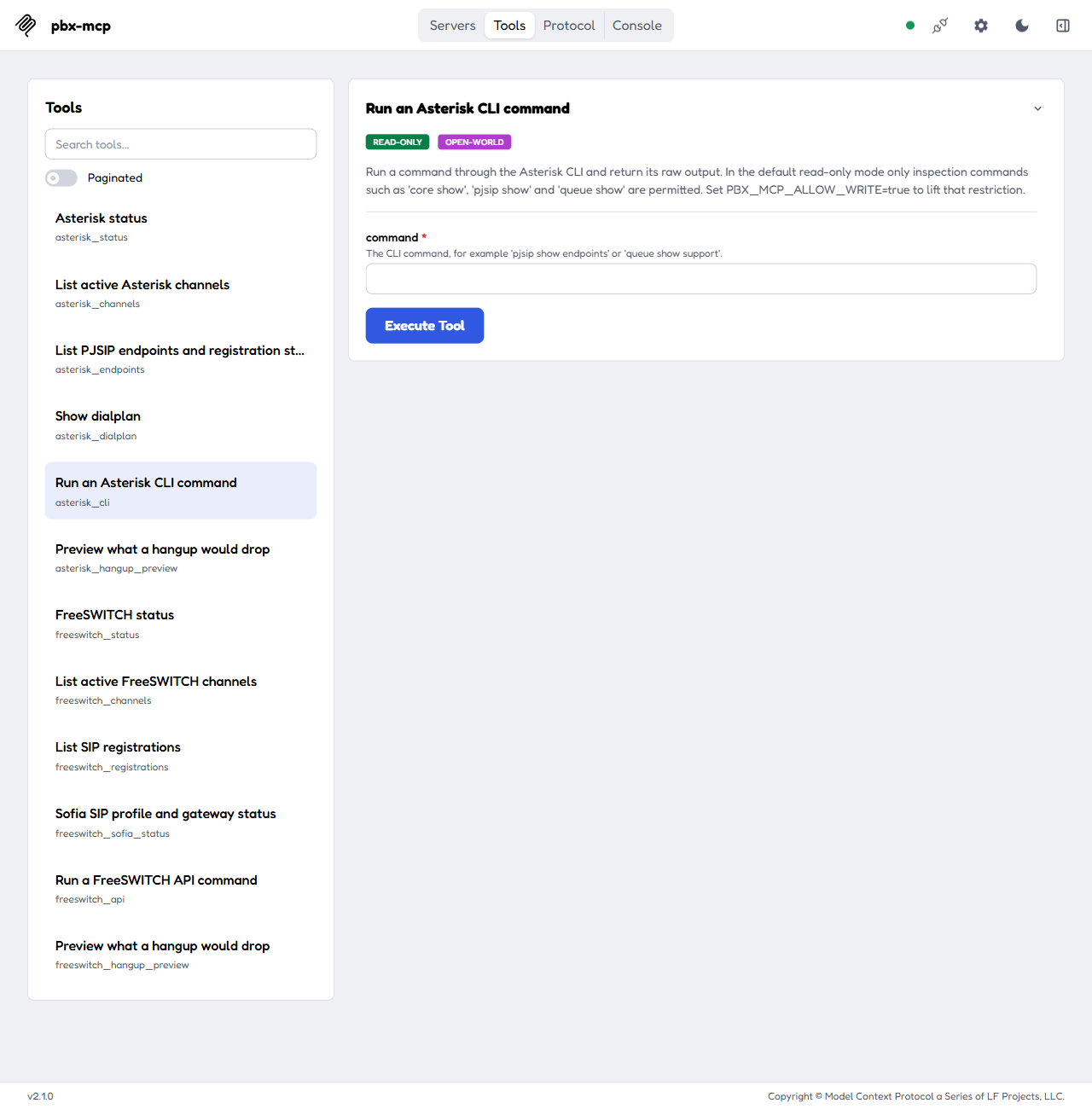
The four write tools, asterisk_originate, asterisk_hangup, freeswitch_originate and freeswitch_hangup, stay hidden until you set PBX_MCP_ALLOW_WRITE=true.
Install
npm install -g pbx-mcp
Or run it straight from npx, which is what most MCP client configs do:
npx -y pbx-mcp
You need Node 18 or newer.
Docker
There's a prebuilt image if you'd rather not put Node on the machine that talks to your PBX.
docker run -i --rm \
  -e ASTERISK_AMI_HOST=10.0.0.10 \
  -e ASTERISK_AMI_USERNAME=mcp \
  -e ASTERISK_AMI_PASSWORD=change-me \
  ghcr.io/ictinnovations/pbx-mcp
The same image is on Docker Hub as ictinnovations/pbx-mcp if that registry is an easier pull for you.
Three things to know:
-iis not optional. The server speaks MCP over stdio, so without stdin attached the container starts and then sits there saying nothing, which looks exactly like a broken server.- There is no port to publish. Nothing listens.
- Your PBX has to be reachable from inside the container. If Asterisk runs on the Docker host itself, swap the IP above for
host.docker.internalon Mac and Windows, or add--network hoston Linux.
The image runs as a non-root user and, like every other way of running this, starts read only.
Configure
Everything comes from environment variables. Set the Asterisk block, the FreeSWITCH block, or both. The server only registers tools for what you've actually configured, so an Asterisk-only shop never sees a FreeSWITCH tool.
Asterisk
| Variable | Default | Notes |
|---|---|---|
ASTERISK_AMI_HOST |
(required to enable) | Hostname or IP of the Asterisk box |
ASTERISK_AMI_PORT |
5038 |
AMI port from manager.conf |
ASTERISK_AMI_USERNAME |
AMI user | |
ASTERISK_AMI_PASSWORD |
AMI secret | |
ASTERISK_AMI_TLS |
false |
Set true if tlsenable=yes |
Your manager.conf user needs at least read = system,call,command and write = command. Add originate only if you plan to turn on write mode.
[mcp]
secret = change-me
read = system,call,command
write = command
FreeSWITCH
| Variable | Default | Notes |
|---|---|---|
FREESWITCH_ESL_HOST |
(required to enable) | Hostname or IP of the switch |
FREESWITCH_ESL_PORT |
8021 |
Inbound ESL port |
FREESWITCH_ESL_PASSWORD |
ClueCon |
From event_socket.conf.xml |
Shared
| Variable | Default | Notes |
|---|---|---|
PBX_MCP_ALLOW_WRITE |
false |
Unlocks call control. Read the safety section first |
PBX_MCP_TIMEOUT_MS |
10000 |
Per command timeout |
Provisioning (Asterisk only, opt-in)
| Variable | Default | Notes |
|---|---|---|
PBX_MCP_ALLOW_PROVISION |
false |
Registers the six trunk and extension tools. Independent of PBX_MCP_ALLOW_WRITE |
PBX_MCP_TRUNK_ALLOW |
(unset) | Comma-separated IPv4 CIDRs and hostnames a trunk may point at. Unset means asterisk_trunk_create is refused |
PBX_MCP_CONTEXT_ALLOW |
(unset) | Comma-separated dialplan contexts new objects may use. Unset means every create is refused |
PBX_MCP_PJSIP_FILE |
pjsip_mcp.conf |
The one include file provisioning writes to. A bare pjsip_*.conf name (never pjsip.conf, manager.conf or any other file) |
Claude Desktop
Add this to claude_desktop_config.json:
{
  "mcpServers": {
    "pbx": {
      "command": "npx",
      "args": ["-y", "pbx-mcp"],
      "env": {
        "ASTERISK_AMI_HOST": "10.0.0.10",
        "ASTERISK_AMI_USERNAME": "mcp",
        "ASTERISK_AMI_PASSWORD": "change-me",
        "FREESWITCH_ESL_HOST": "10.0.0.11",
        "FREESWITCH_ESL_PASSWORD": "ClueCon"
      }
    }
  }
}
The same shape works for any MCP client that speaks stdio. There's a copy in examples/claude_desktop_config.json.
To run the container instead of npx, keep the env block and point command at Docker:
{
  "mcpServers": {
    "pbx": {
      "command": "docker",
      "args": [
        "run", "-i", "--rm",
        "-e", "ASTERISK_AMI_HOST",
        "-e", "ASTERISK_AMI_USERNAME",
        "-e", "ASTERISK_AMI_PASSWORD",
        "ghcr.io/ictinnovations/pbx-mcp"
      ],
      "env": {
        "ASTERISK_AMI_HOST": "10.0.0.10",
        "ASTERISK_AMI_USERNAME": "mcp",
        "ASTERISK_AMI_PASSWORD": "change-me"
      }
    }
  }
}
Each -e NAME with no value forwards that variable from env into the container, which keeps the secrets out of the argument list.
Tools
Asterisk
| Tool | What it does |
|---|---|
asterisk_status |
Version, uptime, active calls and calls processed |
asterisk_channels |
Every live channel with caller ID, state, bridge, duration and dialplan position. Optional substring filter |
asterisk_endpoints |
PJSIP endpoints with device state and contact count. Falls back to chan_sip peers on older installs |
asterisk_dialplan |
Dumps a context, or one extension inside a context |
asterisk_cli |
Any CLI command, subject to the safety policy below |
asterisk_hangup_preview |
Shows which live channels a hangup would drop, without dropping them |
asterisk_originate |
Places a call. Write mode only |
asterisk_hangup |
Kills a channel by name. Write mode only |
FreeSWITCH
| Tool | What it does |
|---|---|
freeswitch_status |
Version, uptime, current and maximum sessions |
freeswitch_channels |
Every live call leg from show channels. Optional substring filter that keeps the header row |
freeswitch_registrations |
Registered users on a Sofia profile, with contact URI, user agent and expiry |
freeswitch_sofia_status |
Every SIP profile and gateway, including whether trunks are registered upstream |
freeswitch_api |
Any API command, subject to the safety policy below |
freeswitch_hangup_preview |
Shows which live legs a hangup would drop, without dropping them |
freeswitch_originate |
Places a call. Write mode only |
freeswitch_hangup |
uuid_kill on a channel UUID. Write mode only |
Safety
A PBX is not a scratch pad. Reloading a profile drops registrations, and an originate spends real money on a live trunk. So the default posture is read-only and the guards are layered:
Read-only by default. asterisk_cli accepts an allow list of inspection prefixes (core show, pjsip show, dialplan show, queue show and friends). freeswitch_api accepts the same kind of list (status, show, sofia status, db list and friends), matched on the start of the command so the subcommand counts.
The FreeSWITCH list allows subcommands, it does not deny scary words. sofia status reads, sofia profile internal restart isn't on the list, so it's refused. This used to work the other way around, scanning each word against a list of state changing verbs, and that only ever catches the words somebody thought of. conference 3001 kick all walked straight through it. Reported by Electrical-Place-458 on r/mcp.
Write tools aren't registered at all in read-only mode. asterisk_originate and the other three never appear in tools/list unless you set PBX_MCP_ALLOW_WRITE=true. A model can't call a tool it can't see.
The hangup preview tools are always available. asterisk_hangup_preview and freeswitch_hangup_preview show which live channels a hangup would drop without touching them, so you can see the blast radius before setting the write flag, or catch a typo in a channel name before running the real thing. They're read-only by contract but exercise the same matching the write path uses.
Shell metacharacters are rejected on both transports before a command is sent.
AMI header injection is blocked. Every field that lands in an AMI action is checked for carriage returns and newlines, so a caller ID string can't smuggle in an extra header.
Output is clamped to 20,000 characters. One show channels on a busy switch won't flood the context window.
Even with all that, give the AMI user the narrowest permission set that answers your questions, and put the PBX behind a firewall rather than on the public internet.
Provisioning trunks and extensions (Asterisk, opt-in)
Six more tools create, list and delete PJSIP trunks and SIP extensions through AMI UpdateConfig. They are registered only when PBX_MCP_ALLOW_PROVISION=true, and they are separate from write mode: enabling one does not enable the other.
| Tool | What it does |
|---|---|
asterisk_trunk_create |
IP-authenticated trunk: endpoint, aor and identify. Fields: name, host, port (5060), transport (udp, tcp, tls), codecs, context, dry_run |
asterisk_trunk_list / asterisk_trunk_delete |
List or remove trunks this server created |
asterisk_extension_create |
A SIP endpoint phones register to (endpoint, aor, auth), not a dialplan extension. Fields: number, context, codecs, dry_run. The generated password is returned once |
asterisk_extension_list / asterisk_extension_delete |
List or remove extensions this server created. Passwords are never listed |
Codecs are ulaw, alaw, g722, g729, opus. Names and numbers match ^[A-Za-z0-9_-]{1,32}$.
One-time setup
-
Create the managed file, empty, beside
pjsip.conf(a missing include is an error), and let Asterisk write to it:touch /etc/asterisk/pjsip_mcp.conf
-
Add this single line at the end of
pjsip.conf. Nothing else inpjsip.confis ever touched:#include pjsip_mcp.conf
-
Give the AMI user the extra permissions provisioning needs.
configis forUpdateConfig/GetConfig,commandfor the reload and verify steps,originateonly if you also use write mode:[mcp] secret = change-me deny = 0.0.0.0/0.0.0.0 permit = 192.0.2.0/24 read = system,call,command write = command,originate,config
-
Trunks reference a transport named
transport-udp,transport-tcportransport-tls; define the ones you will use inpjsip.conf.
How it works
- Everything goes into the managed file with
UpdateConfig(NewCat,Append,RenameCat,DelCat), thenmodule reload res_pjsip.so, thenpjsip show endpoint mcp-<name>. If Asterisk does not report the endpoint, the change is removed again and the call returns an error. - Every object is named
mcp-<name>. List and delete only act onmcp-sections of the managed file, and a trunk cannot be deleted as an extension or the other way round. - Create refuses a name that already exists.
dry_run=truereturns the exact config block and makes no AMI calls; for an extension the password is shown as a placeholder. - All provisioning calls are serialized in-process, because
UpdateConfigis read-modify-write. Run only one pbx-mcp provisioner per managed file. - An extension registers as
mcp-<number>, not the bare number. PJSIP matches the endpoint and its AOR by the registering username, and every object has to carry themcp-prefix. The create response states the username. - The password is 24 random URL-safe characters from
crypto.randomBytes. It is returned only in the create response, which is the only place it is ever shown or logged; it does exist in the managed file on the PBX, as any SIP password must.
Toll fraud: read this before enabling
A SIP trunk lets calls leave your PBX, and a registrable extension with a context that reaches an outbound route lets anyone who learns the password do the same. Stolen SIP credentials are a leading cause of large telephony bills.
- Point
PBX_MCP_CONTEXT_ALLOWat contexts that cannot dial out to the PSTN unless you really mean it. The context is the only thing that decides what a registered phone or trunk may call. - Keep
PBX_MCP_TRUNK_ALLOWas narrow as you can. Hostnames are compared literally and never resolved, so DNS cannot widen the list. IPv6 is not supported. - An empty allowlist refuses everything: provisioning fails closed.
- Treat the assistant that holds these tools as holding the ability to change who can reach your PBX. Review what it creates (
*_list, ordry_runfirst), and do not expose SIP (5060) or AMI (5038) to the internet. - Prefer a lab or staging PBX when trying this out.
Example flow
Using documentation addresses (RFC 5737) only. Environment:
PBX_MCP_ALLOW_PROVISION=true
PBX_MCP_TRUNK_ALLOW=192.0.2.0/24,198.51.100.0/24
PBX_MCP_CONTEXT_ALLOW=from-trunk,from-internal
-
Preview a trunk with
asterisk_trunk_createanddry_run=true:{ "name": "carrier1", "host": "192.0.2.10", "port": 5060, "transport": "udp", "codecs": ["ulaw", "alaw"], "context": "from-trunk", "dry_run": true }which returns
[mcp-carrier1]
type=endpoint
transport=transport-udp
context=from-trunk
disallow=all
allow=ulaw,alaw
aors=mcp-carrier1

[mcp-carrier1]
type=aor
contact=sip:192.0.2.10:5060

[mcp-carrier1]
type=identify
endpoint=mcp-carrier1
match=192.0.2.10
-
Run it again without
dry_run. A host outside the allowlist, for example203.0.113.5, is refused. -
Create an extension:
{ "number": "1001", "context": "from-internal" }. The reply gives the SIP usernamemcp-1001and the password, once. -
Point a phone at the PBX with those credentials, then check it with
asterisk_endpoints. -
asterisk_extension_listandasterisk_trunk_listshow what exists;asterisk_extension_deletewith1001andasterisk_trunk_deletewithcarrier1remove it again.
Tested against Asterisk 22 (certified 22.8). The PJSIP options used (identify, max_contacts, remove_existing, auth_type=userpass) and the UpdateConfig features (RenameCat, catfilter) are standard, but re-check them on other Asterisk versions. TCP and TLS trunks are generated but were not exercised against a live peer.
Build from source
git clone https://github.com/ictinnovations/pbx-mcp.git
cd pbx-mcp
npm install
npm run build
npm start
The AMI and ESL clients have no third party dependencies. Both protocols are just framed text over TCP, and hand rolling them keeps the install small and the behaviour predictable. The only runtime dependencies are the MCP SDK and Zod.
The protocol clients, on their own
If you want to talk to a PBX from your own Node code and don't need MCP at all, the two clients underneath this server are published separately. Same protocol work, no MCP SDK, no Zod, nothing:
- asterisk-ami-node - Asterisk Manager Interface client.
npm install asterisk-ami-node - freeswitch-esl-node - FreeSWITCH Event Socket client, inbound mode.
npm install freeswitch-esl-node
Both are zero dependency, TypeScript, ESM and CommonJS, Node 18 or newer, and tested against mock switches so you can run the suite without a PBX.
Layout
src/
  index.ts          entry point, config to transport wiring
  ami.ts            Asterisk Manager Interface client
  esl.ts            FreeSWITCH Event Socket Layer client
  config.ts         environment config and the command safety policy
  tools/
    asterisk.ts     Asterisk tool definitions
    freeswitch.ts   FreeSWITCH tool definitions
    format.ts       text table and truncation helpers
Contributing
Issues and pull requests are welcome. If you're adding a tool, describe it the way you'd describe it to a colleague who has never seen your dialplan. The model picks tools from those descriptions, so a vague one is a broken one.
About
Built and maintained by Tahir Almas, founder of ICT Innovations.
ICT Innovations has shipped open source and commercial telephony since 2005. If pbx-mcp is useful to you, the wider stack behind it might be too:
- ICTCore - open source telephony framework, the base for the products below
- ICTPBX - white label multi tenant IP PBX, with a free community edition on GitHub
- ICTContact - contact center and unified communications
- ICTDialer - auto and predictive dialer
- ICTFax - open source fax server
- asterisk-ami-node and freeswitch-esl-node - the protocol clients from this repo, published on their own
Questions about the commercial products go through the ICT Innovations support portal. Questions about pbx-mcp itself belong in GitHub issues, where everyone can read the answer.
License
MIT. See LICENSE.
Facts
- Kind
- MCP server
- Group
- Uncategorized
- Stars
- 17
- License
- MIT
- Language
- TypeScript
- Last push
- 2026-10-09
- Forks
- 13
- MCP Registry
- io.github.ictinnovations/pbx-mcp
- Homepage
- ictinnovations.com
- Topics
- ai-agent, ami, asterisk, claude, esl, freeswitch, mcp, model-context-protocol, pbx, sip, telephony, voip, ai, anthropic, devops, llm, mcp-server, nodejs, observability, typescript
- 1REAio.github.morluto/reaReverse engineer anything from your terminal or agent with one CLI and MCP server.125.3k
- 2com.browser-use/browser-usecom.browser-use/browser-useControl a real Chrome browser to complete any task: fill forms, extract data, book flights.117.7k
- 3World Monitorapp.worldmonitor/mcpLive markets, conflicts, country risk, chokepoints, energy, and China decision signals. 93 tools.88.3k
- 4Scrapling MCP Serverd4vinci/scrapling🕷️ An adaptive Web Scraping framework that handles everything from a single request to a full-scale crawl! Don't be shy, join here: https://discord.gg/EMgGbDceNQ and follow here for daily tips and tricks: https://x.com/Scraplingdev86.9k
- 5Everythingmodelcontextprotocol/serversThis MCP server attempts to exercise all the features of the MCP protocol. It is not intended to be a useful server, but rather a test server for builders of MCP clients. It implements prompts, tools, resources, sampling, and more to showcase MCP capabilities.85.8k
- 6Fetchmodelcontextprotocol/serversA Model Context Protocol server that provides web content fetching capabilities. This server enables LLMs to retrieve and process content from web pages, converting HTML to markdown for easier consumption.85.8k


