Firenook
io.github.firenook-dev/firenook · 111 stars · Rust · Apache-2.0
MCP server Local Firebase emulators for coding agents: Firestore, Auth, Storage, Functions, logs, rules checks.
Install
The repo has no one-line install. Follow its README.
Published as
- npm
firenookstdio
From the server's entry in the official MCP Registry.
Files

A faster drop-in replacement for the Firebase Local Emulator Suite
Keep your firebase.json, SDKs and ports. Get 40× faster writes,
10× less memory, no Java, and data that survives restarts.
Getting started · Docs · Benchmarks · Compatibility · GitHub
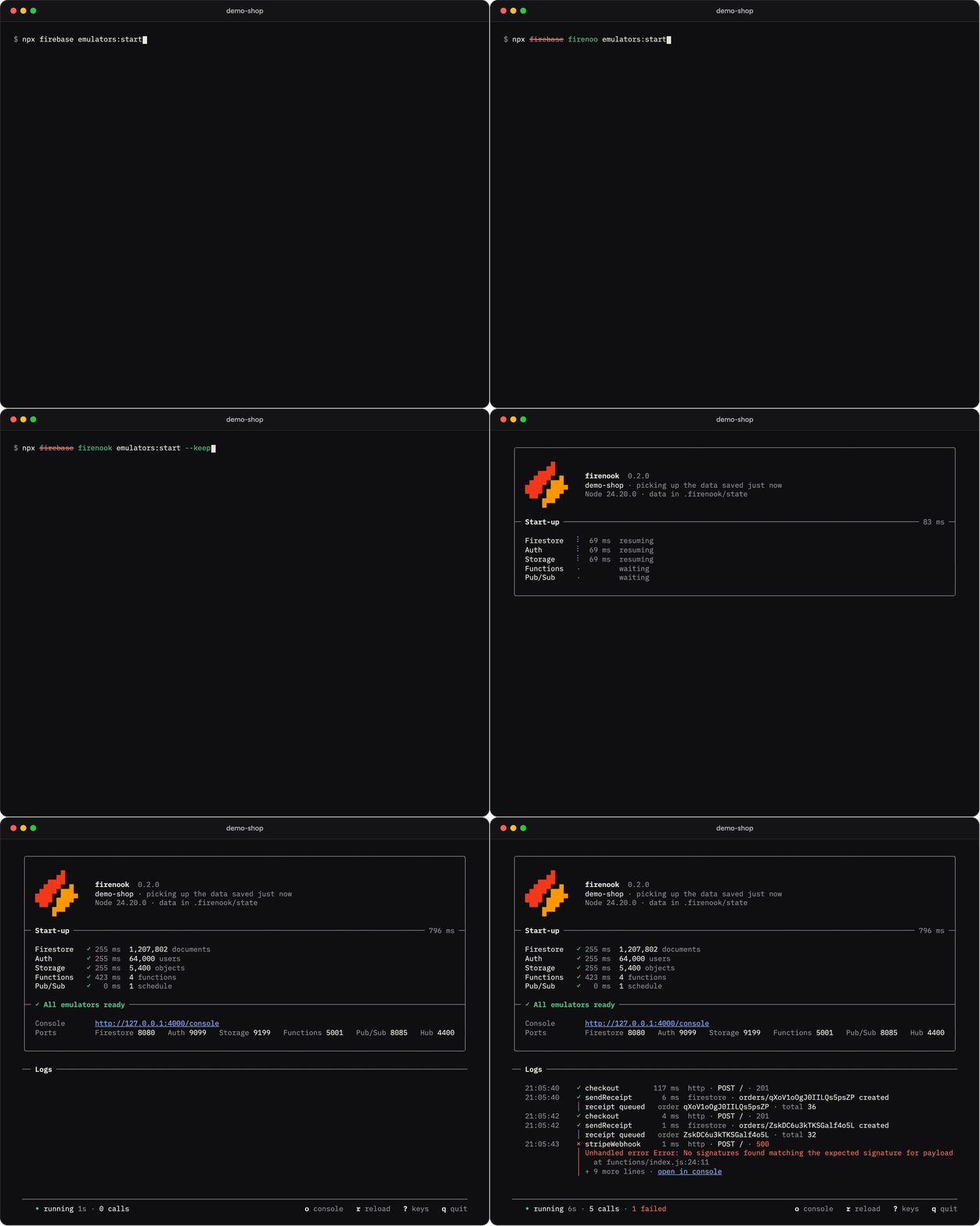
Already using the Firebase emulators? Install Firenook and change one word:
npm install --save-dev firenook
- firebase emulators:start --import ./data
+ firenook emulators:start --import ./data
Same flags, same ports, and your firebase.json, rules, Functions code and app
stay as they are. In a terminal, run it as npx firenook emulators:start. To
keep your data between runs, add --keep-data.
Firenook needs Node 22, 24 or 26. Starting a new project? npx firenook init
sets one up on one screen, installs it and starts the emulators.
Why Firenook
- A drop-in for the official emulator. It reads
firebase.json,.firebaserc, rules and indexes the way the Firebase CLI does, serves the same ports, and your client and Admin SDKs connect unchanged. It imports and exports the official format. - Fast and light. Native Rust services with the data on disk. On a real application's two-hour workload, Firenook peaked at 2.11 GiB of memory where the official emulator reached 22.57 GiB, answered writes in 5.1 ms against 208 ms at the median, and used 61% less CPU.
- Your data stays. Add
--keep-dataand Firestore, Auth and Storage come back with all your data in about half a second, even with millions of documents. A crash loses at most the last second of writes. - Nothing else to install. No Java, no firebase-tools, nothing else downloaded at install or start (an Extension from the registry is fetched once, on first use). npm or Bun picks the native engine for your machine; Node runs your Functions.
- A console and a terminal made for it, and
firenook mcpfor your coding agent: Firestore, users and their tokens, logs and function calls, Security Rules decisions, Storage, Pub/Sub, Cloud Tasks and Eventarc as tools.npx firenook mcp addsets it up for Claude Code, Cursor and VS Code; other agents run the samenpx firenook mcp.
Switching from the official emulator
Keep firebase-tools for deploying, and add .firenook/ to your .gitignore:
every run keeps its working data there.
$ npx firenook init --adopt --dry-run
  skip    Firenook: firebase.json configures the hosting emulator, which Firenook does not implement; skipping it.
  ok      nothing to change; services: firestore, auth, storage, functions
-  "emulators": "firebase emulators:start --import ./data --export-on-exit",
+  "emulators": "firenook emulators:start --import ./data --export-on-exit",
Same flags, same ports, the official export format both ways. To keep your
data between runs without exporting, replace --export-on-exit with
--keep-data; ./data is then never written.
Starting fresh instead: npx firenook init.
Getting started
covers both.
The console
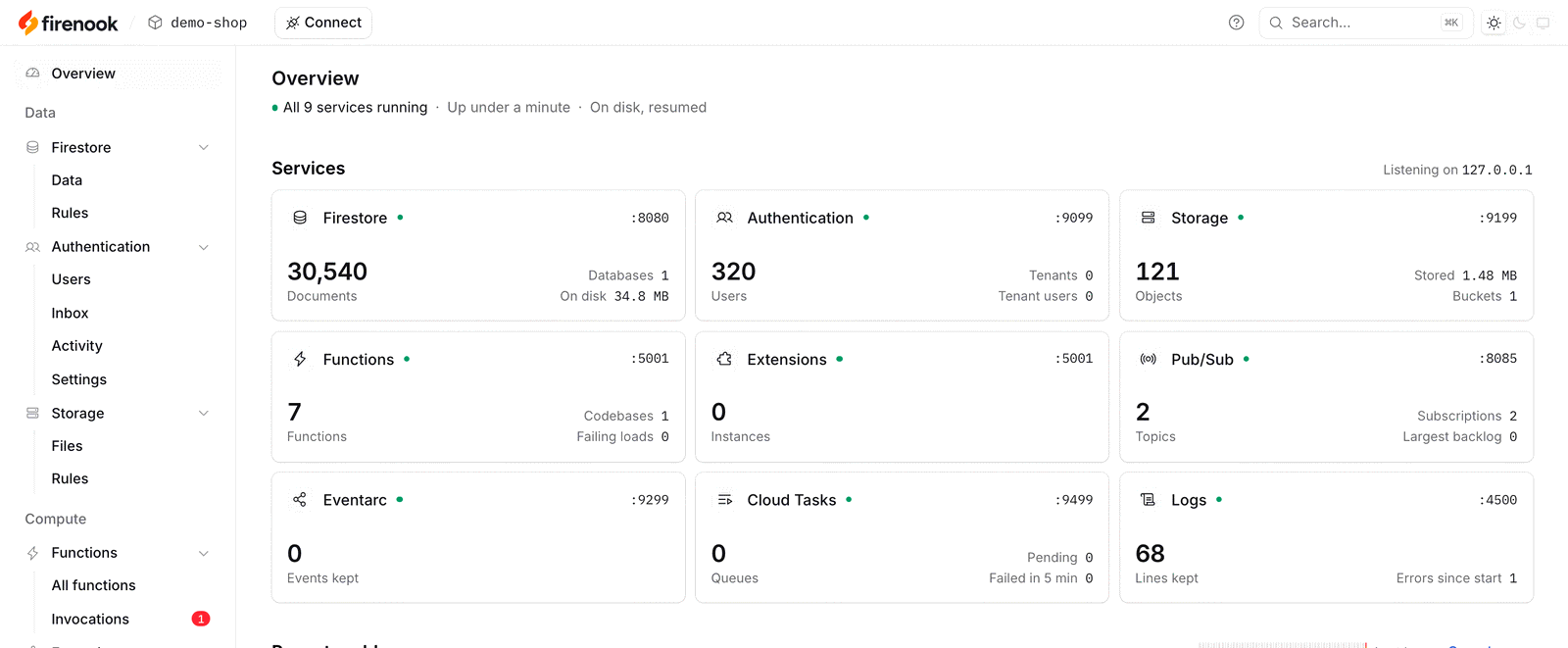
The console the Firebase emulators should have had. Google's Emulator UI
has no page for your Functions, Pub/Sub, Cloud Tasks or Eventarc, only a log.
Firenook's console covers every service it runs, live, on the Emulator UI's
port, at
http://127.0.0.1:4000/console. It shows every function call with its
trigger, duration and logs, and an inbox of the codes and links Auth would
have sent. It has Firestore and Storage with their rules, Pub/Sub, Cloud
Tasks and Eventarc, and an Overview of every service's health.
What it emulates
Firestore, Authentication, Cloud Storage (with native Security Rules), Cloud
Functions (every trigger type, reload on save, debugging), Extensions, Pub/Sub,
Cloud Tasks and Eventarc. Realtime Database, Hosting, App Hosting and Data
Connect are not emulated; a firebase.json that configures them still starts,
with a warning. See compatibility.
Benchmarks
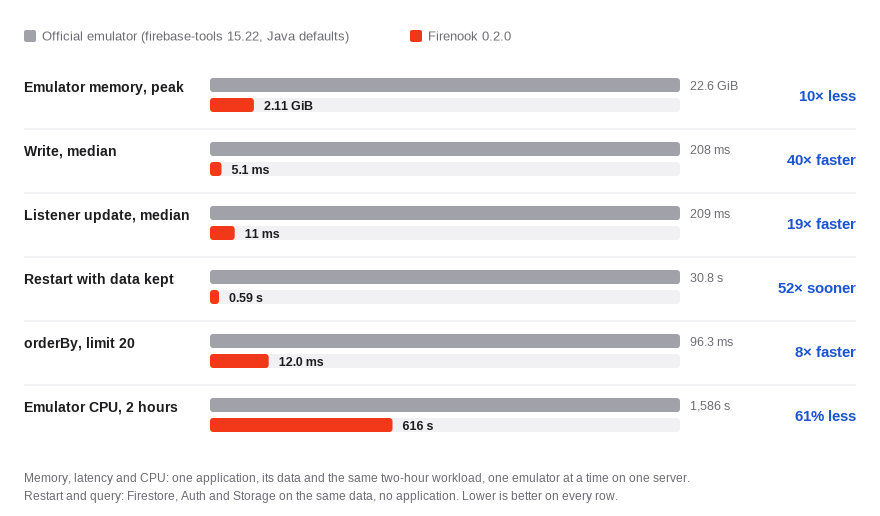
One real application with 211,205 documents and 6.7 GB in Storage, and two hours of its traffic against each emulator in turn on one server. Firenook answered 25 of the 26 query shapes faster and tied on the last. The method and every figure.
Commands
firenook init [--yes]                         # a new project: choose, install, start
firenook init --adopt [--dry-run]             # adapt an existing firebase.json
firenook doctor                               # read-only checks, JSON
firenook emulators:start [options]            # --only, --project, --import, --export-on-exit, --inspect-functions
firenook emulators:start --keep-data [--import ./seed]   # keep data between runs, in .firenook/state
firenook emulators:start --build              # compile TypeScript first and on every save
firenook emulators:exec "npm test"            # start, run your tests, stop
firenook emulators:export ./export            # snapshot a running suite
firenook functions:invoke NAME [--data JSON | --event-data JSON]   # call any function, any trigger
firenook ext:vendor [--offline]               # copy registry Extensions into the project
firenook mcp                                  # the running suite as tools for a coding agent
firenook mcp add                              # give Claude Code, Cursor and VS Code that server
firenook state:inspect | state:compact --state-dir DIR
Every command and option: CLI reference.
Requirements
Node 22, 24 or 26 on macOS (Apple silicon or Intel), Linux (x64 or arm64,
glibc 2.28 or newer: RHEL 8, Debian 10, Ubuntu 20.04, node:24-slim and later;
not Alpine) or Windows x64; your Functions run on it, and a codebase whose
engines.node asks for another Node is warned about at start. Keep optional
dependencies enabled: they carry the native engine for your platform. Commit
your lockfile and upgrade on purpose.
License
Apache License 2.0. Firebase, Cloud Firestore, Cloud Functions, Cloud Storage, Cloud Pub/Sub and Cloud Tasks are trademarks of Google LLC; Firenook is not affiliated with or endorsed by Google.
Facts
- Kind
- MCP server
- Group
- Uncategorized
- Stars
- 111
- License
- Apache-2.0
- Language
- Rust
- Last push
- 2026-11-14
- Forks
- 9
- MCP Registry
- io.github.firenook-dev/firenook
- Homepage
- firenook.dev
- Topics
- emulator, firebase, firestore, local-development, rust, cloud-functions, cloud-storage, cloud-tasks, developer-tools, firebase-auth, firebase-emulator, mcp, pubsub, testing
Next on this shelf
- 1427🌊 HTTP + SSE MCP Server w/ OAuthNapthaAI/http-oauth-mcp-serverRemote MCP server (SEE + Streamable HTTP) implementing the MCP spec's authorization extension. Use directly from your agents, or from Cursor / Claude with mcp-remote110
- 1428Atlassian Data Center MCPb1ff/atlassian-dc-mcpMCP servers for the Atlassian products (Bitbucket, Confluence, JIRA) of the Data Center version110
- 1429Blueprint Mcp For Chromerailsblueprint/blueprint-mcp110
- 1430Atlassian Dc Mcp Bitbucketio.github.b1ff/atlassian-dc-mcp-bitbucket110
- 1431Atlassian Dc Mcp Confluenceio.github.b1ff/atlassian-dc-mcp-confluence110
- 1432Atlassian Dc Mcp Jiraio.github.b1ff/atlassian-dc-mcp-jira110


