kyle-mirich/horizonlayer
kyle-mirich/horizonlayer · 1 stars · 1 plugin
Marketplace
Install
/plugin marketplace add kyle-mirich/horizonlayerRun inside Claude Code, then install plugins from it. Check the repo's README before you run it.
Plugins 1
After adding the marketplace, install one with /plugin install <name>@horizonlayer.
- 1horizonlayerDurable PostgreSQL knowledge and agent-friendly issue tracking for coding agents.
/plugin install horizonlayer@horizonlayer
Files
HorizonLayer
HorizonLayer is a local MCP server for project knowledge and issue tracking. It stores data in PostgreSQL on your machine and exposes it through knowledge and issues MCP tools. Optional Qdrant-backed semantic search and a React dashboard are included for retrieval, inspection, and editing.
Coding sessions end; project decisions and unfinished work should survive them. HorizonLayer lets the next session retrieve the rationale and claim a ready task through the same MCP connection.
Explore the engineering decisions, retrieval and recovery evidence, or reproducible session demo.
Status: Early release on the 0.x line. This README describes the current source checkout; commands using
@latestrun the published npm version. See CHANGELOG.md for unreleased changes. Bundled plugin manifests pin the published package version.
What it provides
- Two MCP tools. One
knowledgetool and oneissuestool group the available operations. Module selection (HORIZONLAYER_MODULES) trims the catalog to what a project actually uses. - PostgreSQL storage with a rebuildable search index. PostgreSQL 17 stores pages, blocks, typed databases, rows, issues, comments, dependencies, and links. The optional Qdrant-backed RAG index is fully derived: it rebuilds from canonical records.
- Optimistic revisions. Updates to revisioned records carry the revision the client read. Stale writes return a retryable
CONFLICT; other refusals identify the condition to resolve. Archive and restore are the public lifecycle operations. - Backup and recovery. Checksummed
.hlbackupartifacts, a read-only recovery preview, atomic restore in an isolated container, schema validation, and an automatic safety backup before any recovery touches data. - Bundled agent skills. Per-module skill libraries stage into Codex and Claude Code covering the query language and mutation protocol.
See a handoff between sessions
One session saves the decision “Use PostgreSQL as the source of truth” and creates a related task. A fresh MCP process then finds the decision, reads its rationale, and claims the task using its current revision.
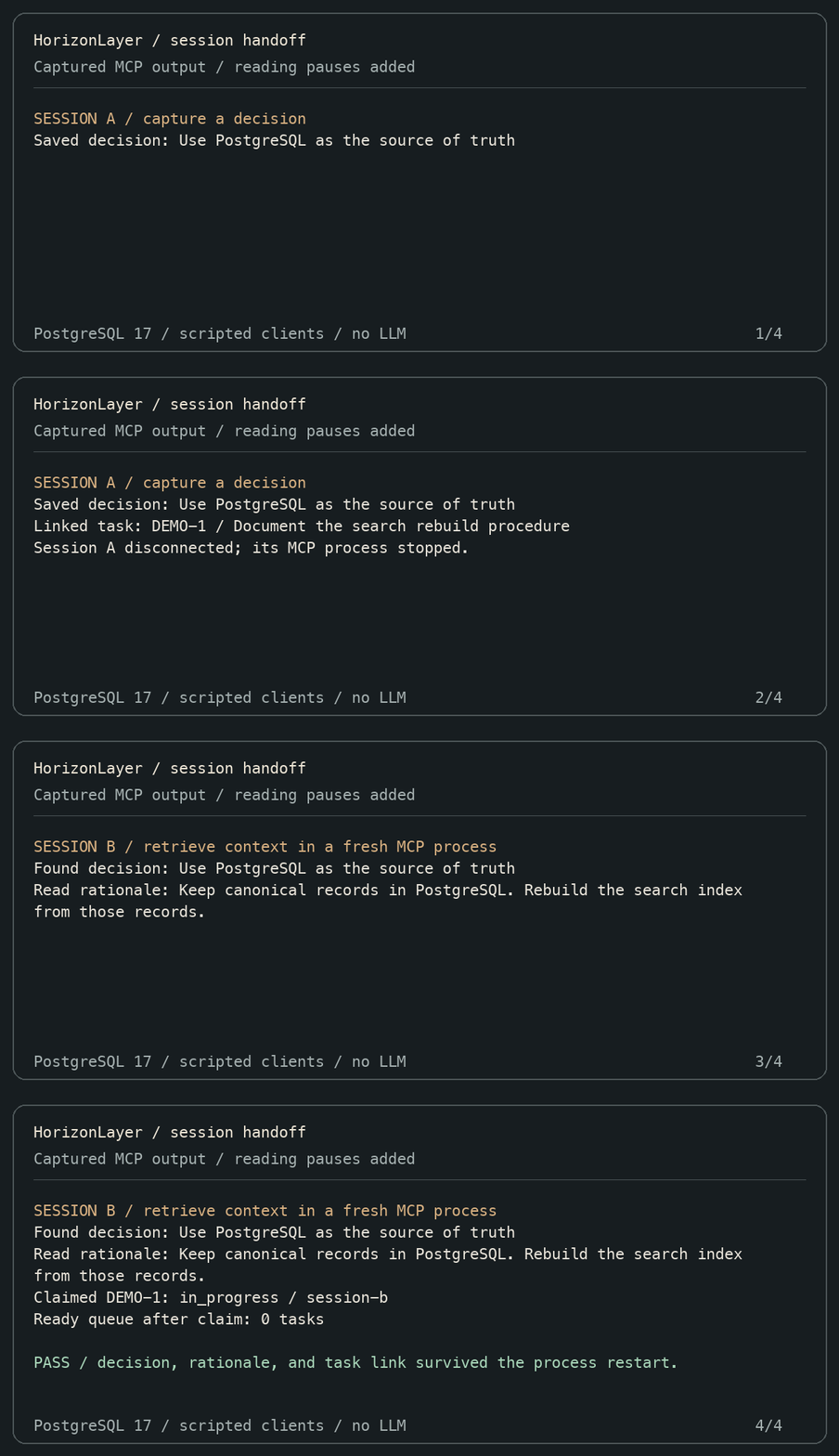
Read the recorded transcript and reproduce the demo. The recording uses scripted MCP clients against a disposable PostgreSQL database; it demonstrates persistence and task coordination, not an LLM benchmark.
Architecture
flowchart LR
    subgraph agent["Coding agent (Codex CLI, Claude Code, any MCP client)"]
        calls["MCP tool calls"]
    end
    subgraph server["horizonlayer MCP server (stdio, Node.js 22)"]
        k["knowledge module"]
        i["issues module"]
        lc["launcher: setup, doctor, backup, recover, reset"]
    end
    subgraph docker["Docker-managed local runtime"]
        pg[("PostgreSQL 17 - canonical store")]
        qd[("Qdrant - derived search index")]
    end
    dash["Local dashboard on 127.0.0.1:4317"]

    calls --> k & i
    k & i --> pg
    pg --> qd
    lc --- docker
    dash --> pg
Loading
Deeper design writeups live in docs/engineering-notes.md; the project vocabulary lives in docs/glossary.md.
The local dashboard
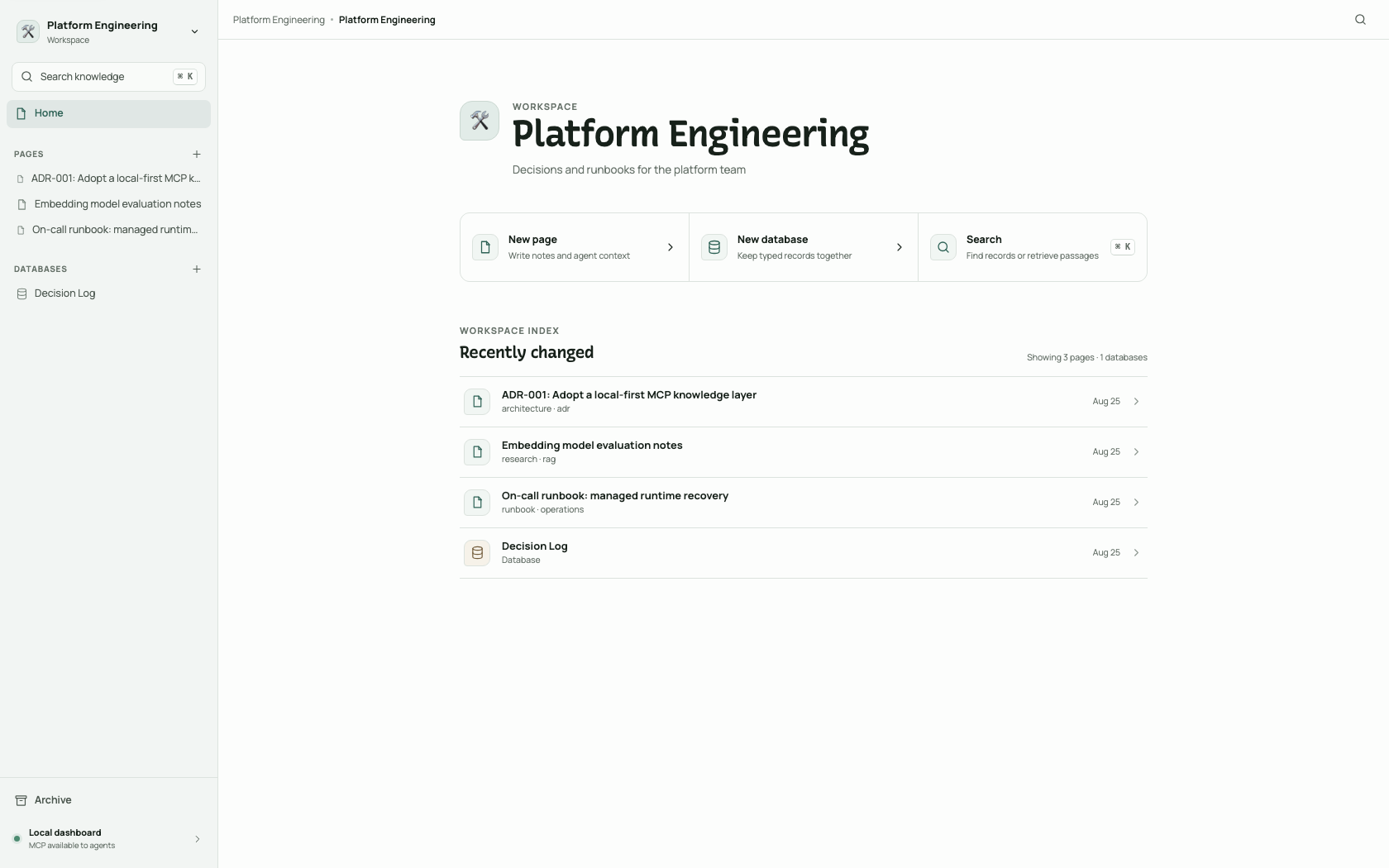
horizonlayer dashboard --open serves a read-and-edit view of canonical knowledge on loopback only — workspaces, pages and blocks, typed databases with schema editing, archive, and search.
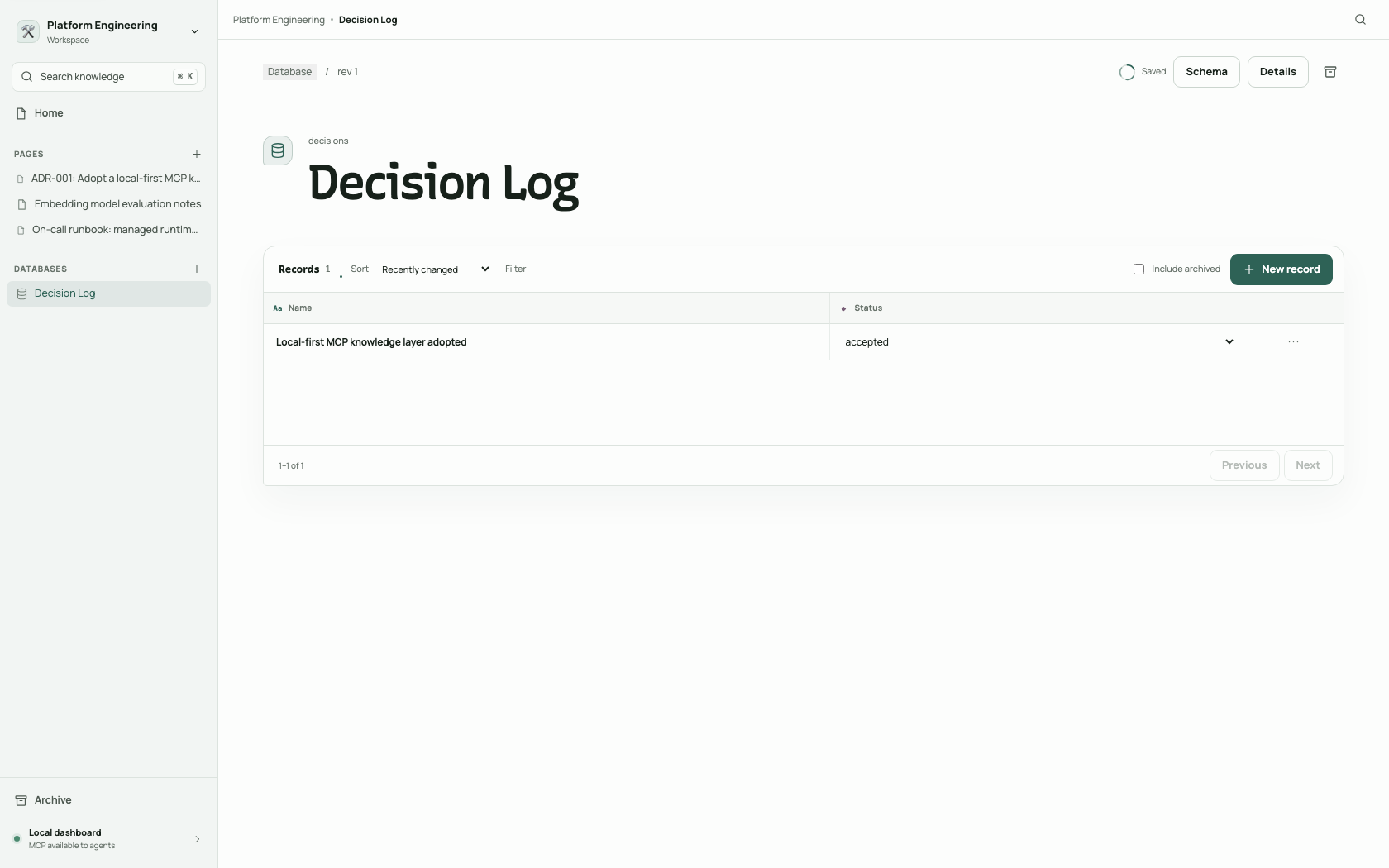
Typed databases render as tables with select, number, date, text, and checkbox properties:
Local quickstart
Use Docker-managed PostgreSQL and Qdrant with the bundled Codex plugin. No global npm installation is required.
Prerequisites
- Node.js 22 or later.
- Docker Desktop on macOS or Windows, or a running Docker Engine on Linux. The first setup downloads the PostgreSQL, Qdrant, and local embedding-model assets.
- The Codex CLI for the Codex integration below, or the Claude Code CLI for the Claude Code integration. Any MCP-capable coding agent works through its own MCP configuration without either CLI.
1. Install HorizonLayer and provision local services
npx -y horizonlayer@latest setup
setup selects Knowledge, Issues, or Both and optionally installs the matching Codex or Claude Code skills. It starts local services, creates or reuses the shared Default Knowledge Workspace and an Issue Project named after the current directory, and writes a credential-free .horizonlayer.json. Rerunning setup is idempotent. Set RAG_ENABLED=false to start only PostgreSQL and skip Qdrant readiness and embedding-model warm-up during setup, MCP, and dashboard launches. Keep that variable set for subsequent launches if semantic search should remain disabled. If the local embedding model cannot be downloaded, setup warns and continues with RAG disabled for that run; rerun setup to retry the embedding warm-up.
Setup searches the whole catalog when reusing matching workspaces and projects. Name matching ignores surrounding spaces and case differences; a saved active Issue Project is reused by its immutable key after a rename. Archived project keys stay reserved, and setup never restores an archived project automatically.
A PostgreSQL-only first setup records port 6333 for future Qdrant startup without checking its availability. Before enabling RAG later, ensure that the Qdrant port saved in runtime.json is free. Existing runtime ports are reused; a conflict is reported by Docker Compose without changing the saved configuration.
For unattended setup, provide every choice without prompts:
npx -y horizonlayer@latest setup --non-interactive --modules both --skills none
Supported module values are knowledge, issues, and both; skill targets are none, codex, claude, and all. Runtime credentials remain only in the private local runtime.json, never in project configuration.
2. Verify health
npx -y horizonlayer@latest doctor
The command reports the configuration path and whether Docker Desktop, PostgreSQL, and Qdrant are ready. With RAG_ENABLED=false, it reports Qdrant as disabled and requires only Docker and PostgreSQL. It validates configuration values first and names the offending variable when they are invalid. It exits nonzero if any required local service is unavailable.
3. Connect a coding agent
Install the bundled plugin for your agent and restart it:
npx -y horizonlayer@latest install all
install all installs the complete bundle; install codex and install claude target one host. The installer copies the plugin, keeps the Knowledge and Issues skills selected for this project's enabled modules, and always includes the engineering workflow: using-horizonlayer, Wayfinder, specification and ticket planning, Implement, TDD, research, architecture, diagnosis, and review. It never edits project files outside its managed directories. See the bundled third-party notice for the workflow skill attribution.
| Agent | What the installer does |
|---|---|
| Codex CLI and ChatGPT desktop | Copies the plugin to ~/plugins/horizonlayer and registers it in the personal marketplace at ~/.agents/plugins/marketplace.json. |
| Claude Code | Stages a durable marketplace at ~/.claude/horizonlayer-marketplace, registers it with claude plugin marketplace add, and installs the plugin at user scope. |
| Any Agent Plugins 1.0 client (for example VS Code with GitHub Copilot or Kiro) | Load the same staged plugin directory with the client's native plugin flow; the bundle includes a root plugin.json manifest and portable mcp.json conforming to the Agent Plugins 1.0 specification. |
Any other MCP-capable agent works without the plugin: register a stdio MCP server whose command is npx with args -y horizonlayer@latest mcp. On Windows the installer writes the equivalent cmd /c npx ... launch into staged configurations automatically, because Windows cannot spawn npx directly; the portable mcp.json keeps the bare npx token as the Agent Plugins specification requires.
4. Create and query your first typed record
After restarting the agent, paste this into its chat. It uses the installed HorizonLayer MCP tools and returns the identifiers and query result in the chat:
Use HorizonLayer's `knowledge` MCP tool. Create a workspace named "HorizonLayer Quickstart" unless one already exists with that name. In it, create a typed database named "Decisions" with a title property named "Name" and a select property named "Status" whose allowed value is "accepted". Create a row with Name "HorizonLayer local setup is verified" and Status "accepted". Then query the Decisions rows where Status equals accepted. Show the workspace, database, and row IDs plus the query result.
The knowledge tool selects an operation family and accepts that operation's action in input. Property names and select choices are exact and case-sensitive.
5. Inspect it in the local dashboard
npx -y horizonlayer@latest dashboard --open
The dashboard listens only on http://127.0.0.1:4317 by default. This command stays in the foreground; press Ctrl-C to stop it without deleting data.
Configuration, backup, and troubleshooting
- Runtime locations and lifecycle
- Existing PostgreSQL instances
- Environment variables
- Backup and recovery, including failure outcomes
- Resetting development data
- Troubleshooting
Data model and behavior
- Knowledge records belong to isolated workspaces. Issues belong to separate Issue Projects.
- Pages store blocks; typed databases define properties and validated rows.
- Mutations use optimistic revisions. Archive and restore are the public lifecycle operations; there is no public hard-delete workflow.
- PostgreSQL record search is available in a workspace scope. The optional RAG index is derived and rebuildable.
The default MCP catalog exposes only the enabled knowledge and issues module tools. Set HORIZONLAYER_MODULES=knowledge or HORIZONLAYER_MODULES=issues to enable one module surface; unset it or use both for both. The tools share one PostgreSQL database and can create explicit Page-Issue links without automatically expanding either side. knowledge supports bounded navigate traversal and issues supports link.traverse, both capped at depth 3.
Issue queries use a compact, AND-only Jira-style language. Supported filters are project, status, priority, assignee, tag, text (or summary), and ready; IN (...) is supported for status, priority, and tags. For example: project = HL AND status IN (open, blocked) AND assignee IS EMPTY.
Existing integrations can temporarily launch horizonlayer legacy-mcp to expose the former workspace, session, page, database, row, link, search, and run catalog. This mode is explicitly opt-in. Search responses there retain compact, lossless typed references by default.
Read the database guide for the typed model, the flow guide for the startup and MCP journeys, and the glossary for the exact vocabulary the code and docs share.
Contributing and releases
Bug reports and feature requests are welcome through GitHub Issues. You do not need access to the maintainer's local tracker. See CONTRIBUTING.md for setup, contribution ideas, and the review workflow.
Read the release notes for shipped versions and CHANGELOG.md for upcoming changes. Report vulnerabilities privately using GitHub's security reporting form.
Development and verification
From a repository checkout:
npm ci
npm run verify
npm run test:coverage
npm run build
HORIZONLAYER_INTEGRATION_DATABASE_URL='postgres://postgres:postgres@127.0.0.1:5432/horizonlayer_test' npm run test:integration:postgres
npm run test:smoke:local
npm run test:smoke:recovery
npm pack --dry-run
Reproducible retrieval-quality, freshness, scaling, and timed packed-recovery evidence is available through npm run benchmark:retrieval and npm run benchmark:recovery. See the benchmark guide for disposable-service setup, the authored synthetic corpus, metrics, and evidence limits.
The unit and coverage commands do not require Docker or external services. The integration command requires HORIZONLAYER_INTEGRATION_DATABASE_URL. test:smoke:local provisions an isolated Docker PostgreSQL instance; test:smoke:recovery packs the public CLI and proves the isolated A→B→A→safety-B, reset, corruption, interruption, MCP, dashboard, SQL, and semantic-search journey. See CONTRIBUTING.md for setup details, docs/engineering-notes.md for design rationale, CHANGELOG.md for release history, and SECURITY.md for responsible disclosure.
License: MIT.
{
  "$schema": "https://json.schemastore.org/claude-code-marketplace.json",
  "name": "horizonlayer",
  "owner": {
    "name": "Kyle Mirich"
  },
  "description": "Official HorizonLayer plugins for coding agents.",
  "plugins": [
    {
      "name": "horizonlayer",
      "source": "./plugins/horizonlayer",
      "description": "Durable PostgreSQL knowledge and agent-friendly issue tracking for coding agents.",
      "version": "0.1.2",
      "author": {
        "name": "Kyle Mirich"
      },
      "homepage": "https://github.com/kyle-mirich/horizonlayer",
      "repository": "https://github.com/kyle-mirich/horizonlayer",
      "license": "MIT",
      "category": "productivity",
      "tags": [
        "agent-memory",
        "issue-tracking",
        "knowledge",
        "mcp",
        "postgres"
      ]
    }
  ]
}
Facts
- Kind
- Marketplace
- Repo
- kyle-mirich/horizonlayer
- Group
- Uncategorized
- Stars
- 1
- Marketplace name
- horizonlayer
- Owner
- Kyle Mirich
- License
- MIT
- Language
- TypeScript
- Created
- 2026-03-20
- Last push
- 2026-10-10
- Plugins
- 1
- 1obra/superpowersobra/superpowersAn agentic skills framework & software development methodology that works.297.9k
- 2affaan-m/everything-claude-codeaffaan-m/ECCThe agent harness performance optimization system. Skills, instincts, memory, security, and research-first development for Claude Code, Codex, Opencode, Cursor and beyond.277.5k
- 3anthropics/skillsanthropics/skillsPublic repository for Agent Skills180.6k
- 4f/prompts.chatf/prompts.chatf.k.a. Awesome ChatGPT Prompts. Share, discover, and collect prompts from the community. Free and open source — self-host for your organization with complete privacy.172.7k
- 5anthropics/claude-codeanthropics/claude-codeClaude Code is an agentic coding tool that lives in your terminal, understands your codebase, and helps you code faster by executing routine tasks, explaining complex code, and handling git workflows - all through natural language commands.150.3k
- 6nextlevelbuilder/ui-ux-pro-max-skillnextlevelbuilder/ui-ux-pro-max-skillAn AI skill that provides design intelligence for building professional UI/UX across multiple platforms.135k


