ascendaone-com/ai-engineer-tools
ascendaone-com/ai-engineer-tools · 2 stars · 1 plugin
Marketplace
Install
/plugin marketplace add ascendaone-com/ai-engineer-toolsRun inside Claude Code, then install plugins from it. Check the repo's README before you run it.
Plugins 1
After adding the marketplace, install one with /plugin install <name>@ascenda-one.
- 1ascendaCognitive performance and AI-work telemetry for Claude Code — a passive work-signals skill, a metadata-only MCP reporting tool, and lifecycle hooks, all reading from the same Ascenda pairing.
/plugin install ascenda@ascenda-one
Files
ai-engineer-tools
The collectors behind Ascenda: small, open-source hooks and an editor extension that notice how AI-assisted engineering work is going. They record metadata only, never source code, prompts or file names. What the measurements do and do not establish is set out in What this measures.
There are two ways to use them, and the first needs no account:
- On this Mac only. The hooks send a live signal to a socket on your own
machine. The Ascenda Flow app's live view and the Waterline screen saver
read it to show that an agent is working, or waiting on you. They also
write every event to
~/.ascenda/events.jsonl, in an open format any tool can read (see Using the events yourself). Nothing leaves the machine. - With your Ascenda account. Pair a tool once and its events also go to Ascenda, so your sessions appear in the Flow app over time.
Install
Pick the tools you use. Each works alone, and each has its own pairing.
| Agent | Command | Hooks registered in |
|---|---|---|
| Claude Code | npx -y @ascenda-one/claude-code-hooks setup |
~/.claude/settings.json |
| Codex CLI | npx -y @ascenda-one/codex-hooks setup |
~/.codex/hooks.json |
| Cursor (agent) | npx -y @ascenda-one/cursor-hooks setup |
~/.cursor/hooks.json |
| Windsurf | npx -y @ascenda-one/windsurf-hooks setup |
~/.codeium/windsurf/hooks.json |
| Gemini CLI | npx -y @ascenda-one/gemini-hooks setup |
~/.gemini/settings.json |
Add --no-pair to install without an account. setup then installs the hooks
and stops; the live signal works, and nothing is sent.
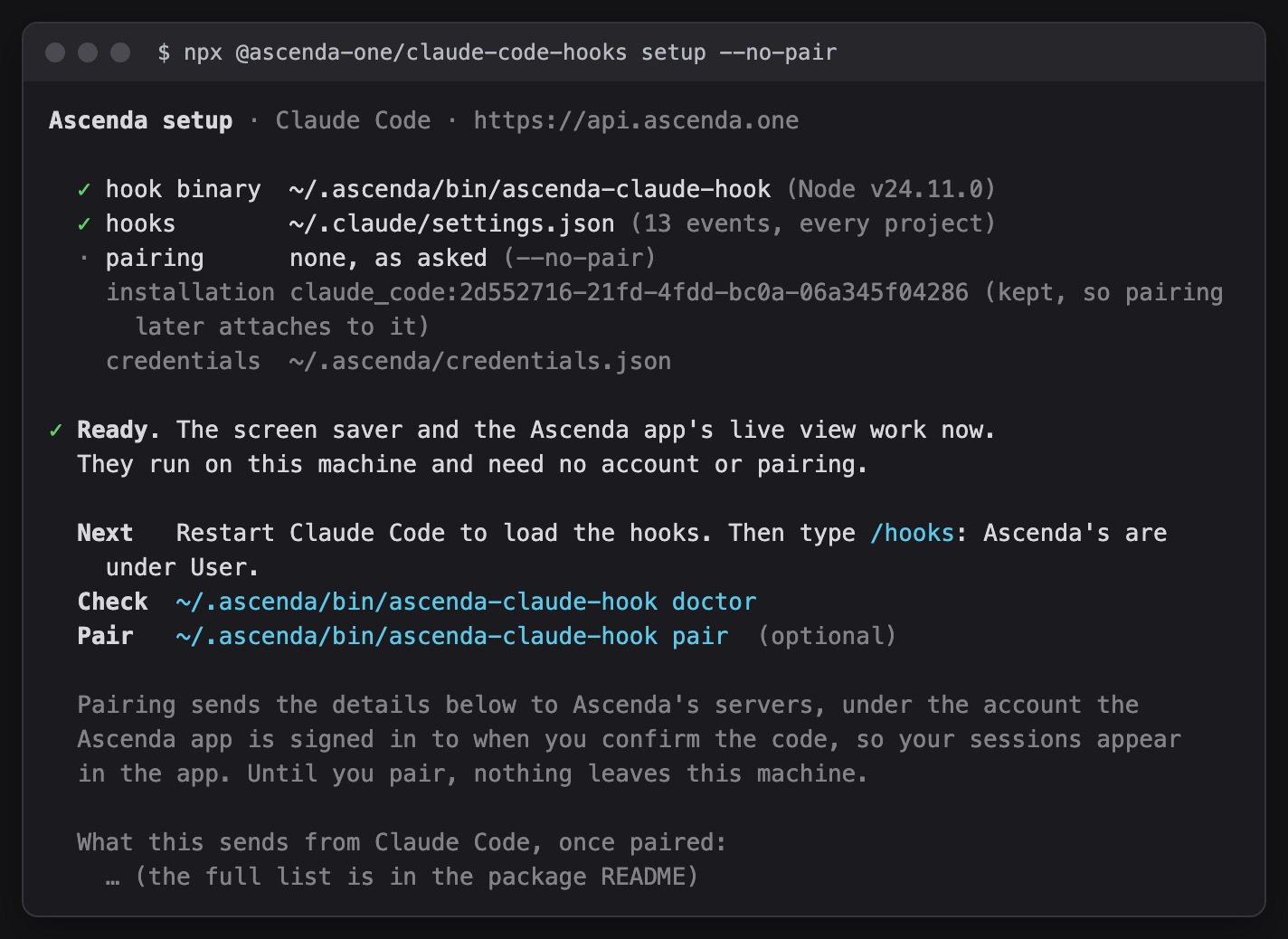
What setup does, for every agent:
- Registers the hooks for every project.
--scope projectlimits them to the current folder instead. Re-runningsetupmoves an older install from the other place, so each event runs once. - Installs a launcher that finds Node. Each hook runs
~/.ascenda/bin/ascenda-<agent>-hook, a small shell script that uses the Node 20+ that ransetupand finds another if that one goes (Homebrew, nvm, fnm, volta, asdf, mise). Hooks keep working when the agent starts from the Dock or an IDE without your shell's PATH. On Windows the hook runs the Node that ransetupdirectly. - Pairs, unless you passed
--no-pair: it prints a 6-digit code to confirm in the Flow app under Connections → Ingest telemetry.
Nothing goes in your shell profile. Then restart the agent:
- Claude Code: type
/hooks. The Ascenda hooks are listed under User. - Codex: open
/hooksand trust the Ascenda hooks. Codex doesn't run a hook until you do.
Check it works
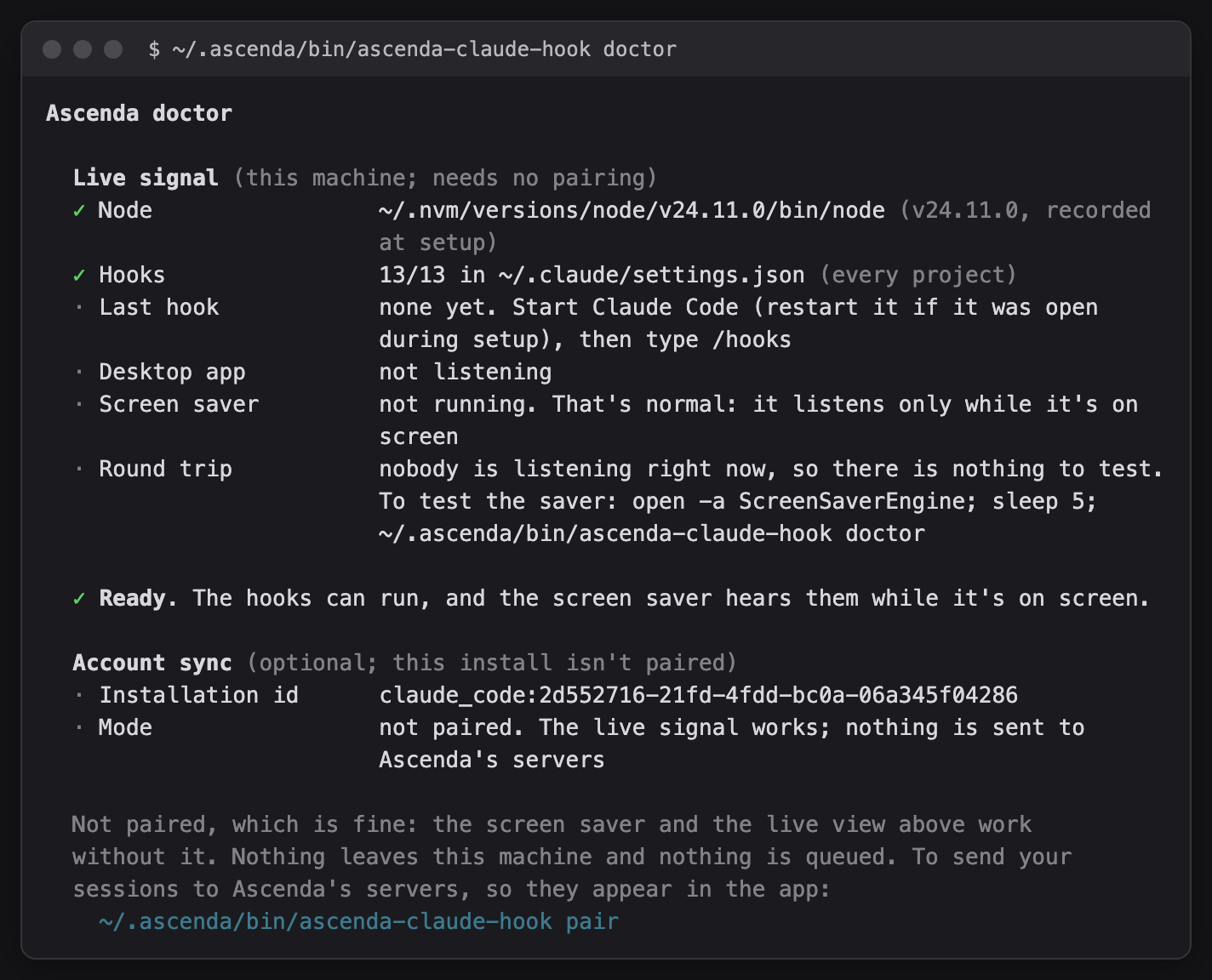
~/.ascenda/bin/ascenda-claude-hook doctor # or ascenda-codex-hook, -cursor-, -gemini-, -windsurf-
doctor checks the local half first, which needs no pairing. Can the hooks
start, are they registered where the agent loads them, has the agent run one
yet, and is anything listening for the live signal. When the screen saver is
running it pings it and waits for the answer. Every line says how to fix
what it finds.
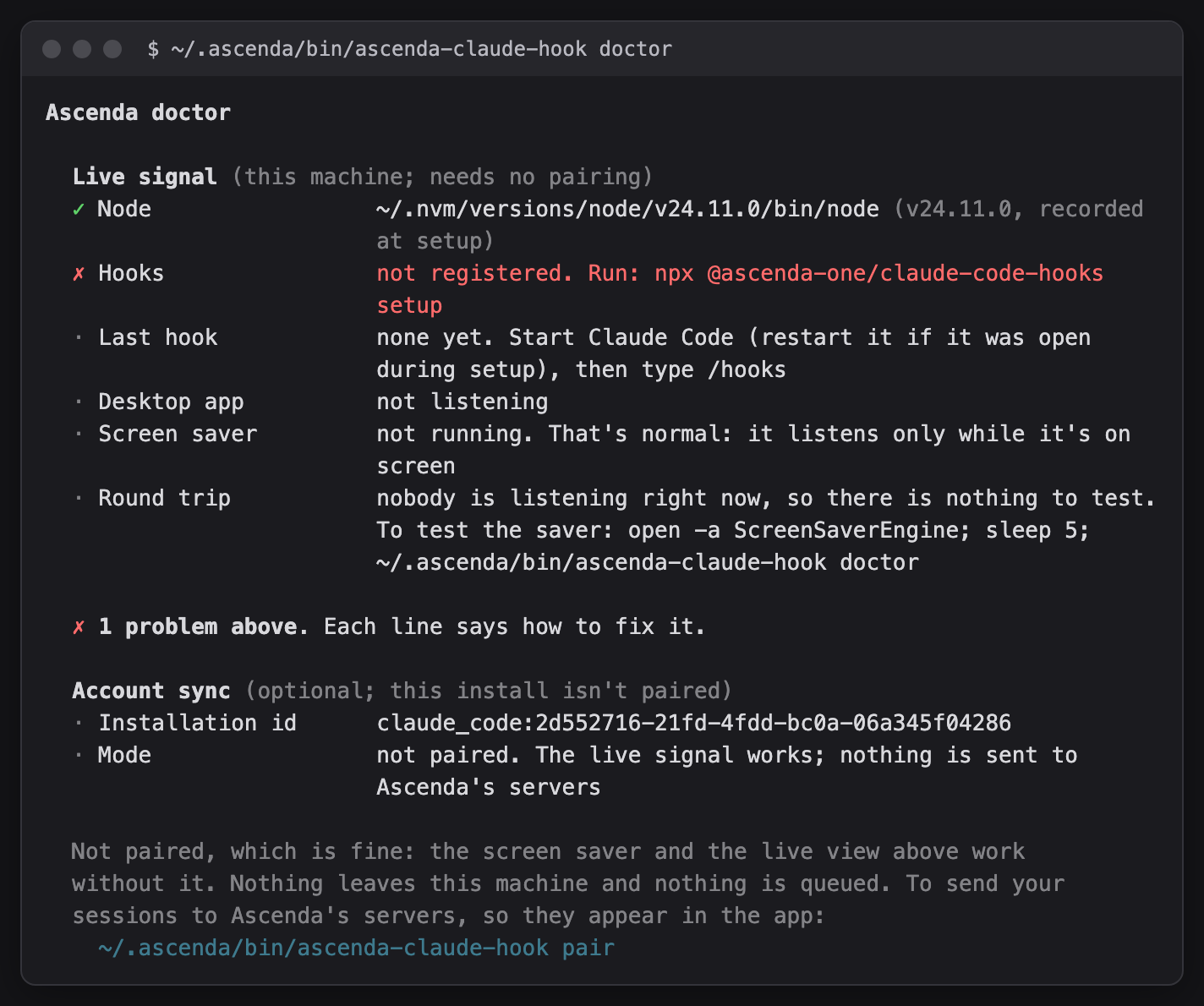
status is the short version, and exits non-zero when something is missing,
so it can gate a CI step. uninstall removes the hooks, the launcher and the
pairing.
What each agent can report
The agents expose different hooks, so they can't all say the same things. A gap here is the agent's hook set, not something we infer around.
| Claude Code | Codex | Cursor | Gemini CLI | Windsurf | |
|---|---|---|---|---|---|
| Working (prompts, tool calls) | yes | yes | yes | yes | yes |
| Waiting on you (an approval) | yes | yes | no hook | yes | no hook |
| Context compaction | yes | yes | yes | yes | no hook |
| Quit mid-turn ends the session | yes | no hook | yes | yes | no hook |
Each package's README lists its events in full.
Claude Code: the plugin, or setup
The Claude Code plugin installs the hooks together with the work-signals skill and the MCP server:
claude plugin marketplace add ascendaone-com/ai-engineer-tools
claude plugin install ascenda@ascenda-one
Its hooks run through npx, so they need Node on the PATH Claude Code was
started with, and they don't get the launcher. Use the plugin or setup for
the hooks, not both: with both, every event runs twice.
VS Code and the Cursor editor
The editor extension records editor and terminal activity. It is one extension for both editors.
-
Open the Extensions pane (⇧⌘X, or Ctrl+Shift+X on Windows and Linux).
-
Search Ascenda and click Install. The publisher is
ascenda-one.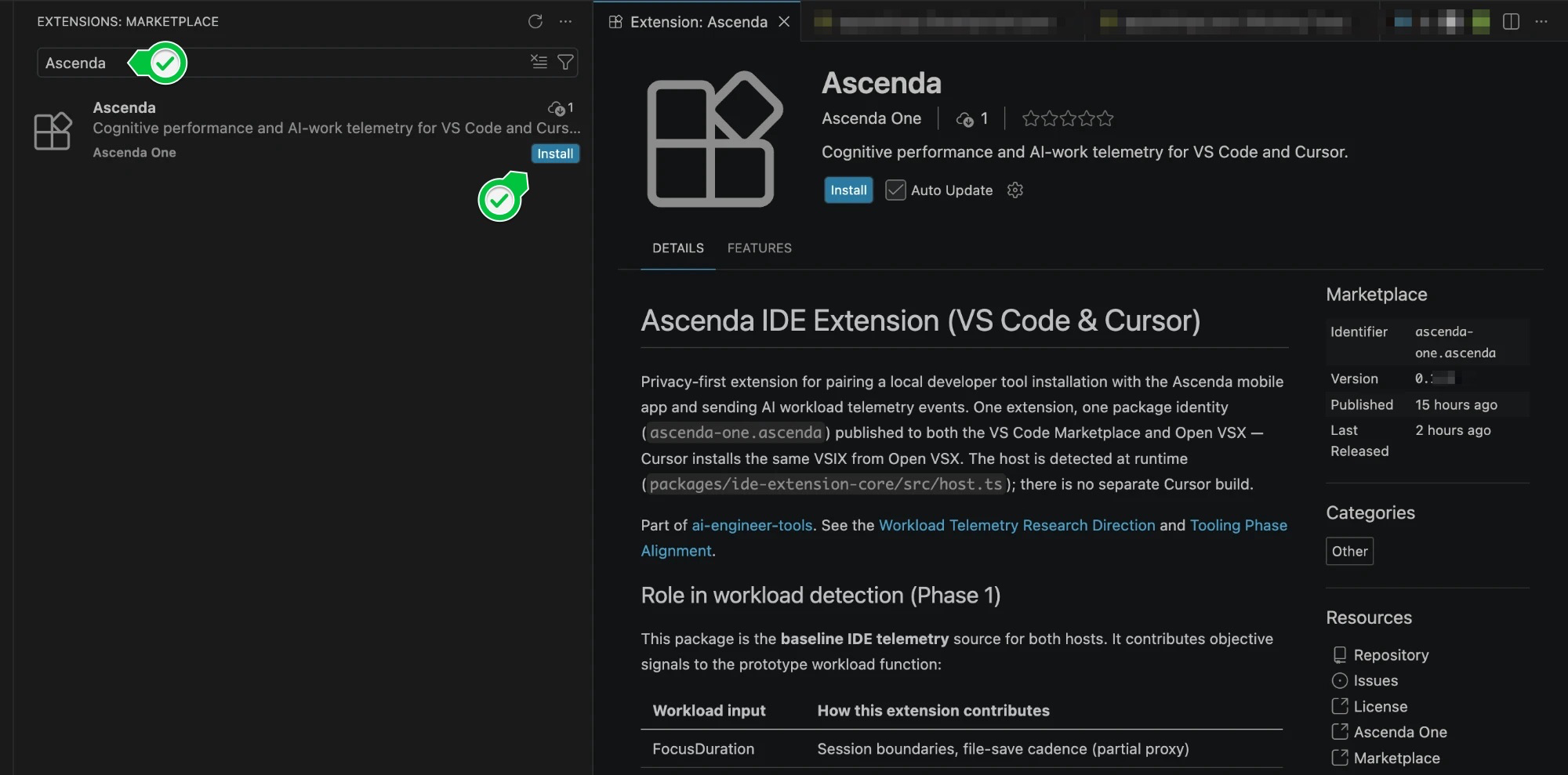
-
Open the Command Palette (⇧⌘P / Ctrl+Shift+P) and run Ascenda: Connect App.
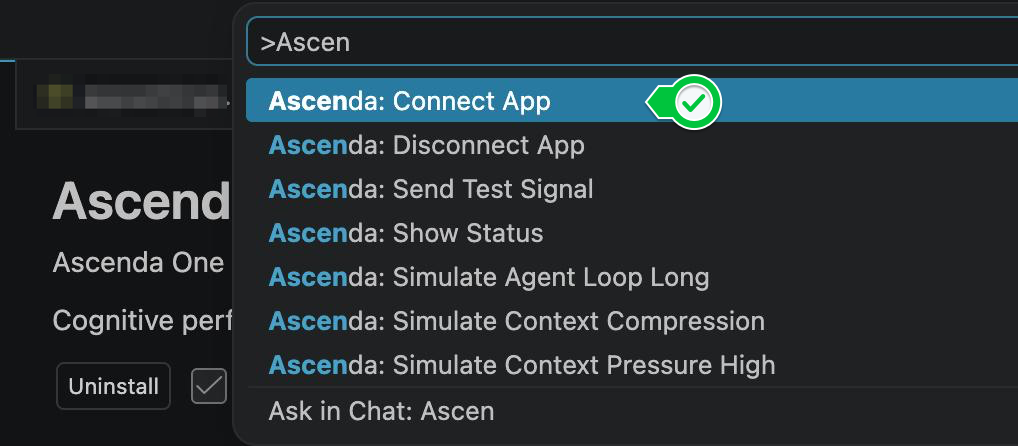
From the command line instead:
code   --install-extension ascenda-one.ascenda   # VS Code
cursor --install-extension ascenda-one.ascenda   # Cursor
On macOS those commands aren't on PATH until you run Shell Command: Install 'code' command in PATH from the Command Palette.
Pairing
Pairing links one tool installation to your Ascenda account. Each tool pairs on its own, and each pairing can be revoked on its own in the Flow app.
The editor extension pairs with Ascenda: Connect App, which shows a QR code and a six-digit code, good for a few minutes:
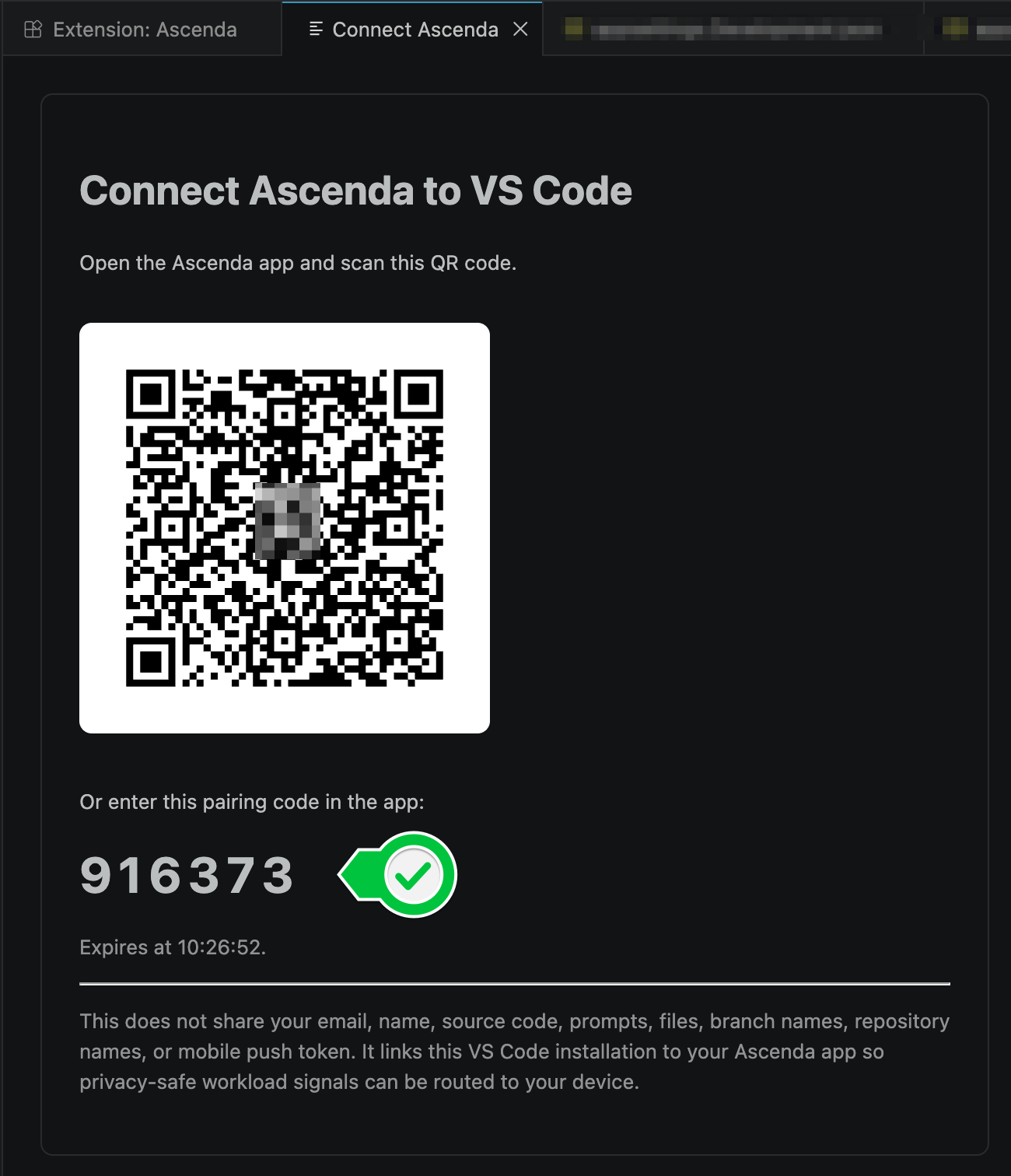
Confirm it in the Flow app under Connections → Ingest telemetry: scan the QR, or paste the code. The code carries no personal data.
The CLI agents pair during setup, which prints the same kind of code. To
pair an install made with --no-pair, run setup again (or, for Claude Code,
~/.ascenda/bin/ascenda-claude-hook pair). It attaches to the installation
already on file, so the hooks you have keep their identity.
The editor's pairing can't be shared with the CLI agents: its token lives in
the editor's own secret storage, by design. Each CLI agent keeps its pairing
under its own key in ~/.ascenda/credentials.json, so several agents on one
machine never borrow each other's identity. ASCENDA_TOOL_INSTALLATION_ID
overrides that for every agent at once; set it only if you mean that.
A setup whose pairing can't finish (the server unreachable, the code not
confirmed in time) still installs the hooks, and says plainly that it isn't
paired.
Upgrading
An install keeps the hooks it registered until setup runs again, so a
release that adds a hook reaches you on the next setup. The Flow app says so
in Connections → Ingest telemetry and names the command.
npx -y @ascenda-one/claude-code-hooks setup # or codex-, cursor-, gemini-, windsurf-hooks
setup is safe to re-run. It keeps your pairing, replaces its own entries,
and prints what it added. Restart the agent afterwards. A plugin install
upgrades with claude plugin update ascenda@ascenda-one instead.
Packages
| Package | Published as | What it does |
|---|---|---|
| ascenda-claude-code-hooks | @ascenda-one/claude-code-hooks (npm) |
Claude Code hooks: prompts, tool calls, compaction, waits, subagents |
| ascenda-codex-hooks | @ascenda-one/codex-hooks (npm) |
Codex CLI hooks, through Codex's hooks.json |
| ascenda-cursor-hooks | @ascenda-one/cursor-hooks (npm) |
Cursor agent hooks |
| ascenda-windsurf-hooks | @ascenda-one/windsurf-hooks (npm) |
Windsurf Cascade hooks; the gaps in Windsurf's hook set are documented, not filled in |
| ascenda-gemini-hooks | @ascenda-one/gemini-hooks (npm) |
Gemini CLI hooks; the per-inference hooks are deliberately left unregistered |
| ascenda-vscode-extension-telemetry | ascenda-one.ascenda (VS Code Marketplace and Open VSX) |
The editor extension for VS Code and Cursor: editor activity, terminal classification, sessions |
| ascenda-agent-skills | ascenda@ascenda-one (Claude Code plugin) |
The plugin: the work-signals skill, the hooks and the MCP server in one install, plus the Cursor rule |
| ascenda-agent-mcp | @ascenda-one/agent-mcp (npm) |
MCP server exposing ascenda_emit_work_signal, for patterns only the agent can see |
| ascenda-history-import | @ascenda-one/history-import (npm) |
Reads the AI-tool history already on your machine (Claude Code, Codex, Cursor, VS Code, git) into a baseline |
| ascenda-github-collector | @ascenda-one/github-collector (npm) |
Your own review load and pull request activity from a code forge, never anyone else's |
| ascenda-pairing-sim | not published | Stands in for the app in pairing tests: confirm, list, revoke, end to end |
| ascenda-dev-server | not published | A local mock of the /v1 pairing and ingest API, so any tool runs with no backend. Binds to 127.0.0.1 |
Shared packages
The repo is an npm workspace. The tools above are thin shells over these:
| Package | Role |
|---|---|
| packages/tool-contract | The event catalog, DTOs and constants, declared once. Mirrors the Tool Pairing API Reference |
| packages/tool-kit | The shared runtime: setup, status and doctor for the CLI agents, the hook launcher, the live signal, the command classifier, the token store and the /v1 client |
| packages/ide-extension-core | The single extension implementation; whether it runs in VS Code or Cursor is detected at runtime |
| packages/agent-events | @ascenda-one/agent-events on npm. The public event format, v0 and experimental: a JSON Schema, types and a log reader |
Using the events yourself
Install any agent's hooks with --no-pair and every event lands in
~/.ascenda/events.jsonl. Each line's event field follows an open, versioned
format: which agent, what happened, which tool, how it ended. It's documented
in packages/agent-events, and
examples/local-event-reader is a
dependency-free script that reads it. Build a dashboard, feed your own tool,
or check what the collectors record. None of it needs an Ascenda account.
The format is v0 and experimental. If you build on it, tell us what's missing in an issue: that's what decides v1.
Forks and commercial products built on these collectors are welcome under Apache-2.0.
Build from source
You don't need this to use the tools. It's here because "verify what you're running" is a reasonable thing to want from a telemetry tool, and the repo is Apache-2.0 so you can.
npm install
npm run build     # shared packages first, then the tools
npm run verify    # the DRY guard rail (scripts/check-dry.sh), a full build, and every test
The extension is bundled with esbuild at package time (npm run package), so
the shared packages are inlined. Each package's README has its own
development notes.
Install from a release (no registry)
For machines that can't reach the Marketplace or npm, or for anyone who wants
to check a checksum first. Every tagged release attaches each artifact and a
manifest.json; resolve downloads through the manifest rather than from
main. Requires Node 20+.
BASE=https://github.com/ascendaone-com/ai-engineer-tools/releases/latest/download
curl -fsSLO "$BASE/manifest.json"
cat manifest.json    # { version, minNode, artifacts: [{ name, url, sha256 }] }
The editor extension. One VSIX for both editors:
curl -fsSLO "$BASE/ascenda-<version>.vsix"
code   --install-extension ./ascenda-<version>.vsix   # VS Code
cursor --install-extension ./ascenda-<version>.vsix   # Cursor
Prefer the Marketplace or Open VSX when you can reach them; you get updates.
The hooks. Each is a self-contained ESM file with no dependencies.
Download it anywhere and run its setup, which installs the launcher and the
bundle in ~/.ascenda/bin. No sudo, no npm -g, nothing to add to PATH:
curl -fsSLO "$BASE/ascenda-codex-hooks.mjs"
node ascenda-codex-hooks.mjs setup --no-pair
Verify before you run. Check the checksum against the manifest, and optionally the build provenance:
shasum -a 256 ascenda-codex-hooks.mjs        # must match sha256 in manifest.json
gh attestation verify ascenda-codex-hooks.mjs --repo ascendaone-com/ai-engineer-tools
Releases are built only by .github/workflows/release.yml,
gated on npm run verify, and signed with keyless Sigstore build provenance.
Developing on this repo
TESTING.md runs everything with no backend, phone or
sign-in: ./scripts/dev-quickstart.sh gets events flowing against
ascenda-dev-server in about two minutes.
To pair against a dev backend without a phone:
ascenda-pairing-sim e2e --tool-type cursor_mcp
Point a CLI at another backend with ASCENDA_API_BASE_URL, or the extension
with the ascenda.apiBaseUrl setting. Never commit tokens.
The terminal screenshots above are rendered from the real CLI by
node scripts/render-cli-shots.mjs; re-run it when the output changes. See
docs/images.
Privacy and compliance
Workspace identifiers are hashed with a random salt generated on first run and
stored only at ~/.ascenda/salt. It is never sent, so the hashes can't be
turned back into folder or repository names by anyone holding the telemetry.
Deleting the file resets the hashes.
Metadata only, by default. Not a medical device: it measures workload
patterns for self-awareness, not diagnosis or treatment, and makes no clinical
claim. Consent is scoped and separately revocable: ide_telemetry for editor
and agent signals, workflow_telemetry for collaboration signals, and
semantic_work_signals for the patterns an agent reports. Granting one does
not grant the others.
What the metadata-only guarantee covers on each surface is listed in each package's README under Privacy defaults, including where it is enforced by schema rather than convention: the semantic signal tool rejects free text outright.
What this measures, and what that does not yet prove
What it captures. Named, observable events: context switches, prompt and correction loops, verification runs, tool-call density, context compaction, agent loop depth, after-hours activity. Counts and classifications, compared against your own history.
The hypothesis under test. That friction of this kind rises measurably before a person notices being overloaded, and that a personal baseline shows the rise earlier than self-report alone. That is why the collectors exist. It is not a result they demonstrate.
What is not established. There is no peer-reviewed link between AI-tool operational metrics and any validated cognitive-load instrument, and our own calibration study has not been run. So nothing here detects burnout, diagnoses a state, or predicts one. It counts things that happened and shows them against your own history.
We say that plainly on purpose. Implying the inference already works is the failure this design exists to avoid, and a strange thing to fake in a repository whose whole argument is that you can read the source.
Wire contract: Tool Pairing API Reference.
{
  "name": "ascenda-one",
  "owner": {
    "name": "Ascenda One",
    "url": "https://ascenda.one"
  },
  "description": "Ascenda's Claude Code integrations — cognitive performance and AI-work telemetry.",
  "plugins": [
    {
      "name": "ascenda",
      "source": "./ascenda-agent-skills",
      "description": "Cognitive performance and AI-work telemetry for Claude Code — a passive work-signals skill, a metadata-only MCP reporting tool, and lifecycle hooks, all reading from the same Ascenda pairing.",
      "version": "0.2.1",
      "author": {
        "name": "Ascenda One",
        "url": "https://ascenda.one"
      },
      "homepage": "https://github.com/ascendaone-com/ai-engineer-tools/tree/main/ascenda-agent-skills",
      "license": "Apache-2.0",
      "keywords": [
        "ascenda",
        "ai telemetry",
        "developer flow",
        "cognitive performance",
        "mcp"
      ]
    }
  ]
}
Facts
- Kind
- Marketplace
- Repo
- ascendaone-com/ai-engineer-tools
- Group
- Uncategorized
- Stars
- 2
- Marketplace name
- ascenda-one
- Owner
- Ascenda One
- License
- Apache-2.0
- Language
- TypeScript
- Created
- 2026-07-03
- Last push
- 2026-10-11
- Topics
- ai-agents, developer-tools
- Plugins
- 1
- 1obra/superpowersobra/superpowersAn agentic skills framework & software development methodology that works.297.9k
- 2affaan-m/everything-claude-codeaffaan-m/ECCThe agent harness performance optimization system. Skills, instincts, memory, security, and research-first development for Claude Code, Codex, Opencode, Cursor and beyond.277.5k
- 3anthropics/skillsanthropics/skillsPublic repository for Agent Skills180.6k
- 4f/prompts.chatf/prompts.chatf.k.a. Awesome ChatGPT Prompts. Share, discover, and collect prompts from the community. Free and open source — self-host for your organization with complete privacy.172.7k
- 5anthropics/claude-codeanthropics/claude-codeClaude Code is an agentic coding tool that lives in your terminal, understands your codebase, and helps you code faster by executing routine tasks, explaining complex code, and handling git workflows - all through natural language commands.150.3k
- 6nextlevelbuilder/ui-ux-pro-max-skillnextlevelbuilder/ui-ux-pro-max-skillAn AI skill that provides design intelligence for building professional UI/UX across multiple platforms.135k


